
Forum › Forums › Official Releases › antiX-23 “Arditi del Popolo › [Solved]Strange characters in vi/vim (escape sequences?)
- This topic has 6 replies, 4 voices, and was last updated Dec 2-10:19 am by Brian Masinick.
-
AuthorPosts
-
July 5, 2024 at 10:18 am #148043
sterretje
MemberI recently upgraded from Antix 19 to Antix 23
When I start vi/vim in RoxTerm, it starts with some strange characters.
[?4mPressing i adds some more, pressing <esc> to get out of it adds a few more. How do I restore normal behaviour?
I never experienced this issue in Antix 19.
- This topic was modified 2 years, 2 months ago by sterretje.
- This topic was modified 2 years, 2 months ago by sterretje.
- This topic was modified 2 years, 2 months ago by sterretje.
July 5, 2024 at 10:19 am #148045gnuoob_02
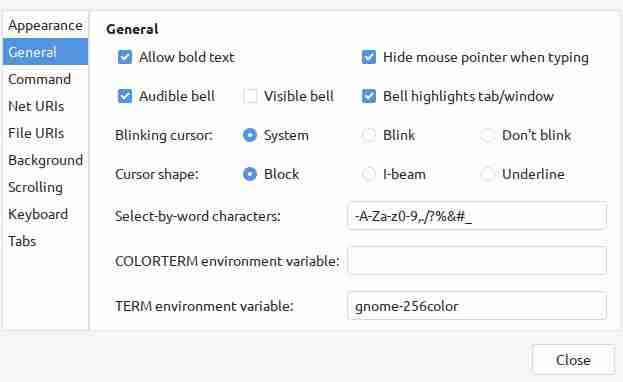
MemberIf it’s roxterm, please set TERM environment variable to gnome-256color.. it worked for me.
- This reply was modified 2 years, 2 months ago by gnuoob_02.
Attachments:
July 5, 2024 at 11:10 am #148053MemberThanks @gnuoob_02
I did try it first on the command line which worked.
After that I modified .bashrc and added the environment setting.Looks like there are multiple ways that lead to Rome 😀
July 5, 2024 at 12:50 pm #148059 Brian MasinickModerator
“If it’s roxterm, please set TERM environment variable to gnome-256color.. it worked for me.”
Even though I use some GNOME based libraries, I’ve never liked much of the desktop components of the GNOME project, so when I “see” that name, it tends to “turn me off”. There’s an equally easy way to set the terminal to get rid of the garbage characters and use vi, vim, or other tools that use escape character sequences to generate features:
When I start my personally customized version of .bashrc, I have it display this:
The terminal type is Eterm-color
--
Brian Masinick
Alternate "Search B":
This search pageJuly 5, 2024 at 12:50 pm #148060Brian MasinickModeratorexport TERM=Eterm-color
--
Brian Masinick
Alternate "Search B":
This search pageDecember 2, 2025 at 9:32 am #191318cup
MemberJust for the fun of it, I tried
export TERM=ANSI
When I started vi, I got the following
E558: Terminal entry not found in terminfo
‘ANSI’ not known. Available builtin terminals are:
builtin_ansi
builtin_vt320
builtin_vt52
builtin_xterm
builtin_iris-ansi
builtin_pcansi
builtin_win32
builtin_amiga
builtin_dumb
builtin_debug
defaulting to ‘ansi’Setting TERM to ansi seemed to work. All the others either produced strange characters or you couldn’t see the cursor at all. I’ve set my TERM to ansi since it is a lot easier to remember than any of the alternatives. Setting TERM to gnome-256color or Eterm-color produced the same result as ansi. Basically no syntax highlighting – like the way it was in the 80s.
December 2, 2025 at 10:19 am #191319Brian MasinickModerator@cup I understand exactly what you are doing because if you do not set the TERM variable to a viable version, as you say you see ¨strange characters¨. I used to use ANSI but I like ETERM-color because I use a few different console editors that do make use of the colors AND the PROMPT and various other elements are able to use them too. Still, I say this all the time, one of the best things about UNIX and Linux systems is the flexibility they have in so many areas.
In any case, I am pleased that you found something that suits your preference. Differences and preferences are a big deal, so this is another example of what freely available software is capable of offering.
--
Brian Masinick
Alternate "Search B":
This search page -
AuthorPosts
- You must be logged in to reply to this topic.