
Forum › Forums › antiX-development › Development › Independent Session Manager Script [Proposal]
- This topic has 10 replies, 6 voices, and was last updated Jun 5-5:31 am by sybok.
-
AuthorPosts
-
June 3, 2025 at 4:09 pm #178565
anticapitalX
MemberHello everyone,
I’m excited to share my custom standalone session manager script (v1), which I created by merging and modifying the following files from desktop-session:
    /usr/local/lib/desktop-session/desktop-session-exit.py

    /usr/local/lib/desktop-session/desktop-session-file-locations.sh

    /usr/local/bin/desktop-session
The result is a single, self-contained .py script that handles session management independently on my system.
Current Status (v1):✅ Fully functional options:
Reboot
Shut down
Suspend
Logout
Lock
⚠️ Known Issue:
The “Restart Session” option broke (icon hidden) after purging desktop-session.
Workaround: Not critical for now, but fixable—could potentially replace it with Hibernate or another action.
Future Improvements:
Icon Management:
Custom icon paths to make the script fully independent (no reliance on system themes).
Dependency Cleanup:
Further reduce external dependencies for easier package management.
antiX-Full Compatibility:
Note: The original desktop-session package is still recommended for antiX-full (persistence mode testing pending).
Discussion Points:
Has anyone else tried decoupling from desktop-session?
Suggestions for the broken Restart Session issue? (Replace with Hibernate?)
Feedback on icon path handling or feature ideas?
Looking forward to your thoughts!
* :
chmod +x ./session-exit-v1.py- This topic was modified 1 year, 3 months ago by anticapitalX. Reason: Attachment not supported
Attachments:
Let's accept antiX as it is
Pure and Elegant by its natureJune 4, 2025 at 5:46 am #178591 sybokMember
Hm…
I did a pylint review and it complaints (error code E0602) about ‘_’ being an undefined variable.
As a result, I will not run it in my as-is system (and I do not have any virtualised one on this PC to test it).
Did it work for you at all (my guess is that Gemini AI messed up)?Now, not a feedback on the script itself but why are there three separate files/scripts in the first place?
Is it due to evolution (adding more functionality) OR is it because some of the spartan ISOs (‘core’ or ‘net’) lack something, such as X-window system and/or ‘python3-gi’ (imported in your and the original Python script, i.e. a dependency), and only the BASH version can be applied there?June 4, 2025 at 8:07 am #178595 vitforlinuxMember
Interesting proposal, I dream of a program that shuts down any distro it finds, regardless of the init used. I had started doing it with YAD and bash… but back then, the syntax of IF was enough to confuse me and I stopped.
A program to shut down with a nice appearance can be found in MX Linux fluxbox.
Sorry for my spaghetti english, i'm italian. Happy XORG user. GNOME? No thanks!
June 4, 2025 at 8:48 am #178596ProwlerGr
MemberInteresting proposal, I dream of a program that shuts down any distro it finds, regardless of the init used. I had started doing it with YAD and bash… but back then, the syntax of IF was enough to confuse me and I stopped
You might want to look at the init-diversity-tools package in my repo which does this.
Test my spin if you want to see it in action with all inits.
It also works for systemd (I have an unpublished MX iso I am testing)June 4, 2025 at 9:41 am #178598MemberHm…
I did a pylint review and it complaints (error code E0602) about ‘_’ being an undefined variable.
As a result, I will not run it in my as-is system (and I do not have any virtualised one on this PC to test it).
Did it work for you at all (my guess is that Gemini AI messed up)?yes .
more work needs to be done.
sorry for the rush .
this is only the beginner version .
and I observed logout , on one of my systems doesn’t work without desktop-session-exit installedNow, not a feedback on the script itself but why are there three separate files/scripts in the first place?
Is it due to evolution (adding more functionality) OR is it because some of the spartan ISOs (‘core’ or ‘net’) lack something, such as X-window system and/or ‘python3-gi’ (imported in your and the original Python script, i.e. a dependency), and only the BASH version can be applied there?I also don’t know why there is multiple files to manage sessions on antiX.
that’s why I think having a standalone script is good thing .Interesting proposal, I dream of a program that shuts down any distro it finds, regardless of the init used. I had started doing it with YAD and bash… but back then, the syntax of IF was enough to confuse me and I stopped
You might want to look at the init-diversity-tools package in my repo which does this.
Test my spin if you want to see it in action with all inits.
It also works for systemd (I have an unpublished MX iso I am testing)I will check .
thank you.Let's accept antiX as it is
Pure and Elegant by its natureJune 4, 2025 at 9:58 am #178599vitforlinuxMemberAlmost what I would like… but I mean a monstrous thing, that if I put it in Fedora, it turns it off, in Debian, Devuan, Arch, Artix… no specific dependencies, just a program for graphics whatever it is.
Then with IF it finds the right command and gives it to those who don’t always know the right one… and that’s why it doesn’t turn off.
The world would be better if we didn’t need studies to shut down a desktop; for example, Budgie on antiX can’t shut down, but Cinnamon can.
Sorry for my spaghetti english, i'm italian. Happy XORG user. GNOME? No thanks!
June 4, 2025 at 10:29 am #178600anti-apXos
MemberI did a pylint review and it complaints (error code E0602) about ‘_’ being an undefined variable.
As a result, I will not run it in my as-is system (and I do not have any virtualised one on this PC to test it).
Did it work for you at all (my guess is that Gemini AI messed up)?The python script @anticapitalX posted works fine for me. I don’t think there’s any actual error involving underscores. Probably just your robot just doesn’t understand his robot. Too bad we can’t find some actual people…
There is an odd usage of _ in the original desktop-session-exit.py and also this one that stumped me for a bit until I looked it up and found that it’s an alias for “gettext” used to provide multilanguage translations of strings.
set.self_title(_("Exit Session"))is
set.self_title(gettext("Exit Session"))That’s supposed to make it easier to read, but it just makes it harder in my opinion since I’ve never seen an alias like that used in python.
Does your pylint give the same report when you run it on /usr/local/lib/desktop-session/desktop-session-exit.py? It should because I don’t see any other odd uses of _ in the script posted here.
Now, not a feedback on the script itself but why are there three separate files/scripts in the first place?
It’s because desktop-session-exit is only part of a much larger desktop-session package that handles a lot more than just this pygtk panel. All default sessions in antix (e.g. “rox-icewm”, “zzz-fluxbox”, etc.) are launched using desktop-session. It handles loading the window manager and optional components, as well as other daemons and setting up the environment. It’s also what allows switching between different session types after log in. It does all this using a whole network of interdependent scripts, not just three.
I’m surprised @anticapitalX even has a working system after purging desktop-session. The posted python script only replaces a tiny fraction of what is done. He must have already been using a custom .xinit instead of desktop-session or something. Personally, I don’t use desktop-session to log in either, but for new and less technical users, it’s a pretty indispensible part of what makes antix antix, in my opinion.
The current way the desktop-session-exit part of desktop-session works does also allow for the same commands to be used whether in a terminal or from the pygtk GUI panel. In that sense, combining them into one python script seems like a step back. antix should always offer equivalent CLI commands if it’s possible, in my opinion. This is not just for net/core installs, either. I’m on full and using X, but I still use the terminal (or shortcut keys bound to shell commands) to do things like this all the time. The bash script part of desktop-session-exit only just in the past couple months got a more fully fleshed out TUI interface, too.
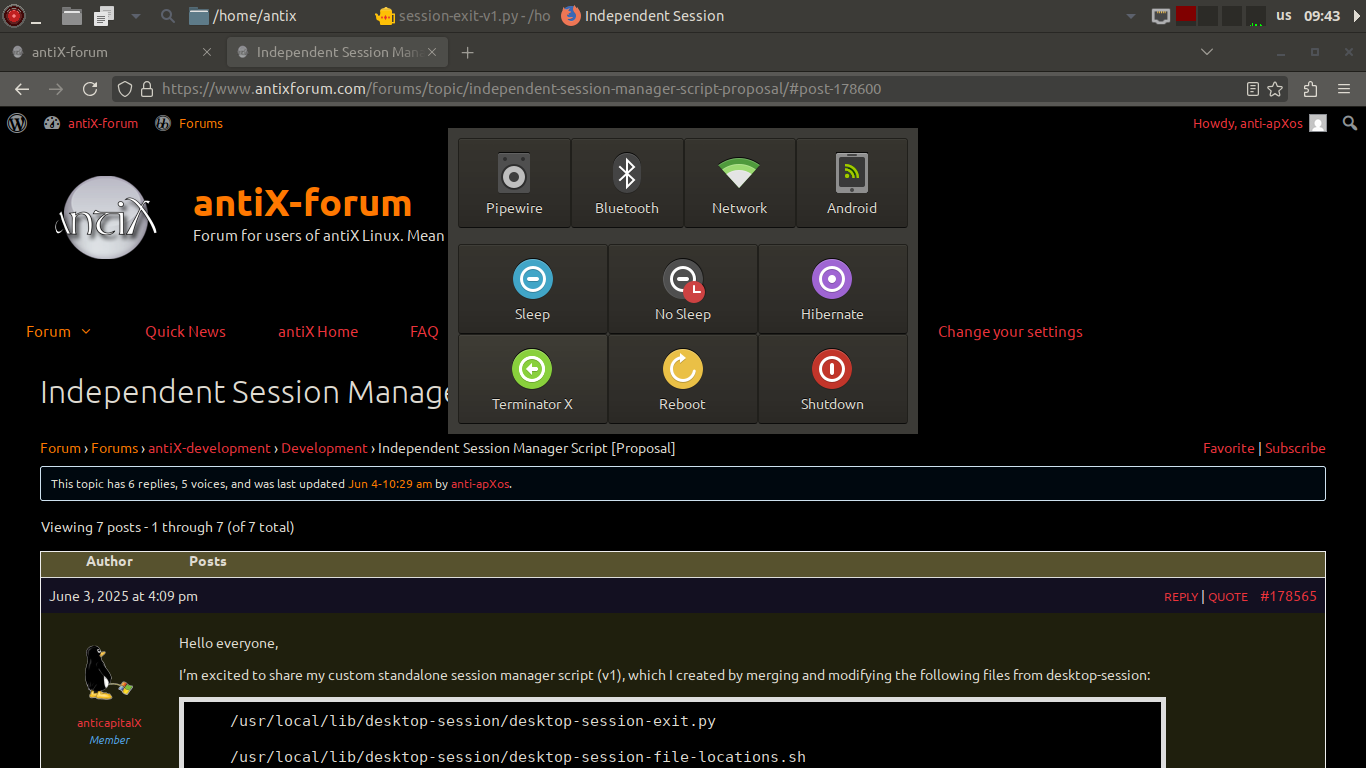
desktop-session-exit -tAnyway, not trying to throw too much water on @anticapitalX’s script. I do think some changes to desktop-session-exit.py would be cool. What I’ve always wanted was an ability to modify it at the user-level. Like adding, removing, or changing buttons. Currently, the only way to do that is to modify the script itself like this, but a GUI could be made to do it without too much difficulty really. The layout is actually very flexible.
I’ve also modified mine quite a bit, so I’ll post it here for reference as to what could be done. I’ve changed buttons, added a separate grid to control services, made some buttons into toggles with changing icons, etc. It all makes for a very useful panel when you can customize it this way.
EDIT: derp, I forgot to post the archive. This panel is neutered, by the way, since I’m not including the bash script it uses to actually execute the commands (there would be little point since it’s so specific to my system). It can still be run to see what it looks like, though. The extra icons included in the zip also need to be moved to /usr/share/icons/antiX-papirus/ to get the full effect.
- This reply was modified 1 year, 3 months ago by anti-apXos.
- This reply was modified 1 year, 3 months ago by anti-apXos.
"--"
June 4, 2025 at 1:52 pm #178622 DaveForum Admin
_() usage is straight from the gettext documentation.
The current way the desktop-session-exit part of desktop-session works does also allow for the same commands to be used whether in a terminal or from the pygtk GUI panel. In that sense, combining them into one python script seems like a step back.
Exactly. There are more uses than just the graphical part. Really the graphical part was an add-on to the bash script not the other way around. Python works better than gtkdialog / Yad for this imo.
I do think some changes to desktop-session-exit.py would be cool. What I’ve always wanted was an ability to modify it at the user-level
I have explored having a XML config file for this. However it seemed more work to alter the XML then the script itself. Outside of this there is also it Yad/zenity/gtkdialog etc for scripts. I did not want to accidentally make another version of such things. This method was also prototyped for the control centre.
@anti-apXos. I do like your additions. A bit like a tablet or smartphone but makes sense to me. If you have a gitlab account could you link this under the issues tab so I do not forget/loose this idea?
Computers are like air conditioners. They work fine until you start opening Windows. ~Author Unknown
June 4, 2025 at 2:05 pm #178624DaveForum AdminThe “Restart Session” option broke (icon hidden) after purging desktop-session.
Workaround: Not critical for now, but fixable—could potentially replace it with Hibernate or another action.
Yes, as the session is built by desktop-session this would make sense.
Future Improvements:
Icon Management:
Custom icon paths to make the script fully independent (no reliance on system themes).
The original had this. There were by default in the desktop-session-exit.py script a few lines to specify the image location. Only recently did I alter this to follow the gtk theme. There should be a commit in the antix-linux/desktop-session-antix gitlab repo to show the exact changes. As it stands however it will fall back to a location as specified in the script for the images.
Dependency Cleanup:
Further reduce external dependencies for easier package management.
Which ones in particular are the problem?
antiX-Full Compatibility:
Note: The original desktop-session package is still recommended for antiX-full (persistence mode testing pending).
Discussion Points:
Has anyone else tried decoupling from desktop-session?
Yes. Purge the package, change slimski.conf to use ~/.xinitrc and modify ~/.xinitrc and the configs of the window manager of your choice as per standard debian. Some people I have seen even forgo slimski and run startx from the cli.
Suggestions for the broken Restart Session issue? (Replace with Hibernate?)
Uhm, install desktop-session or build and restart the sessions in the way that you like. Desktop-session is basically a fancy ~/.xinitrc to allow session restarts, changes of the desktops on the fly, standardization between the default window managers in antiX, etc
Feedback on icon path handling or feature ideas?
See above
Looking forward to your thoughts!
Computers are like air conditioners. They work fine until you start opening Windows. ~Author Unknown
June 4, 2025 at 2:41 pm #178626MemberI mean a monstrous thing, that if I put it in Fedora, it turns it off, in Debian, Devuan, Arch, Artix… no specific dependencies, just a program for graphics whatever it is.
Which ones in particular are the problem?
some yad dependencies (which are already removed)
and minimum python imports .
like @vitforlinux said a monstrous thing with no dependencies, to be used cross distribution.
the desktop-session package gave me the basic idea , thanks to antiX .I understand desktop-session and desktop-session-exit, already working solid and reliable for antiX.
I respect that .
I am just implementing my own ideas .Let's accept antiX as it is
Pure and Elegant by its natureJune 5, 2025 at 5:31 am #178646sybokMember@anti-apxos:
You are right, pylint review does complaint about the original script as well – I did not check it.
When I first searched single ‘_’ on web, I stumbled upon a ‘gettext’ code example where ‘gettext’ was explicitly imported as ‘_’ and the Python documentation https://docs.python.org/3/library/gettext.html contains an explicit definition as well.
I did not read thoroughlyClass-based API
[…] Instances of this class can also install themselves in the built-in namespace as the function _().I find this behavior highly surprising but that’s simply my fault – a case of too casual RTFM.
Hereby, I apologise to @anticapitalX for my mistake.
What I’ve always wanted was an ability to modify it at the user-level.
Well, you could do it along these lines:
– Call of the current-ish script: check for user-name who called it (thus allowing for determining the user’s home directory).
– If a Python custom script is located at a specific place in user’s home, (attempt to) import it; using try-except to ensure that if import fails, fall-back to the current default behavior.
– Modify the button grid using a logic described in the custom script.
– A label indicating any such modification should appear in the description of the window.This opens door for a trickster to create a spin-off with buttons and labels intentionally messed up (just like Monty Python’s Flying Circus had a sketch about a dictionary for tourists that misled its poor users) so that e.g. suspend shuts the PC off, making it hard to debug.
With great power comes great… mess-ability. -
AuthorPosts
- You must be logged in to reply to this topic.