
- This topic has 13 replies, 6 voices, and was last updated Jul 29-5:43 pm by kempelen.
-
AuthorPosts
-
June 28, 2025 at 12:57 pm #180261
Robin
MemberOnce more antiXscreenshot2 has been updated
This is in the first place a maintenance update, dealing with the bug reports discussed here in forum since release of 1.08f, including (hopefully) all the hotfixes I had posted. Moreover it includes all working translations freshly harvested from transifex. Unfortunately I have found some of them not working, these were not to be used, so they are missing in the package. Users of the following languages should have a closer look at transifex for fixing them: Galician Spain (gl_ES), Catalan (ca), Russian (ru_RU) (while ru works and is included), Slovenian (sl), Swedish (sv). Also all languages with less than 50% translations ready are not included.
And then: I have switched to a new packaging scheme, excluding Petter Rasmussen’s gdrive from the postinstaller of antiXscreenshot2, moving this functionality to a separate installer-package. Thanks to Kempelen @lion for nudging me into doing so. It is a way cleaner solution now. Even better it would be if we could get rid of the gdrive-installer package and have a real 32bit and 64bit gdrive package built from the sources. But since this tool is written in rust, I’ve cut my teeth on this, all in vain. Hopefully somebody with more experience in compiling and recent programming languages can step in some day.
Read here more about the new package, and read here more about antiXscreenshot2.
So here are the recent instructions for installing antiXscreenshot2 on antiX 25, 23.2, 23.1, 22, 21, full, runit and sysvinit both, 32 and 64 bit.
As already with version 1.08f you’ll need a tiny additional helper tool for this version: „laufweite”
This is mandatory and you can download it’s installer package matching your system from my gitlab:1.) Downloading
laufweite 0.2 (32bit)
Installer package
Checksum filelaufweite 0.2 (64 bit)
Installer package
Checksum fileNext you need antiXscreenshot 1.09 debian installer package itself:
antiXscreenshot 1.09 (32bit and 64bit both)
Installer package
Checksum fileAnd finally, if you want to be able to directly take shots from your screen into a google cloud drive, you can make use of the new gdrive installer mentioned above. (Instead of installing the package you can download its latest release manually from his git space yourself as well.) Unfortunately this tool is only available for 64 bit currently:
gdrive installer (64 bit only)
Package
Checksum fileAs said, the latter is optional. If not installed, the respective section will be simply greyed out in antiXscreenshot2
2.) File checking (replace 64 by 32 for 32bit systems)
$ shasum -c ./laufweite-x64.deb.sha512.sum
OK
$ shasum -c ./antixscreenshot2.sha512.sum
OK
$ shasum -c ./gdrive-installer.deb.sha512.sum
OK
Only proceed if all return a clean „OK”. Otherwise try to redownload.
3.) Installation (replace 64 by 32 for 32bit systems)
$ sudo apt-get update
$ sudo apt-get install './laufweite-x64.deb' './antixscreenshot2.deb' ./gdrive-installer.deb
Omit the gdrive-installer.deb in the above command in case you don’t want it.
Additionally to what the antiXscreenshot2 installer describes about switching between classic antiXscreenshot and antiXscreenshot2 on your system …
Setting up antiXscreenshot2 as system wide alternative. Call
  sudo update-alternatives --config screenshot
in order to restore the original version of antiXscreenshot tool.
… you can use the antiX Control Centre as well:

Translations from version 1.08 series will match for the 1.09 version. Some parts of the integrated help text, referring to the install procedure, will need to be updated still, but this is not that urgent. Once you can read them, you have antiXscreenshot already successfully installed 🙂
Have fun with it
Kind regards
Robin_____________
P.S.: Please report any issues you encounter with the new install, or whatever else you find not working as expected, in particular on antiX 25. And please bark up if I missed to include one of the hotfixes from the depths of the forum. I’m not completely convinced I made it to look them up all.Windows is like a submarine. Open a window and serious problems will start.
June 28, 2025 at 3:02 pm #180266 marcelocripeMember
Hello Robin.
Thank you very much for bringing this update to the antiX Screenshot2 program.
I suggest you rename the packages to make it easier to identify which antiX edition the package is compatible with.
Imagine the situation where the user tries to install on antiX 19 or 21 the package that was designed to work on antiX 23. The same situation can be repeated where the user tries to install on antiX 23 the package that was designed to work on antiX 25.
The model that is on the page https://mxrepo.com/MX23packages.html is the same model that I saw in some anticapitalista packages.
aacgain_2.0.0-1~mx23+1_i386.deb
aacgain_2.0.0-1~mx23+1_amd64.deb
I.e, name package_version~antix edition_architecture.deb.
I have been following this model for over a year now for the home-made packages that I build from “.rpm” or from the binaries of programs that are already available compiled.
For example: “melonds_1.0-rc~antix23_amd64.deb”, where the name of the package, the version, the edition for which it was packaged, the architecture are described, and the underscore serves to separate each integral part of the package name.
You can check the control file of these packages that have in their name the edition for which it was packaged so you know where to include it in your packages.
June 28, 2025 at 3:36 pm #180267MemberHi Marcelo,
rename the packages to make it easier to identify which antiX edition the package is compatible with. … Imagine the situation where the user tries to install on antiX 19
As said above, these Ver. 0.6 packages do work on all still supported antiX versions:
on antiX 25, 23.2, 23.1, 22, 21, full, runit and sysvinit both, 32 and 64 bit.
After which of these antiX versions should I name the package? That is why I rather abstain from correlating the package names with antiX versions whenever possible. It would conjure the same issue we have now with our .desktop files package: Would I have named it antix-desktop-files only instead of antix23-desktop-files, we now wouldn’t have to think about renaming for antiX 25; instead each apt repo would deliver the proper version under the same name, which is much easier to handle. Btw, this reminds me of firefox states currently on antiX 25: »Updates will come through package manager antiXLinux – 21« 🙂 Not the very best idea to bind names to specific versions if they are meant to survive some upgrades.
But If I’m not completely mistaken, antiXscreenshot2 works also on antiX 17 and 19 flawlessly. Unfortunately I have currently no antiX 17 and antiX 19 instances I could retest on. If you happen to have them still running, feel free to check out. In the folder at my git are some older versions archived, in case the newer ones won’t do for some reason.
Windows is like a submarine. Open a window and serious problems will start.
June 28, 2025 at 4:19 pm #180268marcelocripeMemberI understand your concerns perfectly, but who would waste time testing antiX 17 or 19 these days?
I have some packages to try to keep running for antiX 25, because they are programs that have never been packaged for “.deb”, so I will have a lot of testing to do when antiX 25 is released.
You may already know my Internet Archive and GigtLab pages where I share the programs I managed to package for “.deb”.
Debian controls by versions, see some of them on the page http://deb.debian.org/debian/pool/main/l/lcalc/.
lcalc_1.23+dfsg-11+b1_amd64.deb
lcalc_1.23+dfsg-11+b1_i386.deb
lcalc_2.0.5-1.1+b2_amd64.deb
lcalc_2.0.5-1.1+b2_i386.debIn PCLinuxOS which is packaged with “.rpm” it also does this type of control, but includes the year of the operating system version, see some of them on the page http://pclinuxos.c3sl.ufpr.br/pclinuxos/apt/pclinuxos/64bit/RPMS.x86_64/.
sip-4.19.25-2pclos2021.x86_64.rpm
sir-3.2.2-1pclos2023.x86_64.rpmJune 28, 2025 at 4:26 pm #180269 anticapitalistaForum Admin
I understand your concerns perfectly, but who would waste time testing antiX 17 or 19 these days?
Both are now EOL (End of Life).
Philosophers have interpreted the world in many ways; the point is to change it.
antiX with runit - leaner and meaner.
June 29, 2025 at 1:11 am #180273Xunzi_23
MemberHi Robin, I find it irritating when anything antiX reads like it endorses a google drive,
all things google have been from conception, some time before prism fully started a major
part of the usa surveillance and domination mechanisms.Offer attractive looking free services and there will be little to no backlash from users
whos intimate details are grabbed. Google supports the nazis in us along with their programmes
in many ways. It is presently heavily involved in military actions including supporting Israel.Google has been supporting Israel’s Defense Ministry and military with artificial intelligence
tools since the onset of its attacks on Gaza on Oct. 7, 2023, even as its employees protested the Nimbus cloud computing contract.
https://www.aa.com.tr/en/world/report-reveals-googles-secret-support-for-israels-ai-demands/3460529
my, non google search engine refused to find the original Washington post article, it was even harder than expected to find the linked one.
Startpage worried at being accused of supporting terrorists!, which means anyone vocal about Genocide in Gaza…https://koofr.eu/pricing/ 10GB free,
https://proton.me/drive/pricing 5GB Free
https://shadow.tech/fr/drive/offers/ 20GB Free at presentFor many others pls consider it is MUCH cheaper and offers more privacy when you
June 29, 2025 at 2:39 am #180276Member~mx23+1_amd64
+dfsg-11+b1_amd64
+b2_amd64.debPlease note, @marcelocripe, that the part behind the + or ~ signs actually doesn’t belong to the package name. It will be automatically attached by the professional packaging tools once a packages is packaged the official way by a maintainer for apt distributing. This versioning identifiers are not part of the package name. I have no real understanding how these naming scheme works, it looks to me pretty arbitrary and its description I have studied seems to be confusing: Some packages follow completely different schemes than others with their numbering and the way the string is built, as you can see already in your above examples. I’ve stopped my attempts trying to apply it for the non official packages I create manually. If someone wants to know which version out of tree works for which antiX, he’ll have to look that up here in the forum anyway.
I find it irritating when anything antiX reads like it endorses a google drive, all things google have been from conception, some time before prism fully started a major part of the usa surveillance and domination mechanisms.
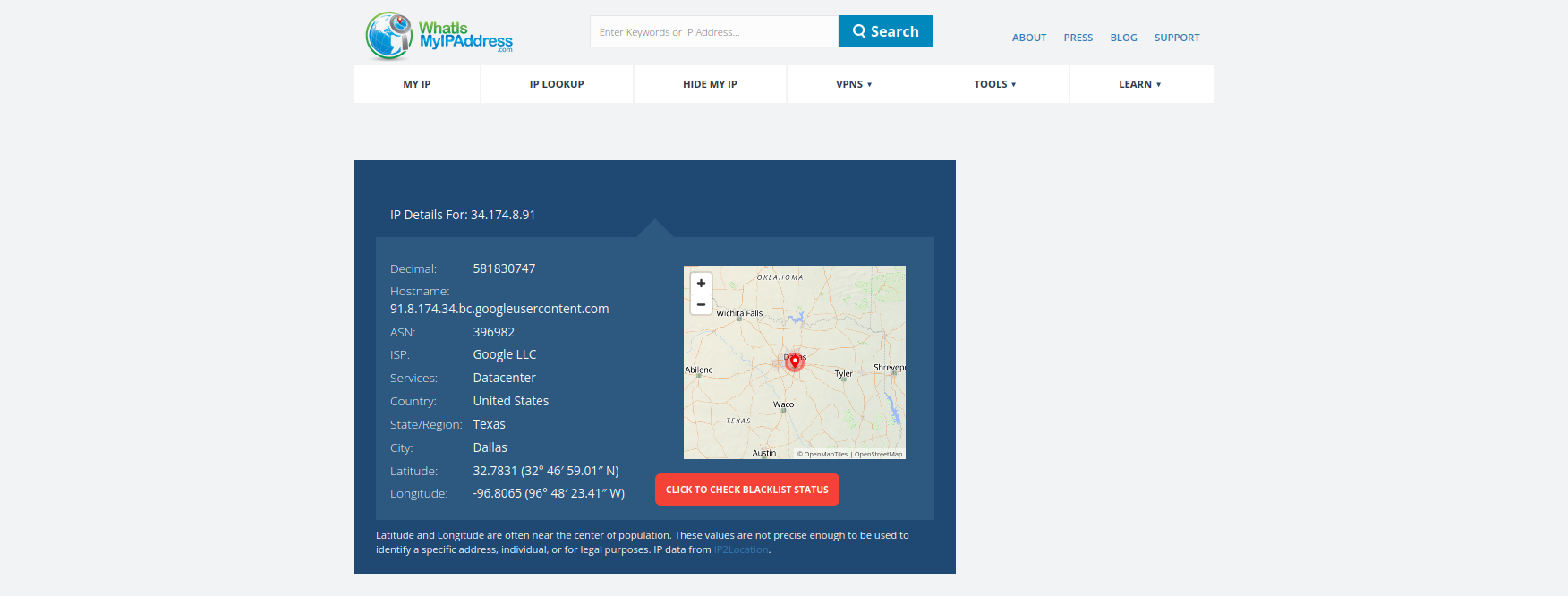
Well said, @Xunzi_23. But please consider they (google) are a reality in the current internet. Even the antiX forums in which we write here run on google services completely, see screenshot below:
$ ping antixforum.com
PING antixforum.com (34.174.8.91): 56 data bytes
64 bytes from 34.174.8.91: icmp_seq=0 ttl=103 time=135,178 ms
IP details for 34.174.8.91: Hostname: 91.8.174.34.bc.googleusercontent.com ASN: 396982 ISP: Google LLC Services: DatacenterDoes antiX endorse google now? I don’t think so. antiX uses google, that’s a slight but important difference.
In the same way I do not endorse google. Personally I have moved long since to proton. And I don’t use this cloud feature myself at all. I just accept the fact that there are people around who have still these accounts and need to use and access them. The google drives are part of their email accounts they have there for many years already, so they may not be able to change them without losing the ability of being contacted by people knowing these addresses from somewhen in the past. Precisely for that reason I also keep my old accounts there, which I have for decades already, from the days when they were still considered the good ones (but no longer using them actively). Moreover:
From the contributing section of the outsourced package:“Unfortunately this tool is restricted to google drives. If somebody happens to know such a tool for universal access of cloud services, please speak up in forums. Mandatory is, that the tool can upload individual files to the cloud space one by one (not by “syncing” directories), and that the upload process can be run completely by bash console commands.”
If you happen to know such a command line tool qualifying for integration, for one or more of your preferred cloud services, I won’t hesitate trying to implement it immediately. antiXscreenshot2 is designed and thought internally modular, and the plan was from the beginning to add some more modules for other services. Its just, there seem not to exist any tools which you can run by console commands and which allow immediate upload if single files to the drive, as needed here. Ideas (and support with the implementation into antixscreenshot2) welcome.
Attachments:
Windows is like a submarine. Open a window and serious problems will start.
June 29, 2025 at 8:05 am #180286MemberHi Robin, I asked, student suggestion was rclone, not sure how easy it is but will
try and figure it out for shadowtech.fr well knowing that France is an eyes member.
The student said it is popular and very easy to use.
His easy level is possibly way over my head.June 29, 2025 at 8:22 am #180289MemberVery thankful for the help in translation by ponzu840w
I do not read japanese but took a look at the blog and found an rclone example for one drive staring back at me.
MS is not my friend but I think the example nay be useful.
https://ponzu840w.jp/blog/blog.html?id=00074Will also be reading here:
https://gcore.com/learning/manage-cloud-storage-linux-commands
Examples start from apt install rclone onwards so should be good for learning.June 29, 2025 at 11:41 am #180300marcelocripeMemberHello Robin.
I just ran some tests on the antiX Screenshot2 program and everything worked perfectly on the test ISO “antiX-25.a1-runit_x64-full.iso”.
Thank you very much.
Attachments:
July 28, 2025 at 12:58 pm #182433anticapitalX
MemberYears ago, I found the Deepin Screenshot tool very appealing and solid, offering excellent annotation and shape tools that could be applied to screenshots on-the-go before saving. The editing capabilities were very similar to what we experience with Android screenshot editing – immediate access to highlighting, drawing, and annotation tools right after capturing.
Currently, Deepin Screenshot has been integrated into the larger deepin-screen-recorder package, which includes OCR and cloud saving features. However, I firmly believe that no antiX default tool should be connected to any cloud services or external OCR services, maintaining the distribution’s philosophy of privacy and independence.
What I’m requesting for antiX Screenshot2:
The core editing and annotation features that made Deepin Screenshot exceptional, specifically:
Visual Editing Tools:
– Text Annotation: Add customizable text with different fonts, sizes, and colors
– Drawing Tools: Lines, arrows, rectangles, circles, and freehand brush
– Highlighting: Multi-color highlighting with adjustable opacity
– Privacy Tools: Blur and mosaic effects for sensitive information
– Shape Tools: Geometric shapes for emphasis and organizationUser Experience Features:
– Color Picker: Select precise colors from the screenshot or palette
– Undo/Redo: Edit operations with full history support
– Delay Timer: Timed capture for dropdown menus and tooltips
– Smart Selection: Automatic window detection and custom area selection
– Scrolling Screenshot: Capture long webpages or documents in fullInterface Improvements:
– Toolbar Access: Quick tool selection during editing
– Keyboard Shortcuts: Customizable hotkeys for efficiency
– Multiple Formats: Export options (PNG, JPG, GIF, BMP)
– Quality Control: Adjustable compression and resolution settingsHere’s a screenshot of the current deepin-screen-recorder tool interface:

For detailed explanations of these features: Deepin Screenshot Features
Summary:
These requested features would transform antiX Screenshot2 into a comprehensive screenshot editing tool while maintaining antiX’s core principles of being lightweight, privacy-focused, and independent from external services. The goal is to provide users with professional-grade screenshot annotation capabilities similar to modern mobile screenshot tools, but within a desktop Linux environment.Let's accept antiX as it is
Pure and Elegant by its natureJuly 28, 2025 at 5:36 pm #182453MemberWhat I’m requesting for antiX Screenshot2:
Thanks, @anticapitalX for the suggestions for improvement of antiXscreenshot2. But have you ever actually run it? I mean, because of your strange feature requests: Most of what you are requesting is there already.
Visual Editing Tools:
– Text Annotation: Add customizable text with different fonts, sizes, and colors
– Drawing Tools: Lines, arrows, rectangles, circles, and freehand brush
– Highlighting: Multi-color highlighting with adjustable opacity
– Privacy Tools: Blur and mosaic effects for sensitive information
– Shape Tools: Geometric shapes for emphasis and organizationUser Experience Features:
– Color Picker: Select precise colors from the screenshot or palette
– Undo/Redo: Edit operations with full history support
– Toolbar Access: Quick tool selection during editingComes all via the integrated mtPaint interface. Just check the tick box “Edit Screenshot” in the section “Postprocessing” of the main dialogue screen’s Screenshot tab before taking the shot. If some more advanced features are still missing, like e.g. “healing”, we either would need to switch to a more powerful postprocessing tool (on cost of lightweight), or ask the developer of mtPaint whether it could be added (but I don’t have great hope, he even won’t add another zoom level between 50% and 100% for a more convenient working display size, I had discussed this with him already, all in vain.)
– Delay Timer: Timed capture for dropdown menus and tooltips
– Multiple Formats: Export options (PNG, JPG, GIF, BMP)Already there. You can adjust the delay for fullscreen with a slider in main dialogue screen. There are three methods for capturing area selection: “Rubberband (Cusor select)”, “Window” (with and without border and/or mouse cursor), and “fullscreen”.
Also you can select currently the following formats from a pulldown in main dialog screen: png, bmp, gif, jpg, jp2, lbm, pam, pcx, ppm, tga, tiff, webp, xpm. Still not enough?– Quality Control: Adjustable compression and resolution settings
Please check what the second tab Advanced Settings in the main dialogue window provides in its sections Image Properties and Thumbnail Properties , and check the size settings in the Thumbnail section of the first tab.
These requested features would transform antiX Screenshot2 into…
I’d suggest to install it on an antiX “full”, and then read carefully the help text after clicking the help button in its main screen. Also try the -h command line option, once you are familiar with all its possible workflows it can be configured to. Check out all its capabilities (note the tooltips, explaining the meaning of all GUI elements).
If I’m not mistaken, what actually is missing from your above listing merely is:
– Keyboard Shortcuts: Customizable hotkeys for efficiency
– Scrolling Screenshot: Capture long webpages or documents in fullPlease feel free to improve the script, enriching it with these two missing features. It is an antiX Community project. Everybody is invited to contribute.
I firmly believe that no antiX default tool should be connected to any cloud services or external OCR services, maintaining the distribution’s philosophy of privacy and independence.
I’m perfectly with you. This is why I have removed the gdrive package as a dependency from the recent antiXscreenshot2 installer packages. The Cloud upload is now merely optional, in case a user urgently needs it for his work. If not installed, the cloud functionality is simply not accessible. (As an additional workaround the user can select a local folder, to which his cloud space was mounted to by antiXcloud beforehand, as target folder to which the screenshot is saved.) OCR is out of scope currently, but a locally installed OCR tool could be added easily to the downstream Action Dialog as an additional choice.
If you happen to know one, which could blend in and is antiX compatible FOSS, not requiring systemd or whatever, please feel free to add it.EDIT: Some tests with recent tesseract 5.3.0-2 from the debian bookworm repos are promising. Recognition rate from screenshots taken was excellent. I guess I’ll add that to the postprocessing options, available if the needed packages are installed on a users system (so we have another “recommendation” when packaging). If you happen to know a better one, which could blend in and is antiX compatible FOSS, not requiring systemd or whatever, please feel free to let me know or even help implementing it into the script.- This reply was modified 1 year, 1 month ago by Robin. Reason: OCR with tesseract seems to work
Windows is like a submarine. Open a window and serious problems will start.
July 28, 2025 at 5:51 pm #182455marcelocripeMember…or ask the developer of mtPaint whether it could be added (but I don’t have great hope, he even won’t add another zoom level between 50% and 100% for a more convenient working display size, I had discussed this with him already, all in vain.)
Now I can understand why wjaguar created a completely unnecessary situation and refused to accept my Brazilian Portuguese translation of mtPaint. If wjaguar can’t recognize that there are many missing options for zooming in and out of the image on the canvas (this isn’t a feature for resizing the image), then it would never be able to accept that I put a lot of effort into producing the Brazilian Portuguese translation of mtPaint.
Merge request that was rejected.
Robin, from reading anticapitalX’s requests, it’s clear that he never ran the antiXscreenshot2 program.
– – – – –
…or ask the developer of mtPaint whether it could be added (but I don’t have great hope, he even won’t add another zoom level between 50% and 100% for a more convenient working display size, I had discussed this with him already, all in vain.)
Agora eu consigo compreender porque o wjaguar criou uma situação totalmente desnecessária e se recusou a aceitar a minha tradução para o idioma Português do Brasil do mtPaint. Se o wjaguar não é capaz de perceber que faltam muitas opções para ampliar ou reduzir a visualização da imagem na tela de pintura (isso não é funcionalidade de alterar as dimensões da imagem), então ele nunca seria capaz de aceitar que eu me esforcei muito para produzir a tradução para o idioma Português do Brasil do mtPaint.
Pedido de mesclagem que foi recusado.
Robin, ao ler os pedidos do anticapitalX, fica evidente que ele nunca executou o programa antiXscreenshot2.
July 29, 2025 at 5:43 pm #182566kempelen
MemberScrolling Screenshot: Capture long webpages
…
That’s built-in the browsers nowadays. Right click the page and there is “Take Screenshot” there you can choose full length. I think this is by default in Firefox, isn’t it? (I have LibreWolf here.)
-
AuthorPosts
- You must be logged in to reply to this topic.