
Forum › Forums › Official Releases › antiX-26 “Stephen Kapos” › antix TV – how does it work?
- This topic has 31 replies, 9 voices, and was last updated May 27-5:44 pm by enigma9o7.
-
AuthorPosts
-
May 7, 2026 at 8:33 am #203747
m4r35n357
MemberWell I noticed this feature advertised on the web page, and after spending a little time looking for it, I found a script called aCSTV.sh in /usr/local/bin – I assume that is it. Anyway, running it, gave me what looks like a yad UI with lots of channel buttons. I pressed “BBC One” and the UI vanished, and the terminal showed (the “nice” error was already there before I pressed the button):
$ aCSTV.sh
nice: cannot set niceness: Permission denied

(gtkdialog:13650): Gdk-WARNING **: 14:25:23.413: gdk_window_set_icon_list: icons too large
[ytdl_hook] ERROR: [bbc] bbcone: Unable to extract playlist data; please report this issue on  https://github.com/yt-dlp/yt-dlp/issues?q= , filling out the appropriate issue template. Confirm you are on the latest version using  yt-dlp -U
[ytdl_hook] youtube-dl failed: unexpected error occurred
Failed to recognize file format.
Now, I looked into the version of yt-dlp:
$ dpkg -l|grep yt-dlp
ii  yt-dlp                                   2026.03.17-1~bpo13+1                       all          downloader of videos from YouTube and other sites
So, is this working for anyone else, and if so what version of yt-dlp do you have? I should mention that I worked with python for several years a while back. and I would never attempt to do anything “clever” with a system Python installation, always using virtual environments instead. In any case, I assume I already have the latest version of yt-dlp from antiX as I have just updated my system.
Any suggestions?
- This topic was modified 4 months, 3 weeks ago by m4r35n357. Reason: corrections
- This topic was modified 4 months ago by m4r35n357.
May 7, 2026 at 8:37 am #203749 anticapitalistaForum Admin
To watch BBC you need to be in the UK (or use a vpn and set it to UK).
To answer your question, no I don’t use this program.
Philosophers have interpreted the world in many ways; the point is to change it.
antiX with runit - leaner and meaner.
May 7, 2026 at 8:46 am #203750MemberYes, I am in the UK. I just tried ITV1 and got (the icons too large was there before I hit the button. and I hit CTRL-C when nothing else happened):
$ aCSTV.sh
nice: cannot set niceness: Permission denied

(gtkdialog:19104): Gdk-WARNING **: 14:49:36.747: gdk_window_set_icon_list: icons too large
Exiting... (Quit)
2026/05/07 14:49:45 socat[19210] E write(5, 0x5f43cd51d000, 5): Broken pipe
2026/05/07 14:49:46 socat[19213] E GOPEN: /dev/shm/aCSTV-mpv-socket-1827800: Connection refused
Terminated
Tried another channel for the hell of it – Yesterday – and got this:
$ aCSTV.sh
nice: cannot set niceness: Permission denied

(gtkdialog:21280): Gdk-WARNING **: 14:55:32.034: gdk_window_set_icon_list: icons too large
[ytdl_hook] ERROR: Unsupported URL: https://u.co.uk/channel/yesterday
[ytdl_hook] youtube-dl failed: unexpected error occurred
Failed to recognize file format.
Not having much luck here!
- This reply was modified 4 months, 3 weeks ago by m4r35n357.
- This reply was modified 4 months, 3 weeks ago by m4r35n357.
May 7, 2026 at 9:02 am #203754olsztyn
MemberI have been using aCSTV a lot for quite some time. It did not cross my mind to watch any UK channels but I have been watching programming from some other countries in Europe with no problem.
Live antiX Boot Options (Previously posted by Xecure):
http://antixlinuxfan.miraheze.org/wiki/Table_of_antiX_Boot_ParametersMay 7, 2026 at 9:05 am #203755MemberTried updating channel lists:
--2026-05-07 14:57:48--  https://github.com/iptv-org/iptv/raw/master/streams/uk.m3u
Resolving github.com (github.com)... 20.26.156.215
Connecting to github.com (github.com)|20.26.156.215|:443... connected.
HTTP request sent, awaiting response... 302 Found
Location: https://raw.githubusercontent.com/iptv-org/iptv/master/streams/uk.m3u [following]
--2026-05-07 14:57:48--  https://raw.githubusercontent.com/iptv-org/iptv/master/streams/uk.m3u
Resolving raw.githubusercontent.com (raw.githubusercontent.com)... 2606:50c0:8000::154, 2606:50c0:8001::154, 2606:50c0:8003::154, ...
Connecting to raw.githubusercontent.com (raw.githubusercontent.com)|2606:50c0:8000::154|:443... connected.
HTTP request sent, awaiting response... 200 OK
Length: 20898 (20K) [text/plain]
Saving to: ‘/dev/shm/aCSTV-2045416.tmp’

/dev/shm/aCSTV-2045416.tmp       100%[==========================================================>]  20.41K  --.-KB/s    in 0.001s

2026-05-07 14:57:48 (24.8 MB/s) - ‘/dev/shm/aCSTV-2045416.tmp’ saved [20898/20898]

ERROR: [generic] Unable to download webpage: [SSL: CERTIFICATE_VERIFY_FAILED] certificate verify failed: unable to get local issuer certificate (_ssl.c:1029) (caused by CertificateVerifyError('[SSL: CERTIFICATE_VERIFY_FAILED] certificate verify failed: unable to get local issuer certificate (_ssl.c:1029)')); please report this issue on  https://github.com/yt-dlp/yt-dlp/issues?q= , filling out the appropriate issue template. Confirm you are on the latest version using  yt-dlp -U
ERROR: [generic] Unable to download webpage: HTTP Error 404: Not Found (caused by <HTTPError 404: Not Found>)
ERROR: [generic] Unable to download webpage: HTTP Error 401: Unauthorized (caused by <HTTPError 401: Unauthorized>)
ERROR: [generic] Unable to download webpage: HTTP Error 403: Forbidden (caused by <HTTPError 403: Forbidden>)
ERROR: [generic] Unable to download webpage: HTTP Error 403: Forbidden (caused by <HTTPError 403: Forbidden>)
ERROR: [generic] Unable to download webpage: HTTP Error 403: Forbidden (caused by <HTTPError 403: Forbidden>)
ERROR: [generic] Unable to download webpage: HTTP Error 403: Forbidden (caused by <HTTPError 403: Forbidden>)
ERROR: [generic] Unable to download webpage: HTTP Error 521: <none> (caused by <HTTPError 521: <none>>)
ERROR: [generic] Unable to download webpage: HTTP Error 403: Forbidden (caused by <HTTPError 403: Forbidden>)
ERROR: [generic] Unable to download webpage: HTTP Error 403: Forbidden (caused by <HTTPError 403: Forbidden>)
ERROR: [generic] Unable to download webpage: HTTP Error 403: Forbidden (caused by <HTTPError 403: Forbidden>)
ERROR: [generic] Unable to download webpage: HTTP Error 403: Forbidden (caused by <HTTPError 403: Forbidden>)
WARNING: [generic] Falling back on generic information extractor
ERROR: [generic] Unable to download webpage: HTTP Error 403: Forbidden (caused by <HTTPError 403: Forbidden>)
ERROR: [Bloomberg] eu-event.m3u8: Unable to extract id; please report this issue on  https://github.com/yt-dlp/yt-dlp/issues?q= , filling out the appropriate issue template. Confirm you are on the latest version using  yt-dlp -U
ERROR: [Bloomberg] eu.m3u8: Unable to extract id; please report this issue on  https://github.com/yt-dlp/yt-dlp/issues?q= , filling out the appropriate issue template. Confirm you are on the latest version using  yt-dlp -U
ERROR: [generic] Unable to download webpage: HTTP Error 403: Forbidden (caused by <HTTPError 403: Forbidden>)
ERROR: [generic] Unable to download webpage: HTTP Error 404: Not Found (caused by <HTTPError 404: Not Found>)
ERROR: [generic] Unable to download webpage: HTTP Error 403: Forbidden (caused by <HTTPError 403: Forbidden>)
ERROR: [generic] Unable to download webpage: HTTP Error 403: Forbidden (caused by <HTTPError 403: Forbidden>)
ERROR: [generic] Unable to download webpage: (<urllib3.connection.HTTPSConnection object at 0x792b70e24ad0>, 'Connection to ap02.iqplay.tv timed out. (connect timeout=20.0)') (caused by TransportError("(<urllib3.connection.HTTPSConnection object at 0x792b70e24ad0>, 'Connection to ap02.iqplay.tv timed out. (connect timeout=20.0)')"))
ERROR: [generic] Unable to download webpage: (<urllib3.connection.HTTPSConnection object at 0x7b2302f74ad0>, 'Connection to ap02.iqplay.tv timed out. (connect timeout=20.0)') (caused by TransportError("(<urllib3.connection.HTTPSConnection object at 0x7b2302f74ad0>, 'Connection to ap02.iqplay.tv timed out. (connect timeout=20.0)')"))
ERROR: [generic] Unable to download webpage: [SSL: CERTIFICATE_VERIFY_FAILED] certificate verify failed: Hostname mismatch, certificate is not valid for 'ibc.massstream.net'. (_ssl.c:1029) (caused by CertificateVerifyError("[SSL: CERTIFICATE_VERIFY_FAILED] certificate verify failed: Hostname mismatch, certificate is not valid for 'ibc.massstream.net'. (_ssl.c:1029)")); please report this issue on  https://github.com/yt-dlp/yt-dlp/issues?q= , filling out the appropriate issue template. Confirm you are on the latest version using  yt-dlp -U
ERROR: [generic] Unable to download webpage: [SSL: CERTIFICATE_VERIFY_FAILED] certificate verify failed: Hostname mismatch, certificate is not valid for 'ibc.massstream.net'. (_ssl.c:1029) (caused by CertificateVerifyError("[SSL: CERTIFICATE_VERIFY_FAILED] certificate verify failed: Hostname mismatch, certificate is not valid for 'ibc.massstream.net'. (_ssl.c:1029)")); please report this issue on  https://github.com/yt-dlp/yt-dlp/issues?q= , filling out the appropriate issue template. Confirm you are on the latest version using  yt-dlp -U
ERROR: [generic] Unable to download webpage: (<urllib3.connection.HTTPSConnection object at 0x75ed7b7fcad0>, 'Connection to ap02.iqplay.tv timed out. (connect timeout=20.0)') (caused by TransportError("(<urllib3.connection.HTTPSConnection object at 0x75ed7b7fcad0>, 'Connection to ap02.iqplay.tv timed out. (connect timeout=20.0)')"))
ERROR: [generic] Unable to download webpage: (<urllib3.connection.HTTPSConnection object at 0x747d50978ad0>, 'Connection to cdn149.anystream.uk timed out. (connect timeout=20.0)') (caused by TransportError("(<urllib3.connection.HTTPSConnection object at 0x747d50978ad0>, 'Connection to cdn149.anystream.uk timed out. (connect timeout=20.0)')"))

<CTRL-C>

Exiting... (Quit)
2026/05/07 15:03:52 socat[24129] E read(5, 0x64e52e731000, 8192): Connection reset by peer
ERROR: [Errno 32] Broken pipe
Exception ignored on flushing sys.stdout:
BrokenPipeError: [Errno 32] Broken pipe
2026/05/07 15:03:52 socat[24144] E GOPEN: /dev/shm/aCSTV-mpv-socket-2045400: Connection refused
Terminated
Hmm, looks like this will not be easy to fix! BTW Robin, just saw you listed as the author – not having a go, just trying things out and reporting back!
Live USB updater next . . .
May 7, 2026 at 9:06 am #203756MemberI have been using aCSTV a lot for quite some time. It did not cross my mind to watch any UK channels but I have been watching programming from some other countries in Europe with no problem.
Hmm, what country are you in, if that isn’t prying, of course.
- This reply was modified 4 months, 3 weeks ago by m4r35n357. Reason: add quote
May 7, 2026 at 9:08 am #203758MemberHmm, what country are you in, if that isn’t prying, of course.
I am in the USA.
Live antiX Boot Options (Previously posted by Xecure):
http://antixlinuxfan.miraheze.org/wiki/Table_of_antiX_Boot_ParametersMay 7, 2026 at 9:10 am #203759MemberLooks like I am on a roll 😉 Tried to edit my previous post & got:
*** Forbidden. HTTP links blacklisted. Contains contacts. Message seems to be spam. Anti-Spam by CleanTalk. ***May 7, 2026 at 9:15 am #203760MemberOut of curiosity let me set my channels to the UK and try BBC…
Live antiX Boot Options (Previously posted by Xecure):
http://antixlinuxfan.miraheze.org/wiki/Table_of_antiX_Boot_ParametersMay 7, 2026 at 9:23 am #203761 sybokMember
antiX ugpraded to Trixie, installation worked, I guess.
I clicked to update the list of stations during the install, there seemed to be too many playlist m3u files saved to ‘/dev/shm/’ from various GitHubs.
Calling the corresponding script, I get the following output in Flubxox:1) There is an extra temporary pop-up with warning “Excessive channel list (594 Eintrage)” (translation is mixed up: English + German) with additional information.
2) Terminal output:nice: cannot set niceness: Permission denied
Connection to 8.8.8.8 443 port [tcp/https] succeeded!(gtkdialog:9150): Gdk-WARNING **: 16:17:24.888: gdk_window_set_icon_list: icons too large
Regarding the niceness permission issue – is there any group the user should be added to?
3) The pop-up window with station selection is located at the right bottom corner and overlapping outside of the (monitor) field-of-view.
I see no way to grab it and move it.After this test, I’ve purged ‘acstv’ and autoremoved its dependencies.
May 7, 2026 at 9:37 am #203762MemberOut of curiosity let me set my channels to the UK and try BBC…
I have tested with the following result:
To confirm, from TV channels in the UK, just as OP, I was not able to successfully start BBC English language TV but I there was no problem to start BBC News Pashtun language, as well as Afghaninstan TV channel, which sounds either Urdu or Pashtun.
Perhaps English language is not allowed in the UK?Live antiX Boot Options (Previously posted by Xecure):
http://antixlinuxfan.miraheze.org/wiki/Table_of_antiX_Boot_ParametersMay 7, 2026 at 1:05 pm #203768Robin
MemberSome answers.
In case of issues, please make sure you’ve read and understood the user manual found when clicking in the button field on the “Settings” button, there click “Help”, which already answers many questions raised here.
and after spending a little time looking for it
Isn’t antiX TV literally present in the antiX Main Menu, section Programs → Multimedia for you? It should be there, at least for me it is.
But you’ve guessed correctly, the script aCSTV.sh is the core part of it.Tried updating channel lists:
The update run captured in your codepaste works precisely as intended. You’ve successfully fetched the stations listing for the country from iptv.org at gitlab:
2026-05-07 14:57:48 (24.8 MB/s) – ‘/dev/shm/aCSTV-2045416.tmp’ saved [20898/20898]
From your output, I take you have ticked the checkbox “check stations” (or similar reading in English language). This means, after updating this listing, the script tries to connect each station and check whether it can be accessed from your country or not. As the integrated help manual already explains, this can take a really long time. Each station not responding from your place is removed from the listing during this process, so you end up with a clean listing of working stations.
All the lines starting with
Error: ...
are nothing but the response of stations not available for whatever reason from your place, and thus absolutely expected and correct output. Just wait for the process to complete. It will not be repeated when starting antiX TV next time unless you update the stations list. Alternatively you can untick the checkbox, but then you’ll get many buttons which don’t work, and you’ll have to remove them manually later in the settings.<CTRL-C>
Exiting… (Quit)Obviously you have lost patience and killed the process by entering Ctrl-C on console. Thus the script exits, and since this is done in an unclean state of amidst of processing, it throws some ugly errors before finally quitting (all of which are expected, since they are nothing but several attempts to shut down internal processes in an ordered way, which you have killed already prematurely by your Ctrl-C, so they complain. Nothing to worry about.)
the “nice” error
This is merely the attempt of the script to priorise the video rendering above its own logic processing and other tasks running on the system, so you get stutter free playback even when system is at its limits already, but the restrictions on current systems render this useless, since only root can now nice even user processes. It doesn’t hurt, the video rendering by MPV will simply not be niced as originally intended, but on the other hand this is only actually needed for very slow hardware, way slower than what even a single core 32 bit CPU antiX still fully supports can deliver, or if you outpower your system parallel with other programs. So just ignore that message, it is of no relevance and doesn’t mean anything here. But in case you have issues with stuttering video and you suspect the culprit are concurrent processes, you can try nicing the respective mpv process manually e.g. by using the nice command sudoed from console or by using sudo htop while playback is running.
is there any group the user should be added to?
No, there isn’t. As explained, just ignore that meaningless message.
The pop-up window with station selection is located at the right bottom corner and overlapping outside of the (monitor) field-of-view.
I see no way to grab it and move it.Do you have an unusual screen size/resolution? The calculation should work for most common default settings.
So please let me know your system details. In particular what screen size and resolution you run on, and additionally the output of:$ wmctrl -d | tr -s " " | cut -d" " -f-4 | grep -F "*" | cut -d" " -f4 | cut -dx -f1 $ wmctrl -d | tr -s " " | cut -d" " -f-4 | grep -F "*" | cut -d" " -f4 | cut -dx -f2(from which the script calculates the proper window position)
(gtkdialog:9150): Gdk-WARNING **: 16:17:24.888: gdk_window_set_icon_list: icons too large
And did you install an incompatible icon- or desktop theme possibly? What themes are you running? The above issue with the buttons not reachable for you might be connected to oversized icons very well.
There is an extra temporary pop-up with warning “Excessive channel list (594 Eintrage)”
Well, 594 entries is actually a lot already, but as you said yourself, this message is temporary merely. For users with such excessive stations lists the control window is cut automatically at startup into as much individual pages as needed, through which you can scroll then with additional arrow buttons showing up in this case at the top of the button field. So this message is merely informational, making the user aware of the fact that it most likely would be a good idea to slim down your listing to the number of stations you actually plan to attend (No idea who has time to watch that ridiculously many stations…) The script considers around 50 to 100 stations as a max. reasonable size. As said, it can and does handle more if you really want and need it that way.
Out of curiosity let me set my channels to the UK and try BBC…
To confirm, from TV channels in the UK, just as OP, I was not able to successfully start BBC English language TV but I there was no problem to start BBC News Pashtun language, as well as Afghaninstan TV channel, which sounds either Urdu or Pashtun.
Perhaps English language is not allowed in the UK?Seems there is a specific problem with UK stations. Most likely they have blocked and dongled the access for native applications like MPV completely meanwhile in their country, and only accept access via their own “apps” and from OS they can fully scan in the background for user tracking via active scripting. Shame on them.
Finally there is one crucial point when using antiX TV. It is merely a script, steering already existing applications, in particular MPV, and not executing anything on it’s own. Which means in turn, that you can do everything it does as well manually on console. Secondly, it relies heavily on the presence and up-to-date status of the programmes and helper-tools it controls. As mentioned, it uses MPV as backend. And MPV again needs for proper stream access the most recent version of yt-dlp. Check with
$ yt-dlp -U
Latest version: stable@2026.03.17 from yt-dlp/yt-dlp
yt-dlp is up to date (stable@2026.03.17 from yt-dlp/yt-dlp)
which currently is the latest version available.
If you are still running the deprecated “youtube-dl” instead of “yt-dlp”, or an outdated yt-dlp version, there is a very high chance that you will receive a bunch of crude error messages instead of the expected output. Same goes for missing helpers on which yt-dlp in turn relies, such as ffmpeg and so on; even the python version counts:
»yt-dlp supports only Python 3.9+, and will remove support for more versions as they become EOL«
(quoted from their manpage) So also check your python- and ffmpeg versions.
Please always check on an virgin antiX full Live system whether antiX TV works out of the box for you first when it fails on your installed antiX. If so, there is a high chance that you have removed some implicit helper tool in the chain unnoticed from your install, or have installed an incompatible version of something. If so, please let me know what you found not present, then it can be added to the package as dependency.
If antiX TV fails to come up, try removing its “aCSTV” config folder in ~/.config completely (keep a backup copy elsewhere, so you can restore the files later one by one to isolate the culprit). It will be rebuilt at next startup automatically then, using built-in defaults known to work.
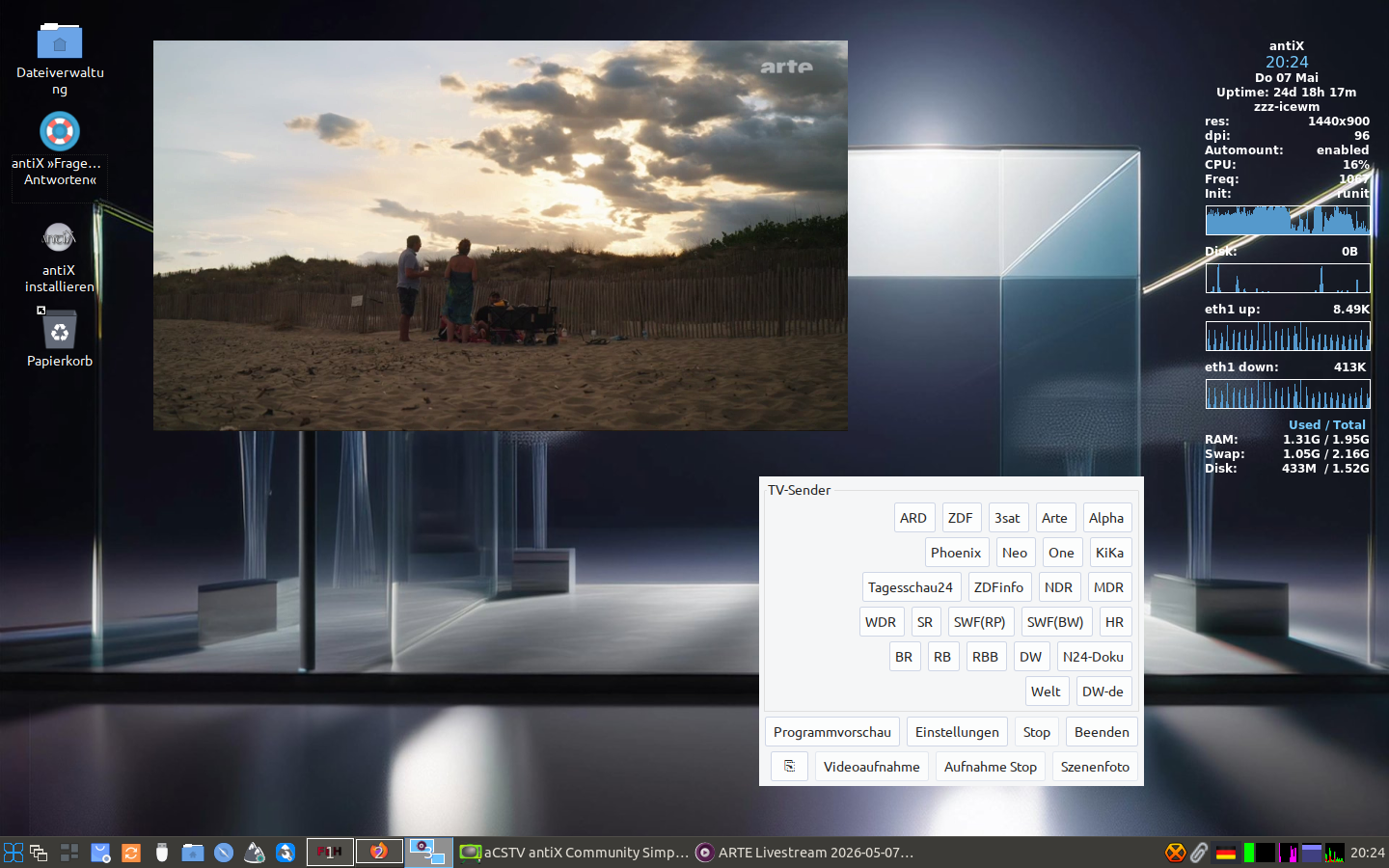
I have checked right now, here antiX TV works perfectly fine out of the box on antiX 23 and antiX 26, at single-core 32 bit and multi-core 64 bit hardware both (see screenshot). Running antiX live from USB, fully apt-upgraded. Desktop: zzz-IceWM. Init: runit mode, but that shouldn’t count.
Attachments:
Windows is like a submarine. Open a window and serious problems will start.
May 8, 2026 at 12:47 am #203810sybokMember@Robin:
Thank you for the thorough analysis.
1) Not nice anymoresince only root can now nice even user processes
I tried to start a program [web browser] from terminal using ‘nice’ and saw no such error so may be I misunderstood your explanation.
3) Viewing details
Screen resolution: 1280×1024 (also, these two numbers coincide with the output of the composed commands starting with ‘wmctrl’).
Icons: None of “apt-cache search icons | grep -i antix | awk ‘{print $1}'” are installed; this is antiX-22_x64-full upgraded (through any necessary intermediaries, if any) to repositories pointing to Trixie.
Themes: radiant-antiX-medium (flubxox; I like the color).Comment on Python version: I wonder if this could be circumvented on older systems (antiX 21 is the first to have Python 3.9+) by installing conda and starting ‘yt-dlp’ from a Conda virtual environment with a newer Python (with all additional dependencies, if any required, installed using ‘pip’).
May 8, 2026 at 1:27 am #203812anti-apXos
MemberI don’t really use antiXTV, so take it with a grain of salt, but when I have tested it I really really really didn’t like that all the windows were by default undecorated, no borders or titlebars. And there’s not even a setting to turn them on? Is there some practical reason for that, or it’s just a preference?
"--"
May 8, 2026 at 2:13 am #203813MemberAnd there’s not even a setting to turn them on?
Doesn’t work the -r command line option for you?
$ aCSTV.sh --help aCSTV — antiX Community Simple TV Ver. 1.13c … Command line options: … --Border or -r . . . . . . . . . . . . . Draw borders around program windowsthis is antiX-22_x64-full upgraded to repositories pointing to Trixie.
Could you recheck on a live antiX 23 or antiX 26 please, whether this strange “gdk_window_set_icon_list: icons too large” issue and the control window exceeding screen then also is present? I have no idea where that could stem from nor what it actually means, have never seen it before and can’t reproduce that either, while your screen size matches precisely what I have tested on, so the arithmetic should work, even for huge stations lists. It might have been raised from whatever incompatibility introduced by your upgrade path possibly. Testing on a clean live antiX 23 or antiX 26 system could shade some light here.
Btw, what aCSTV version shows the command line help message for you? You may run an outdated version possibly, since packaging has changed if I remember correctly, so the package might not have been upgraded automatically once you’ve switched the repos from 22 to 26 on your install. Or what returns
$ apt-cache policy acstv
On antiX 23 and 26 it should come up with 1.13.2 currently.Windows is like a submarine. Open a window and serious problems will start.
-
AuthorPosts
- You must be logged in to reply to this topic.