
Forum › Forums › Official Releases › antiX-21/22 “Grup Yorum” › [Solved] No root password, & Nvidia driver won’t install.
- This topic has 19 replies, 3 voices, and was last updated Apr 21-10:18 pm by scruffyeagle.
-
AuthorPosts
-
April 11, 2022 at 11:40 pm #81069
scruffyeagle
MemberI’m running AntiX v21.4, fully installed on the hard drive in a Dell Precision M6300 laptop.
I’m having a problem installing the Nvidia driver.
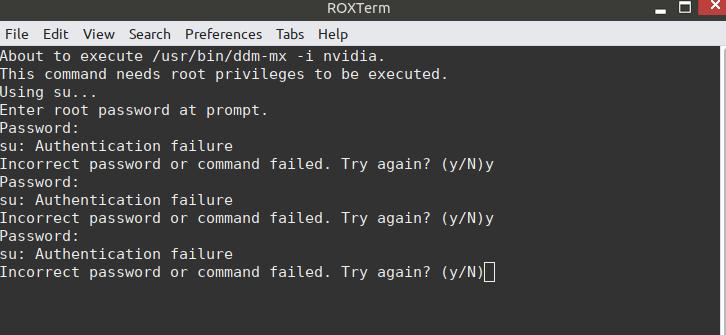
Control Centre / Drivers / Nvidia Driver Installer calls up Terminal for its routine. There, it says it’s using su, then asks me for the Root password. BUT, the AntiX 21.4 installation routines didn’t include setting a Root password. I’ve tried entering my user password, and tried entering both “Root” & “root”. None of those works.
—————————-
Here’s the output of “inxi -Fxxxrz”:
System:
Kernel: 5.10.57-antix.1-amd64-smp x86_64 bits: 64 compiler: gcc v: 10.2.1
Desktop: IceWM 2.9.6 vt: 7 dm: N/A
Distro: antiX-21_x64-full Grup Yorum 31 October 2021
base: Debian GNU/Linux 11 (bullseye)
Machine:
Type: Portable System: Dell product: Precision M6300 v: N/A
serial: <filter> Chassis: type: 8 serial: <filter>
Mobo: Dell model: 0JM680 serial: <filter> BIOS: Dell v: A14
date: 12/06/2011
Battery:
ID-1: BAT0 charge: 65.3 Wh (95.2%) condition: 68.6/73.3 Wh (93.6%)
volts: 12.5 min: 11.1 model: PS2 DELL 00 type: Li-ion serial: <filter>
status: Charging
CPU:
Info: Dual Core model: Intel Core2 Duo T7250 bits: 64 type: MCP
arch: Core Merom rev: D cache: L2: 2 MiB
flags: lm nx pae sse sse2 sse3 ssse3 bogomips: 7978
Speed: 1967 MHz min/max: 800/2001 MHz boost: enabled Core speeds (MHz):
1: 1967 2: 1486
Graphics:
Device-1: NVIDIA G84GLM [Quadro FX 1600M] vendor: Dell driver: nouveau
v: kernel bus-ID: 01:00.0 chip-ID: 10de:040d class-ID: 0300
Display: x11 server: X.Org 1.20.11 driver: loaded: modesetting
unloaded: fbdev,vesa resolution: 1400×900~60Hz s-dpi: 96
OpenGL: renderer: NV84 v: 3.3 Mesa 20.3.5 direct render: Yes
Audio:
Device-1: Intel 82801H HD Audio vendor: Dell driver: snd_hda_intel
v: kernel bus-ID: 00:1b.0 chip-ID: 8086:284b class-ID: 0403
Sound Server-1: ALSA v: k5.10.57-antix.1-amd64-smp running: yes
Network:
Device-1: Broadcom NetXtreme BCM5756ME Gigabit Ethernet PCI Express
vendor: Dell driver: tg3 v: kernel port: df00 bus-ID: 09:00.0
chip-ID: 14e4:1674 class-ID: 0200
IF: eth1 state: up speed: 1000 Mbps duplex: full mac: <filter>
Device-2: Broadcom BCM4312 802.11b/g LP-PHY
vendor: Dell Wireless 1395 WLAN Mini-Card driver: wl v: kernel port: df00
bus-ID: 0c:00.0 chip-ID: 14e4:4315 class-ID: 0280
IF: wlan1 state: down mac: <filter>
Bluetooth:
Device-1: Dell Wireless 360 Bluetooth type: USB driver: btusb v: 0.8
bus-ID: 6-2:2 chip-ID: 413c:8140 class-ID: fe01
Report: hciconfig ID: hci0 rfk-id: 1 state: down bt-service: running
rfk-block: hardware: no software: yes address: <filter>
Drives:
Local Storage: total: 1.2 TiB used: 6.73 GiB (0.5%)
ID-1: /dev/sda vendor: Western Digital model: WD3200BPVT-75JJ5T0
size: 298.09 GiB speed: 3.0 Gb/s type: HDD rpm: 5400 serial: <filter>
rev: 1A03 scheme: MBR
ID-2: /dev/sdb type: USB vendor: Western Digital
model: WD My Passport 0748 size: 931.48 GiB type: N/A serial: <filter>
rev: 1019 scheme: MBR
Partition:
ID-1: / size: 38.15 GiB used: 6.73 GiB (17.6%) fs: ext4 dev: /dev/sda6
Swap:
ID-1: swap-1 type: partition size: 9.77 GiB used: 0 KiB (0.0%)
priority: -2 dev: /dev/sda5
Sensors:
System Temperatures: cpu: 62.0 C mobo: N/A sodimm: SODIMM C gpu: nouveau
temp: 70.0 C
Fan Speeds (RPM): cpu: 0
Repos:
Packages: apt: 2022
Active apt repos in: /etc/apt/sources.list.d/antix.list
1: deb http://mirrors.rit.edu/mxlinux/mx-packages/antix/bullseye bullseye main nosystemd nonfree
Active apt repos in: /etc/apt/sources.list.d/bullseye-backports.list
1: deb http://deb.debian.org/debian bullseye-backports main contrib non-free
Active apt repos in: /etc/apt/sources.list.d/debian-stable-updates.list
1: deb http://ftp.us.debian.org/debian/ bullseye-updates main contrib non-free
Active apt repos in: /etc/apt/sources.list.d/debian.list
1: deb http://ftp.us.debian.org/debian/ bullseye main contrib non-free
2: deb http://security.debian.org/ bullseye-security main contrib non-free
No active apt repos in: /etc/apt/sources.list.d/various.list
Info:
Processes: 178 Uptime: 51m wakeups: 2 Memory: 3.84 GiB
used: 1.22 GiB (31.8%) Init: SysVinit v: 2.96 runlevel: 5 default: 5
Compilers: gcc: 10.2.1 alt: 10 Shell: Bash v: 5.1.4 running-in: roxterm
inxi: 3.3.06Attachments:
Sociatry - psychiatry for egregores.
April 12, 2022 at 12:04 am #81072 capreaModerator
I’ve seen the possibility during installation not to set the root password, if you don’t checkmark to set a root password, but didn’t try it.
What might works for installing the nvidia-driver is to start the installer from terminal withsudo ddm-mx -i nvidiaApril 12, 2022 at 12:30 am #81075MemberThanks for your help.
I have a lot of unused space on this hard drive, so I might try a new installation of A214 using some of that space, just to see if the first time around, I missed the checkmark for setting a root password.
I did as you suggested, starting the Nvidia routine from within Terminal instead of via the Control Centre link – and, it worked.
I installed the Nvidia drivers from the Debian main repo. There was a conflict during installation, and I was advised the easiest way to fix it was to reboot the machine – which is what I’m going to do in about 2 minutes…
(I screwed up, not scanning back to discover the name of what was being conflicted.)Sociatry - psychiatry for egregores.
April 12, 2022 at 12:49 am #81076capreaModeratorHopefully it was the regular message about it can’t load nvidia as long the nouveau is loaded and best is to reboot.
April 12, 2022 at 12:55 am #81079MemberUpdate:
After rebooting, I found the display had reverted to 1920×1200, and the alternate resolutions available in ARandR had all vanished; only the native 1920×1200 remaining. I searched through the menu, but couldn’t find a Nvidia setup link. (In Win10 Pro, Nvidia had a setup routine that provided the alternate 1440×900 display setting.) The only way to regain a 1440×900 display seems to be to revert the Nvidia card to the previous driver.
I’ll wait a few minutes before doing this, to see if you’re still there, giving you a chance to reply…
Sociatry - psychiatry for egregores.
April 12, 2022 at 1:06 am #81080capreaModeratorNo wait, there must be nvidia-settings in the menu.
April 12, 2022 at 1:23 am #81083MemberI went back through the menu a 2nd time, carefully scanning and checking EVERY submenu – and couldn’t find anything including the name “Nvidia”.
Sociatry - psychiatry for egregores.
April 12, 2022 at 1:24 am #81084capreaModeratorDid you refresh the menu ? It’s under settings normally, as far as I can recall.
In time I have no access to my laptop with the 340.nvidia driver which your card should use.
Might nvidia-settings from terminal works.April 12, 2022 at 1:31 am #81086MemberYes, I refreshed the menu, and that didn’t help.
I went & checked the settings menu & submenus a 3rd time – couldn’t find it.
I had already tried issuing both “Nvidia-settings” & “nvidia-settings” as commands in Terminal, and it told me command not found both times.
Sociatry - psychiatry for egregores.
April 12, 2022 at 1:38 am #81087capreaModeratornvidia-settings-legacy
is all I can think ofApril 12, 2022 at 1:39 am #81088MemberNope. Command not found.
It seems like I broke the golden rule, “If it ain’t broke, don’t fix it!” ;P
Sociatry - psychiatry for egregores.
April 12, 2022 at 2:35 am #81090MemberI decided to revert the driver. so I issued “sudo ddm-mx -p nvidia” in the Terminal. It worked like a charm. Everything seems to be back the way it was before changing the Nvidia driver, including my assignment of 1440×900 resolution.
So ends my little experiment for this evening.
Sociatry - psychiatry for egregores.
April 12, 2022 at 4:45 am #81102MemberWhat I need to know, at this point is:
Is there any way to set the missing Root password, or do I need to reinstall from scratch to accomplish that?
Sociatry - psychiatry for egregores.
April 12, 2022 at 6:03 am #81103ModdIt
MemberHi scruffyeagle, please try using sudo su
If that does not help for the nvidia problem,
do sudo passwd root
Which should let you set a root password. Tested.April 12, 2022 at 8:48 am #81114MemberThank you, Moddit!
That worked like a charm.
Sociatry - psychiatry for egregores.
-
AuthorPosts
- You must be logged in to reply to this topic.