
Forum › Forums › News › Announcements › antiX-25-full-beta2 for public testing › Reply To: antiX-25-full-beta2 for public testing
January 8, 2026 at 2:05 pm
#193544
 rokytnji
Forum Admin
Lost app-select through no fault of my own.
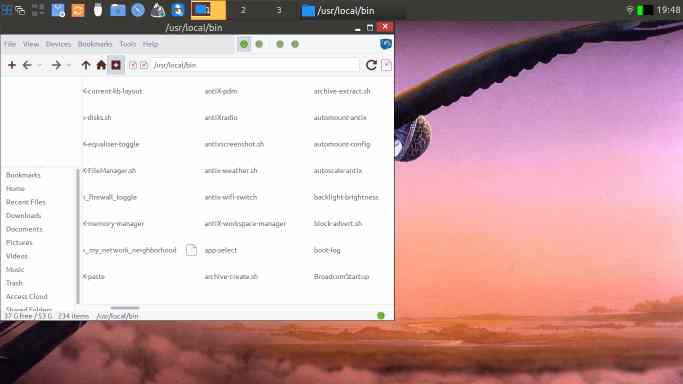 [/url]
Same with .conkyrc not starting anymore
harry@antix1:~
$ conky &
[1] 4024
harry@antix1:~
$ Conky: forked to background, pid is 4025

Conky: desktop window (1b0) is root window
Conky: window type - normal
Conky: drawing to created window (0x1600001)
Conky: drawing to double buffer
X Error of failed request:  BadMatch (invalid parameter attributes)
  Major opcode of failed request:  2 (X_ChangeWindowAttributes)
  Serial number of failed request:  275
  Current serial number in output stream:  276
# Standard antiX .conkyrc file
# For conky editing help and commands visit = Casey's Conky Reference with Examples {http://www.ifxgroup.net/conky.htm}

# set to yes if you want Conky to be forked in the background
background yes

short_units yes

cpu_avg_samples 1
net_avg_samples 1

out_to_console no

# X font when Xft is disabled, you can pick one with program xfontsel
#font 7x12
#font 6x10
#font 7x13
#font 8x12
#font 7x12

# Use Xft?
use_xft yes

# Xft font when Xft is enabled
#xftfont gentium:size=12
#xftfont DejaVu Sans:size=10
xftfont DejaVu Sans:bold:size=9
#xftfont DejaVu Sans:size=9

# Create own window instead of using desktop (required in nautilus, pcmanfm and rox desktops)
own_window yes
own_window_transparent yes
own_window_hints undecorated,below,sticky,skip_taskbar
own_window_type normal

# Text alpha when using Xft
xftalpha 1.0

#on_bottom no

# Update interval in seconds
update_interval 1

# Use double buffering (reduces flicker, may not work for everyone)
double_buffer yes

# Minimum size of text area
minimum_size 55
maximum_width 270

# Draw shades?
draw_shades no

# Draw outlines?
draw_outline no

# Draw borders around text
draw_borders no

# Stippled borders?
stippled_borders 0

# border margins
#border_margin 10

# border width
border_width 2

# Default colors and also border colors
default_color white
default_shade_color white
default_outline_color white

#color ffffff
#color4 yellow
#color fflor9 5599cc
# Text alignment, other possible values are commented
# alignment top_left
alignment top_right
#alignment bottom_left
#alignment bottom_right

# Gap between borders of screen and text

gap_x 20
gap_y 40

# Add spaces to keep things from moving about?  This only affects certain objects.
use_spacer right

# Subtract file system buffers from used memory?
no_buffers yes

# if_up_strictness link:  up | link | address
if_up_strictness address

# set to yes if you want all text to be in uppercase
uppercase no

TEXT
${alignc}antiX
${alignc}}${font DejaVu Sans:size=12}${time %H:%M} ${font} ${color}
${alignc}${time %a %d %b}
${alignc}Uptime: $uptime
${alignc}${exec disp=${DISPLAY#:}; disp=${disp%.[0-9]}; cat $HOME/.desktop-session/desktop-code.$disp 2>/dev/null}
res:${alignr}${execi 60 xdpyinfo | sed -n -r "s/^\s*dimensions:.*\s([0-9]+x[0-9]+).*/\1/p"}
dpi:${alignr}${execi 60 sed -nr "s/^\s*Xft.dpi:\s*([0-9]+(x[0-9]+)?).*/\1/p" $HOME/.Xresources | grep "[0-9]" || echo 96}
Automount: ${alignr}${execi 60 grep -q "^automount=TRUE" $HOME/.desktop-session/automount.conf 2>/dev/null && echo "enabled" || echo "disabled"}
CPU:${alignr}${cpu}%
Freq:${alignr}${freq}
${color}Init:${alignr}${execi 60 detect-init.sh}
${alignr}${cpugraph cpu0 60,260 5599cc 5599cc}
Disk:${alignr}${diskio}
${alignr}${diskiograph 60,260 5599cc 5599cc}${if_up eth0}
eth0 up: $alignr ${upspeed eth0}
${alignr}${upspeedgraph   eth0 60,260 5599cc 5599cc}
eth0 down: $alignr ${downspeed eth0}
${alignr}${downspeedgraph eth0 60,260  5599cc 5599cc}${endif}${if_up eth1}
eth1 up: $alignr ${upspeed eth1}
${alignr}${upspeedgraph   eth1 60,260 5599cc 5599cc}
eth1 down: $alignr ${downspeed eth1}
${alignr}${downspeedgraph eth1 60,260  5599cc 5599cc}${endif}${if_up wlan0}
wlan0 up: $alignr ${upspeed wlan0}
${alignr}${upspeedgraph   wlan0 60,260 5599cc 5599cc}
wlan0 down: $alignr ${downspeed wlan0}
${alignr}${downspeedgraph wlan0 60,260 5599cc 5599cc}${endif}${if_up wlan1}
wlan1 up: $alignr ${upspeed wlan1}
${alignr} ${upspeedgraph   wlan1 60,260 5599cc 5599cc}
wlan1 down: $alignr ${downspeed wlan1}
${alignr}${downspeedgraph wlan1 60,260 5599cc 5599cc}${endif}
${alignr}${color}Used / Total ${color}
RAM:${alignr}$mem / $memmax
Swap:${alignr}$swap / $swapmax
/ Disk:${alignr}${fs_used /} / ${fs_size /}
#/Home ${alignr}$(fs_used /home/harry) /home $(fs_size /home/harry}
${alignc}${execi 1000 persist-enabled}
Battery: ${battery_percent BAT0}% ${alignr}${battery_bar 8,70 BAT0} # You may need to change BAT0 to BAT1 or add the same line again if you have more then one battery.
${execi 1000 acpi 2>/dev/null | grep -q . && echo "Battery: "}${execi 10 acpi -b 2>/dev/null | cut -d" " -f3,4 | sed 's/,$//'}
${texeci 1800 curl 'wttr.in/Pecos?q?0?T'}
Sometimes I drive a crooked road to get my mind straight.
I don't suffer from insanity. I enjoy every minute of it.
Motorcycle racing is rocket science.
Linux Registered User # 475019
How to Search for AntiX solutions to your problems