Forum › Forums › General › Software › Xorg is dead. Long live XLibre › Reply To: Xorg is dead. Long live XLibre
April 2, 2026 at 8:56 pm
#200581
 Larrys4227
Member
I made a quick snapshot of my install (just in case) and did an apt install xlibre. I didn’t see anything in suggested or recommended I thought I needed, so mashed the button. Reboot and everything seems good. 🙂
@anticapitalista … looks like you can put a check mark next to Radeon
Graphics:
  Device-1: Advanced Micro Devices [AMD/ATI] Mullins [Radeon R4/R5 Graphics]
    driver: radeon v: kernel
  Device-2: Cheng Uei Precision Industry (Foxlink) HP Webcam
    driver: uvcvideo type: USB
  Display: server: X.org driver: dri: radeonsi gpu: radeon
    resolution: 1366x768~60Hz
  API: EGL v: 1.5 drivers: kms_swrast,radeonsi,swrast
    platforms: gbm,x11,surfaceless,device
  API: OpenGL v: 4.5 vendor: amd mesa v: 25.0.7-2 renderer: KABINI
    (radeonsi ACO DRM 2.50 6.6.119-antix.1-amd64-smp)
  Info: Tools: api: eglinfo,glxinfo x11: xdriinfo, xdpyinfo, xprop, xrandr
dpkg -l | grep xlibre ✔ 09:49:57 PM
ii xlibre 1:7.7+27.0antix1 amd64 XLibre X Window System
ii xlibre-x11-common 1:7.7+27.0antix1 all X Window System (X.Org) infrastructure
ii xserver-xlibre 1:7.7+27.0antix1 amd64 XLibre X server
ii xserver-xlibre-common 2:25.0.0.12-1+5.0antix1 all common files used by various X servers
ii xserver-xlibre-core 2:25.0.0.12-1+5.0antix1 amd64 XLibre X server - core server
ii xserver-xlibre-input-all 1:7.7+27.0antix1 amd64 XLibre X server -- input driver metapackage
ii xserver-xlibre-input-libinput 1.5.1.0-1.0antix1 amd64 XLibre X server -- libinput input driver
ii xserver-xlibre-video-all 1:7.7+27.0antix1 amd64 XLibre X server -- output driver metapackage
ii xserver-xlibre-video-amdgpu 23.0.0-1+5.0antix1 amd64 XLibre X server -- AMDGPU display driver
ii xserver-xlibre-video-ati 1:22.0.0.2-1.0antix1 amd64 XLibre X server -- AMD/ATI display driver wrapper
ii xserver-xlibre-video-fbdev 1:0.5.1.1-2.0antix1 amd64 XLibre X server -- fbdev display driver
ii xserver-xlibre-video-nouveau 1:1.0.18.1-2.0antix1 amd64 XLibre X server -- Nouveau display driver
ii xserver-xlibre-video-radeon 1:22.0.0.2-1.0antix1 amd64 XLibre X server -- AMD/ATI Radeon display driver
ii xserver-xlibre-video-vesa 1:2.6.0.1-2.0antix1 amd64 XLibre X server -- VESA display driver
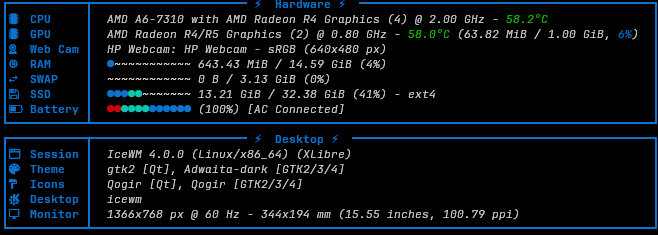
ii xserver-xlibre-video-vmware 1:13.4.0.1-2.0antix1 amd64 XLibre X server -- VMware display driverFastfetch identifies Xlibre on the Session output. 🙂 and CPU/GPU are correct.
- This reply was modified 5 months, 3 weeks ago by Larrys4227. Reason: Formatting