
Forum › Forums › Official Releases › antiX-26 “Stephen Kapos” › assigning a static ip adress › Reply To: assigning a static ip adress
 Robin
RobinI want to assign a static ip adress to my notebook, but I dont know how to do this in antixx.
How this can be done in antixx I have no clue, sorry. But in antiX this is actually pretty simple.
1.) Left click the small square network monitor icon in system tray, right side near the time display.
2.) In the upcoming CMST dialogue, head for the “Details” tab.
3.) From the pulldown in this tab under the header “Service” select the connection you want to configure with a static IP
4.) On the right bottom of the tab click the “Configuration” button.
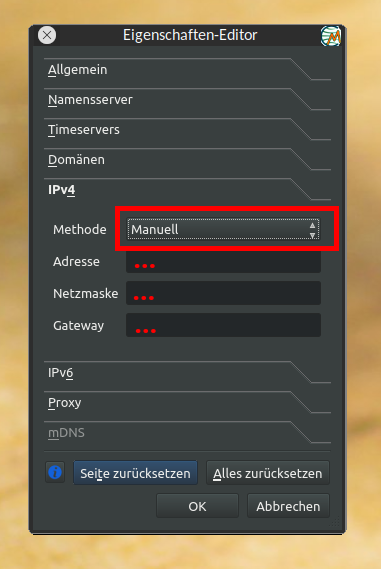
5.) In the upcoming “Properties-Editor” click the tab “IPv4”.
6.) From the “Method” pulldown select “manual” instead of “dhcp” and enter the required fields “Address”, “Netmask” and “Gateway”. (see screenshot)
7.) Confirm with OK.
8.) If using IPv6 click the “IPv6” tab and repeat that, this time the fields “Prefix-length”, “Address” and “Gateway” are expected.
Attachments:
Windows is like a submarine. Open a window and serious problems will start.