
Forum › Forums › New users › New Users and General Questions › [SOLVED] How do I find my other HDD's
- This topic has 18 replies, 4 voices, and was last updated May 3-11:07 am by caprea.
-
AuthorPosts
-
May 1, 2019 at 10:32 pm #20984
Anonymous
G’day I am new, Have come from Peppermint and a long line of Linux distro’s prior to that. All Hail “Linux”. I can not find the additional HDD’s that I have on the P/C that I have just loaded ANTIX 17 on. On Peppermint they were listed the file manager.
Regards Thegrumpyone a.k.a.Shane,
P/s I think that in Linux distro’s we should stop referring to a screen instance as a window, Because as all Micro$oft users know all to well Windows Breaks all the time.
Portals would be a good name.May 1, 2019 at 11:29 pm #20987Aren’t they auto-mounted and shown on the left pane of SpaceFM?
May 2, 2019 at 12:15 am #20989Thank you Mr Clue seem’s like your forename should be Hasa. Have now found my HDD’s but when I try to open one I get this message (as seen below)
so know I see them but I can not access them.Regards Thegrumpyone
May 2, 2019 at 12:43 am #20992Don’t know either. We’ll have to wait until somebody has an idea.
May 2, 2019 at 2:18 am #20993 fatmacMember
The term Windows, comes from WIMP – Windows Icons Menus Pointer – Originally developed at Xerox PARC, a long time before MS trade marked ‘Windows’!!
Linux (& BSD) since 1999
Ultra Small Form Factor & thin client computersMay 2, 2019 at 2:35 am #20995 capreaModerator
Hi Shane, is this a live-system or an installed system, we are talking about ?
May 2, 2019 at 4:09 am #20996G’day Caprea,
This in fact is an installed system that had been installed from a live usb. I also have the problem that my antix 17.3 it will not boot up without manual interference from me. also it wont remember my left handed settings for the mouse. (yeah yeah I’m left handed)Regards Shane,
May 2, 2019 at 5:01 am #20997capreaModeratorIt looks like you have to create a mountpoint for the device(s) you want to access.
Look in your fstab with
geany /etc/fstabUnder eg. sda1 you should see your mountpoint like /media/XXXXXXX
(The media is the mountpoint)Then create a mountpoint with
sudo mkdir /media/XXXXXXXAfterwards this device should be reachable frome spacefm.
May 2, 2019 at 5:13 am #20998capreaModeratorAs far as I can see this is now an antix.17.4.1 installation.Does it now remember your left handed settings for the mouse ?
Is your antix.17.3-installation fully updated and dist-upgraded and you still have the problem with the mouse ?May 2, 2019 at 5:46 am #21000Caprea I took this screen shot, pardon my ignorance but I unsure what to do next.
Regards Shane
May 2, 2019 at 5:54 am #21003capreaModeratorOpen terminal and
sudo mkdir /media/Terry3It will ćreate a mountpoint for your device sda1.Then try to open sda1 with spacefm, should work now.
May 2, 2019 at 6:04 am #21004Sorry for misleading you but it is and always has been 17.4.1 full 64bit. I am a total newbe to Antix
May 2, 2019 at 6:12 am #21005Thank you Caprea it worked. Its good to be a part of the Antix os Community.
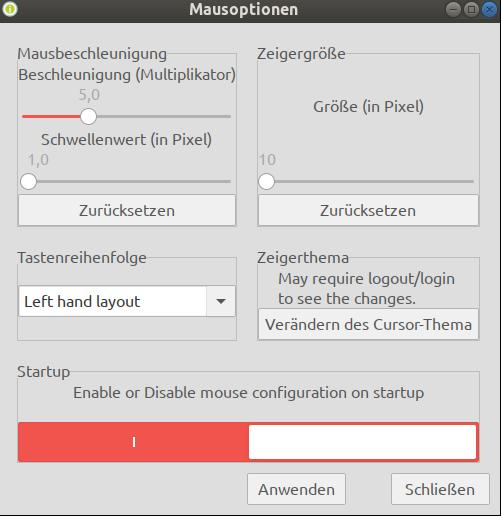
May 2, 2019 at 6:18 am #21007capreaModeratorcontrol-centre-> hardware-> mouse-configuration
There are two changes you have to make when using the mouse-configuration.
First set it to left hand layout.
Then under startup – Enable mouse-configuration on startup
Then click on applyAttachments:
May 2, 2019 at 6:36 am #21010Thank you again Caprea it have now done it.
Regards Shane,
-
AuthorPosts
- You must be logged in to reply to this topic.