
Forum › Forums › antiX-development › Translations › antiX 23 Desktop files: New resource for translation present on tranisfex.
- This topic has 96 replies, 8 voices, and was last updated Sep 20-5:33 am by kempelen.
-
AuthorPosts
-
August 25, 2025 at 4:00 pm #184439
Robin
MemberDoes this make it more understandable?
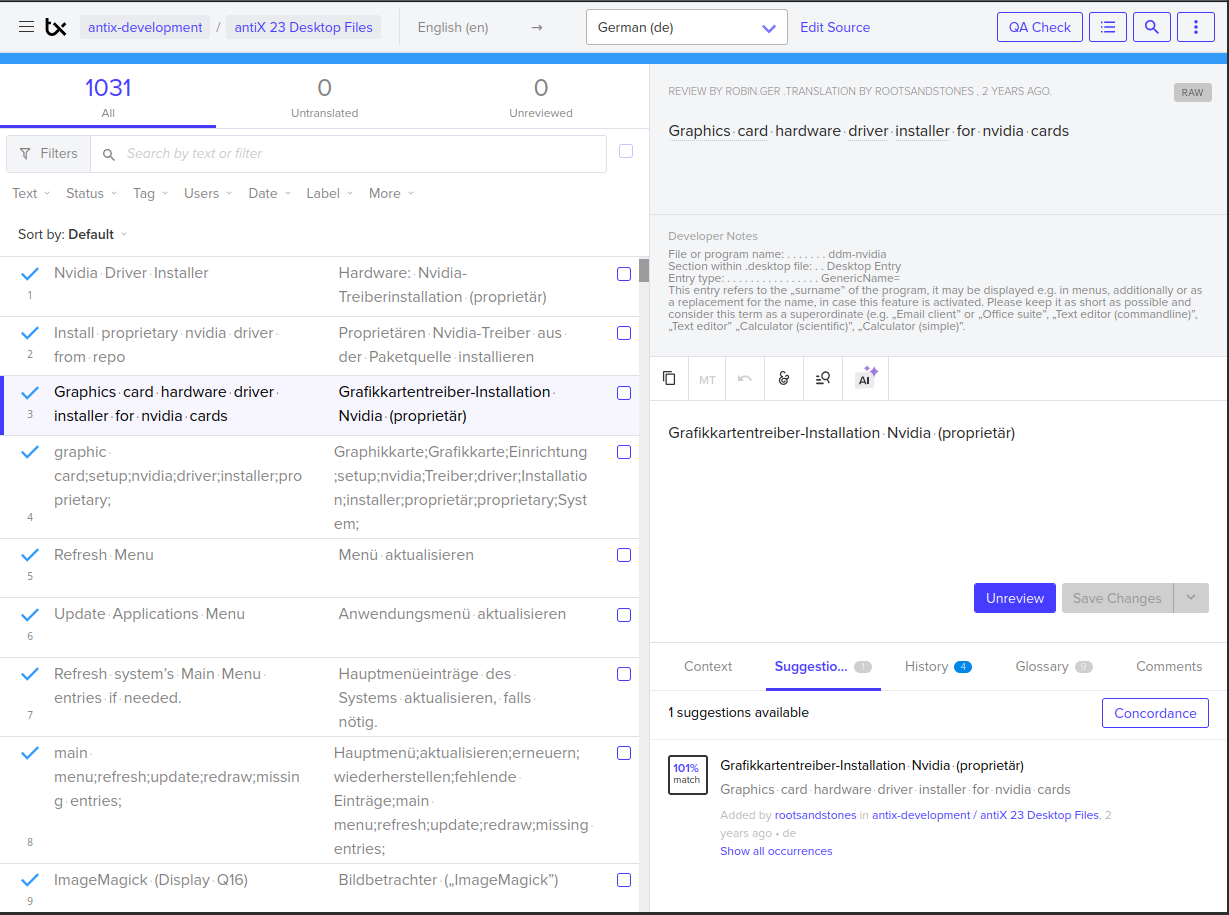
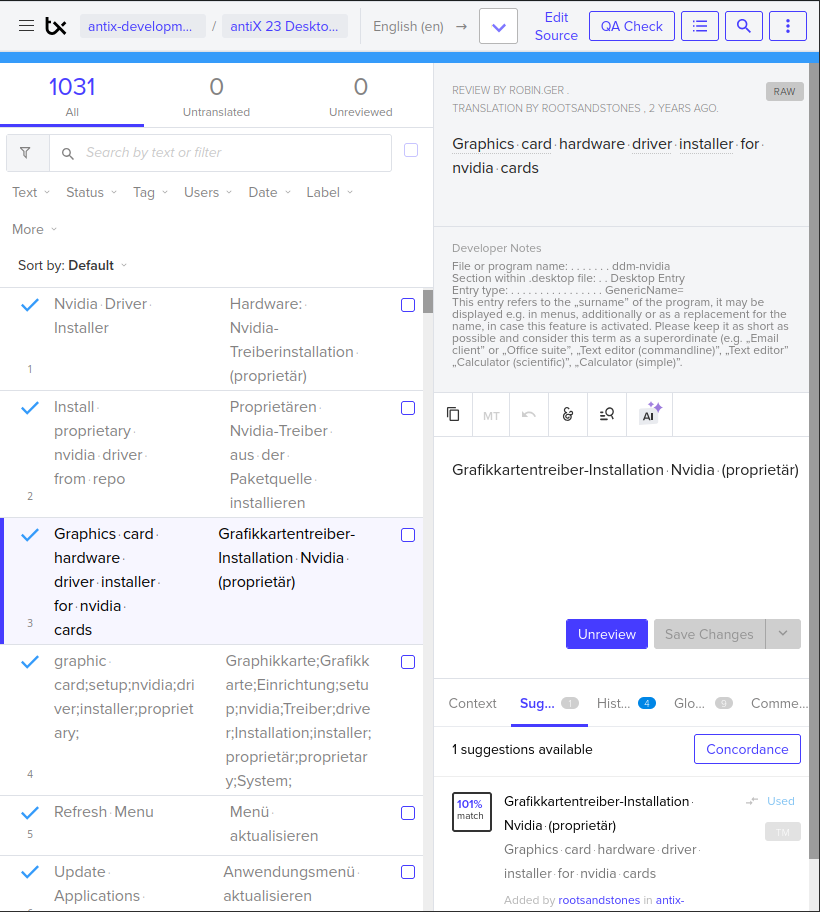
Yes now I understand. Have never seen these hideaways of the dev notes behind an additional button before, must be pretty new. Obviously Transifex has messed up another detail in their translation GUI. Slowly but surely I consider the transifex GUI unusable, each facelift breaks another thing in it from aspect of usability. Seems to be designed for smartphone screens merely on which you have to tap open an additional sub screen for each function and action. Ridiculous.
Sorry, you’ll have to discuss this with the Transifex devs, they provide a chat for this. I found they are pretty interested in getting feedback, and sometimes they can actually change something in a way then so it works again as ergonomically as before. Who could come to the strange idea to hide away the dev notes from the translators behind an extra button on a translation platform!? :facepalm: They are the very basics which are needed for translating properly.
———————-
EDIT:
I can’t reproduce these hideway-buttons here when accessing the transifex translation editor. No way to force it to the strange display you have in the screenshots by any means. Whatever small I resize the browser window, the dev notes are not hidden for me behind extra buttons like for you. Sorry, I really can’t help you with this. As said, please discuss this issue with the transifex devs, this should never happen. I’m keen to learn the result.- This reply was modified 1 year, 1 month ago by Robin. Reason: Can't reproduce
Windows is like a submarine. Open a window and serious problems will start.
August 25, 2025 at 4:27 pm #184449 marcelocripeMember
– Program Name of ddm-nvidia
– Generic Name of ddm-nvidia
– Comments of ddm-nvidia
– Categories of ddm-nvidiaYour concise explanation would confuse me and would not serve the purpose of the comments a programmer can make to translators. Keep in mind that most programmers don’t bother to guide volunteer translators on each sentence, where it will be used, and whether the same sentence will be used in different parts of the program.
If you’re going to use useless comments, then just check the comments from the MX Linux programmers. The programmer repeated in the comment text exactly the ambiguous sentence he wrote in the English entry that would be translated.
You should thank Robin for all his dedication and volunteer work in producing texts in English (which is not his native language) that are mostly understandable through the automatic translator.
Kempelen, think about other people before asking Robin to produce poorly written comments. If you were able to understand what each entry does and where the translation text will be displayed, then Robin’s comments are very well written. Therefore, the comments achieved their purpose, which is to make the information clear to ALL volunteer translators, not just you.
The higher the quality of Brazilian Portuguese translations for antiX Linux, the greater the chances of increasing the number of users. If Brazilian Portuguese translations for antiX Linux are incomprehensible, users will not want to use antiX Linux, and current users will stop using antiX Linux.
Is this what you want to happen?
– – – – –
– Program Name of ddm-nvidia
– Generic Name of ddm-nvidia
– Comments of ddm-nvidia
– Categories of ddm-nvidiaA sua explicação resumida iria me confundir e não serviria ao proposito dos comentários que o programador pode fazer para os tradutores. Saiba que a maioria dos programadores não se importam em orientar os tradutores voluntários sobre cada uma das frases, onde será utilizada e se a mesma frase será utilizada em diferentes partes dos programa.
Se é para utilizar comentários que não servem para nada, então basta conferir os comentários dos programadores do MX Linux. O programador repetiu no texto do comentário exatamente a frase ambígua que escreveu na entrada em idioma inglês que seria traduzida.
Você deveria agradecer ao Robin por todo o seu empenho e trabalho voluntário em produzir textos em idioma inglês (que não é o seu idioma nativo) que são na sua maioria compreensíveis por meio do tradutor automático.
kempelen, pense nas outras pessoas antes de pedir para o Robin produzir comentários maus feitos. Se você conseguiu compreender o que cada entrada faz e onde será exibido o texto da tradução, então significa que os comentários do Robin são muito bem feitos. Por tanto, os comentários atingiram o seu objetivo que é tornar claro a informação para TODOS os tradutores voluntários e não somente para você.
Quanto maior é a qualidade das traduções em idioma português do Brasil para o antiX Linux, maior são as chances de aumentar a quantidade de usuários. Se as traduções em idioma português do Brasil para o antiX Linux forem incompreensíveis, os usuários não irão querer utilizar o antiX Linux e os usuários atuais irão deixar de utilizar o antiX Linux.
É isso que você quer que aconteça?
August 25, 2025 at 5:09 pm #184452MemberMarcelo @marcelocripe, please, calm down, it’s all merely about these strange extra hideaway button @Kempelen sees, which I can’t reproduce, and which shrinks the dev notes to an unusable concoction:
Developer Notes
File or Program name:.....ddm-nvidia Section within .desktop file:...Desktop Ent...V
See his screenshot:

Have you ever seen this button, and do you happen to have an idea how Kempelen can get rid of it so he sees the full dev notes again by default? I have found no means to see this extra button along with these castrated dev notes. So I have no clue how to make it vanish again. It is simply not that way for me here, I always see the full dev notes.
Windows is like a submarine. Open a window and serious problems will start.
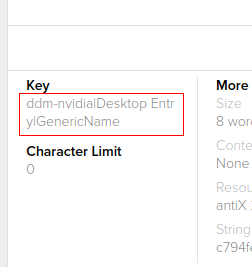
August 25, 2025 at 6:24 pm #184462Member@Kempelen: A workaround for your strange extra hideaway may be: These core infos are directly derived from the true entry key (or let’s say the other way around, the true key is directly derived from these pieces of information), which is visible prominently in the transifex GUI. Here the three pieces of information are compressed into a single string, vertical bar separated, see screenshot.
Key
ddm-nvidia|Desktop Entry|GenericName
For me this GUI field also is always visible, so if you see it also, you can check the entry target there as well, even when the developers notes are castrated on your device by transifex.
Hopefully they have not put this also behind an additional button for you 🙂
Attachments:
Windows is like a submarine. Open a window and serious problems will start.
September 9, 2025 at 3:56 am #185251kempelen
MemberSorry guys, I forgot to answer here, but found in my mailbox marked as “todo” now. 🙂
@marcelocripe I didn’t ask about shortening the text or removing anything about it, I asked to write it on a way, that even the short version (when it is closed to 2 lines on Transifex) displays ENOUGH information for an experienced translator. Those examples that you quoted, would be the first line, after that, you can have long descriptions. I don’t need 300 copies of explanation of what “a program’s”surname” means.
@Robin I like the short format, because especially on this file, the translations are just repeating the very same long explanation for all strings. So when I don’t need, I don’t open the long format. I like this feature. 🙂 When fully opened, it pushes too big distance between the text and translation. What I asked, is that if the text would START with enough information to indicate the actual purpose of that actual string for an experienced translator who does not need the long explanation.
But if you don’t want to change the format for this, I’ll live with it, no problem.
I wanted to make a quick review of just the program names (the name that appears in the menu) but it’s hard to identify this way, it takes too much effort to find in the long description whether it’s a program name, or description or what actually. But well, I can live with it, just had this as an idea to make translation easier. I can also you the “key” that you mentioned. However a short human readable text would have been easier.
Update: @Robin I think you need to clear cookies and local storage to start with closed description panel. Once I open it, it does not close until I close the browser (which deletes cookies and data in my setup). It cannot be manually “closed”. Or, this console command changes it if you don’t want to delete browser data, then need to reload the page (F5). False closes it, true opens it. (Sorry, I’m crazy. 🙂 )
localStorage.setItem("__amplify__translation-instructions-open", "{ \"data\": false, \"expires\": null }");- This reply was modified 1 year ago by kempelen.
- This reply was modified 1 year ago by kempelen.
- This reply was modified 1 year ago by kempelen.
September 18, 2025 at 11:16 am #185667MemberI wanted to make a quick review of just the program names (the name that appears in the menu) but it’s hard to identify this way,
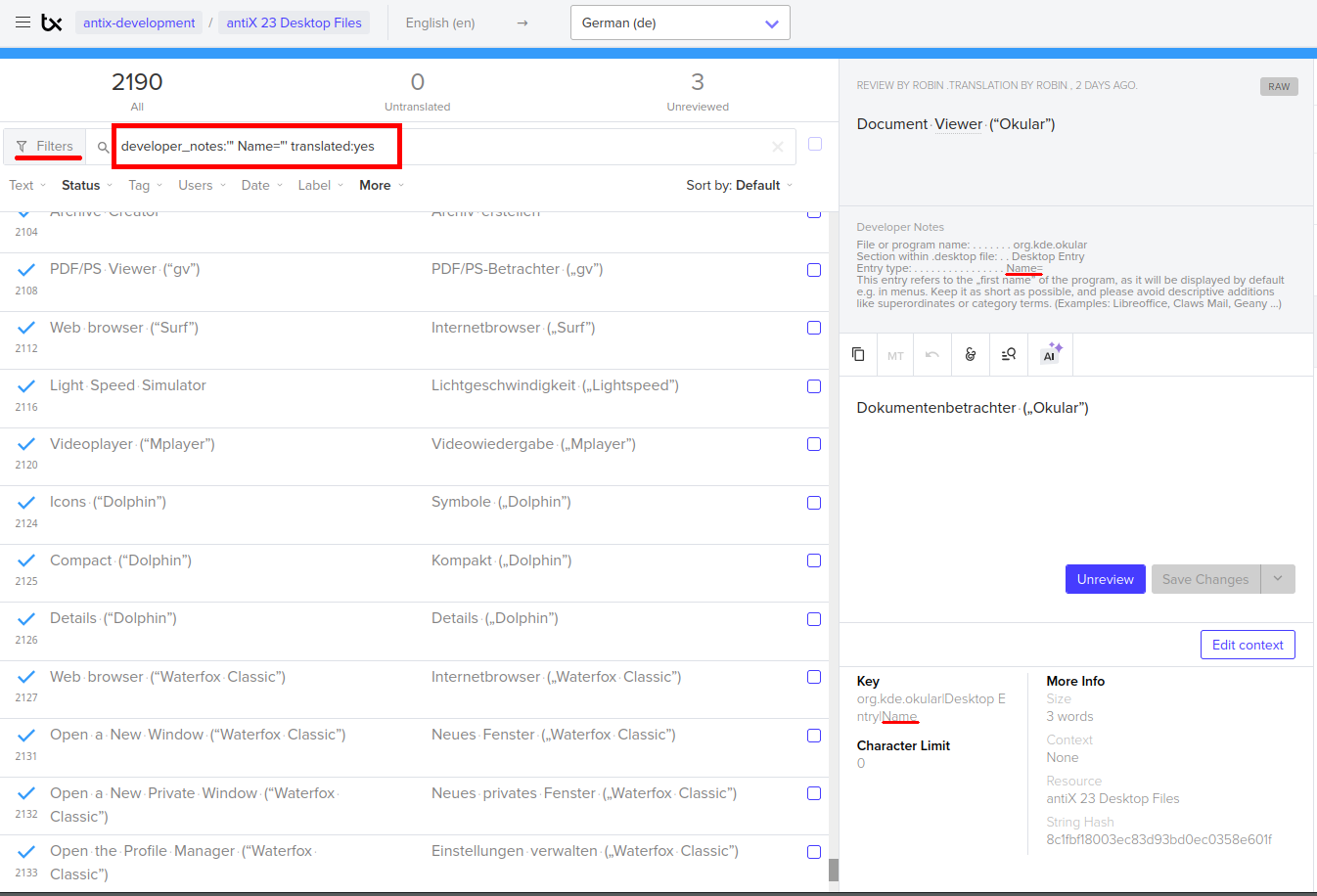
Sorry @Kempelen for the late reply, I was pretty busy with preparing the update of this resource currently. There is a pretty simple way to achieve this quick review of a specific category in Transifex editor, which I do use constantly:
Enter into the Filter field manually the following line:
developer_notes:'" Name="' translated:yes
(please carefully observe the proper sequence of single and double ASCII Quotes in it and the additional leading blank in front of the word Name, otherwise it won’t work.)Use translated:no to see all still untranslated names. You can apply the same method to filter for all GenericNames, Comments or Keywords.
What I asked, is that if the text would START with enough information
The text actually starts with precisely these pieces of Information, but we have no control over what Transifex extracts from it for the short box. Obviously they consider something important what other people wouldn’t cut this way they do. There is no way to tell transifex what to extract, other than corrupting the layout of the full box, making it then hard to understand for unexperienced users what a message starting with something like ddm-nvidia|Desktop Entry|GenericName could mean, which then would most likely fit into the transifex requirements for their short boxes. And this would be a repetition of what they already show in the Key field (see screenshot some postings above), and I dislike 1:1 redundancy.
Moreover it would mean to rewrite the respective functions in the extractor and harvester python script, which automatically writes these lines. I have simple no time to do this, sorry, because I already have to rewrite currently other parts in it for a needed functional enhancement of the antix-23-desktop-files package. Maybe your request can be handled in one way or another some day later. Hopefully the hints for advanced filter usage in the Transifex editor can help you already to an improved workflow.Attachments:
Windows is like a submarine. Open a window and serious problems will start.
September 20, 2025 at 5:33 am #185742Member@Robin wow, I didn’t notice this can be done by searching developer_notes:'” Name=”‘ translated:yes. Your comment solved all my problems. Thanks! 🙂
I understand if you have no time to change the scripts, then they will be as is, no problem. In general I think something that’s short is better, than needing to read long texts to figure out whether it’s description, name, category or what. And after reading this text 1000 times, it gets boring, you can imagine… 🙂 (Until our discussion here, I didn’t even notice there is this small “info block” at the start. I always did read the literal text part, and searched for words “surname” and such things that you use as “key words” in that literal part, then also needed to read what you mean on “surname” etc…)
Thank you for all the work you put in this. I noticed there is a lot more to translate now. 🙂
-
AuthorPosts
- You must be logged in to reply to this topic.