
Forum › Forums › News › Announcements › antiX-25-full-beta2 for public testing
- This topic has 709 replies, 38 voices, and was last updated Jan 30-4:02 pm by Brian Masinick.
-
AuthorPosts
-
December 22, 2025 at 3:58 pm #192276
zchrisw
MemberARandR changes don’t persist. They are lost when you reboot. Have same problem in 23.2.
As a workaround I put in a xrandr command at the end of ~/.destop-session/startup, but, changes like this need to have built-in persistence.
Cher/Dear @zchrisw,
That’s strange because in the Beta 2 SysVinit version, my settings are retained.
Which init are you using?
Did you save the settings in ARandR?
Best regards,
WallonI thought I had been saving the changes by clicking on the check mark, but, I guess not. It’s not clear what is Apply and what is Save as it is in other distros. Moving the cursor over the icons doesn’t give you any descriptive text. Found a Save As, but not Save, under Layout (unexpected) so I gave that a try (replaced default.sh in .screenlayout) and it seems to have worked. GUI needs to be cleaned up so things are clear.
Z. Christopher Witkowski
December 22, 2025 at 4:03 pm #192277 anticapitalistaForum Admin
ARandR changes don’t persist. They are lost when you reboot. Have same problem in 23.2.
As a workaround I put in a xrandr command at the end of ~/.destop-session/startup, but, changes like this need to have built-in persistence.
Cher/Dear @zchrisw,
That’s strange because in the Beta 2 SysVinit version, my settings are retained.
Which init are you using?
Did you save the settings in ARandR?
Best regards,
WallonI thought I had been saving the changes by clicking on the check mark, but, I guess not. It’s not clear what is Apply and what is Save as it is in other distros. Moving the cursor over the icons doesn’t give you any descriptive text. Found a Save As, but not Save, under Layout (unexpected) so I gave that a try (replaced default.sh in .screenlayout) and it seems to have worked. GUI needs to be cleaned up so things are clear.
So ask the dev of the app to fix it.
It is not an antiX issue.Philosophers have interpreted the world in many ways; the point is to change it.
antiX with runit - leaner and meaner.
December 22, 2025 at 4:50 pm #192278Germ
MemberBeen running beta2 on a newer laptop for a couple of days. No problems and everything works.
System:
  Kernel: 6.17.8+deb13-amd64 arch: x86_64 bits: 64 compiler: gcc v: 14.2.0
  Desktop: IceWM v: 3.9.0 dm: slimski Distro: antiX-25-b2_x64-full Stephen
    Kapos 17 December 2025 base: Debian GNU/Linux 13 (trixie)
Machine:
  Type: Laptop System: Dell product: Latitude E6530 v: 01
    serial: <superuser required> Chassis: type: 9 serial: <superuser required>
  Mobo: Dell model: 07Y85M v: A00 serial: <superuser required>
    part-nu: Latitude E6530 UEFI: Dell v: A22 date: 11/30/2018
Battery:
  ID-1: BAT0 charge: 39.7 Wh (100%) condition: 39.7/99.9 Wh (39.7%)
    volts: 12.7 min: 11.1 model: SMP DELL 5F1R523 serial: <filter> charging:
    status: full control: start: 50% end: 90% cycles: N/A
CPU:
  Info: quad core model: Intel Core i7-3720QM bits: 64 type: MT MCP
    arch: Ivy Bridge rev: 9 cache: L1: 256 KiB L2: 1024 KiB L3: 6 MiB
  Speed (MHz): avg: 1200 min/max: 1200/3600 cores: 1: 1200 2: 1200 3: 1200
    4: 1200 5: 1200 6: 1200 7: 1200 8: 1200 bogomips: 41466
  Flags-basic: avx ht lm nx pae sse sse2 sse3 sse4_1 sse4_2 ssse3 vmx
Graphics:
  Device-1: Intel 3rd Gen Core processor Graphics vendor: Dell driver: i915
    v: kernel arch: Gen-7 ports: active: LVDS-1 empty: VGA-1 bus-ID: 00:02.0
    chip-ID: 8086:0166
  Device-2: NVIDIA GF108GLM [NVS 5200M] vendor: Dell driver: N/A arch: Fermi
    pcie: speed: 5 GT/s lanes: 16 bus-ID: 01:00.0 chip-ID: 10de:0dfc
  Device-3: Microdia Laptop_Integrated_Webcam_E4HD driver: uvcvideo
    type: USB rev: 2.0 speed: 480 Mb/s lanes: 1 bus-ID: 4-1.5:5
    chip-ID: 0c45:6449
  Display: server: X.Org v: 21.1.16 driver: X: loaded: modesetting
    unloaded: fbdev,vesa dri: crocus gpu: i915 display-ID: :0.0 screens: 1
  Screen-1: 0 s-res: 1366x768 s-dpi: 96
  Monitor-1: LVDS-1 model: AU Optronics 0x21ec res: 1366x768 hz: 60 dpi: 101
    diag: 394mm (15.5")
  API: EGL v: 1.5 platforms: device: 0 drv: crocus device: 1 drv: swrast
    gbm: drv: crocus surfaceless: drv: crocus x11: drv: crocus inactive: wayland
  API: OpenGL v: 4.5 compat-v: 4.2 vendor: intel mesa v: 25.0.7-2 glx-v: 1.4
    direct-render: yes renderer: Mesa Intel HD Graphics 4000 (IVB GT2)
    device-ID: 8086:0166
  Info: Tools: api: eglinfo,glxinfo x11: xdriinfo, xdpyinfo, xprop, xrandr
Audio:
  Device-1: Intel 7 Series/C216 Family High Definition Audio vendor: Dell
    driver: snd_hda_intel v: kernel bus-ID: 00:1b.0 chip-ID: 8086:1e20
  Device-2: NVIDIA GF108 High Definition Audio driver: snd_hda_intel
    v: kernel pcie: speed: 5 GT/s lanes: 16 bus-ID: 01:00.1 chip-ID: 10de:0bea
  API: ALSA v: k6.17.8+deb13-amd64 status: kernel-api with: apulse
    type: pulse-emulator
  Server-1: PipeWire v: 1.4.2 status: active with: 1: pipewire-pulse
    status: active 2: wireplumber status: active 3: pipewire-alsa type: plugin
    4: pw-jack type: plugin
Network:
  Device-1: Intel 82579LM Gigabit Network vendor: Dell driver: e1000e
    v: kernel port: f080 bus-ID: 00:19.0 chip-ID: 8086:1502
  IF: eth0 state: up speed: 1000 Mbps duplex: full mac: <filter>
  Device-2: Intel Centrino Advanced-N 6205 [Taylor Peak] driver: iwlwifi
    v: kernel pcie: speed: 2.5 GT/s lanes: 1 bus-ID: 03:00.0 chip-ID: 8086:0082
  IF: wlan0 state: down mac: <filter>
RAID:
  Hardware-1: Intel 82801 Mobile SATA Controller [RAID mode] driver: ahci
    v: 3.0 bus-ID: 00:1f.2 chip-ID: 8086:282a
Drives:
  Local Storage: total: 119.24 GiB used: 12.58 GiB (10.6%)
  ID-1: /dev/sda vendor: Patriot model: P210 128GB size: 119.24 GiB
    speed: 6.0 Gb/s serial: <filter>
Partition:
  ID-1: / size: 116.56 GiB used: 12.58 GiB (10.8%) fs: ext4 dev: /dev/sda2
  ID-2: /boot/efi size: 252 MiB used: 282 KiB (0.1%) fs: vfat dev: /dev/sda1
Swap:
  ID-1: swap-1 type: file size: 4 GiB used: 0 KiB (0.0%) priority: -2
    file: /swap/swap
Sensors:
  System Temperatures: cpu: 53.0 C mobo: 39.0 C sodimm: 39.0 C
  Fan Speeds (rpm): cpu: 2696
Info:
  Memory: total: 16 GiB available: 15.53 GiB used: 1.29 GiB (8.3%)
  Processes: 211 Power: uptime: 16m wakeups: 0 Init: runit v: N/A
    runlevel: 2 default: 2
  Packages: pm: dpkg pkgs: 1980 Compilers: gcc: 14.2.0 Shell: Bash v: 5.2.37
    running-in: roxterm inxi: 3.3.39
Regsitered Linux User #274693
December 22, 2025 at 4:57 pm #192279 Brian MasinickModerator
@germ I see that you’re running with “runit” (the default). Have you been able to experiment with any of the other “alternatives” available in this version – the classic sysVinit, and the relatively newer dinit, s6-rc and s6-66?
Most of the day to day stuff just works, but there’s more in the services for each of the variations to sort out, which is why I’m making this inquiry.
Best wishes to you; been a while since I’ve read a post from you, another of our “long time users”!
Happy Holiday season to you and yours!
--
Brian Masinick
Alternate "Search B":
This search pageDecember 22, 2025 at 6:18 pm #192281olsztyn
MemberOnly s6-rc is missing services for networkmanager and lightdm
Thank you @anticapitalista!
I must have missed while looking though *-service-* list. This is great! Thanks for correcting me.
I am going to install them and continue testing.- This reply was modified 9 months ago by olsztyn.
Live antiX Boot Options (Previously posted by Xecure):
http://antixlinuxfan.miraheze.org/wiki/Table_of_antiX_Boot_ParametersDecember 22, 2025 at 6:32 pm #192283Member* is there a “power manager” application like xfce-power-manager used in MX that could be installed by default? I would like the MacBook to “sleep” when I close the lid.
I am not sure if it works in IceWM but I have xfce4-power-manager on antiX 25 Beta2 in LXQT/Openbox setting on my Macbooks. It works great with supporting screen backlight and keyboard backlight controls on the Macbook keyboards.
Live antiX Boot Options (Previously posted by Xecure):
http://antixlinuxfan.miraheze.org/wiki/Table_of_antiX_Boot_ParametersDecember 23, 2025 at 3:27 am #192288Xunzi_23
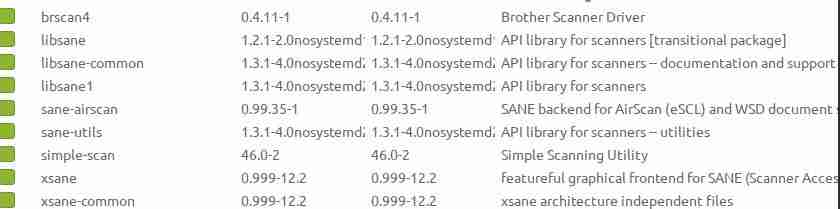
MemberGreeetings Wallon, regarding the Brother driver install.
I just followed apt prompt which showed the keyword sane.Sudo apt install sane must be translated by apt resolver
as the command sudo apt install sane setup scanning.The attached screenshot gives detail, the fitting packages
were installed. None are called just sane, you are correct,
a package called sane no longer exists.I have a larger set of packages installed because of Xsane,
which is my preferred application.Please click on the graphic to show it clearly. Forum quirk.
I only tested brscankey out of curiosity, it may be useful
for students so will stay or be setup on a final version
for university students who have a Brother MFC.Attachments:
December 23, 2025 at 3:29 am #192290anticapitalistaForum Admin* is there a “power manager” application like xfce-power-manager used in MX that could be installed by default? I would like the MacBook to “sleep” when I close the lid.
I am not sure if it works in IceWM but I have xfce4-power-manager on antiX 25 Beta2 in LXQT/Openbox setting on my Macbooks. It works great with supporting screen backlight and keyboard backlight controls on the Macbook keyboards.
Make sure you install libpolkit-gobject-consolekit-1-0 before otherwise it will install some elogind component(s).
You will also need to edit (as root) its desktop file in /usr/share/applications as it is set to only show in Xfce.Philosophers have interpreted the world in many ways; the point is to change it.
antiX with runit - leaner and meaner.
December 23, 2025 at 3:39 am #192291ProwlerGr
Member@anticapitalista
I am getting erratic behavior when all services are enabled with 66 (it doesn’t persist with limited services such as seatd – slimski – connmand -seatd -turnstiled).
I have raised the issue upstream with @eric link
Do you get the same issue?- This reply was modified 9 months ago by ProwlerGr.
December 23, 2025 at 3:53 am #192293MemberI am going to install them and continue testing.
Starting with dinit on this. Running into some issues with network manager and lightdm:
– dinit-service-network-manager appeared to have installed fine, however on starting this service (with connmand off) it shows briefly status up and turns into status ‘oneshot’). Network remains unavailable) Reinstating connman service does work to get network back on dinit though. As if dinit would appear to be hard-coded to connman somewhere…
– dinit-service-lightdm so far fails to install for me. In searching for a solution I installed dinit-service-consolekit, but this did not help. Install attempt appears to indicate broken and held packages but trying to fix this so far unlucky.These above test attempts are performed while logged in on dinit, executing startx from VT1, where the boot process leaves me off, which is fine and correct behavior as slimski is off at the moment. Clearly dinit is something I am not understanding enough yet, such as that mysterious status ‘oneshot’ of service is something new to me. Learning dinit as I go, as well as s6 inits…
- This reply was modified 9 months ago by olsztyn.
Live antiX Boot Options (Previously posted by Xecure):
http://antixlinuxfan.miraheze.org/wiki/Table_of_antiX_Boot_ParametersDecember 23, 2025 at 4:08 am #192296 WallonMember
**Subject: Request for Including the « libsane » Library in the antiX ISO for Scanner Compatibility**
Dear antiX community,
I would like to share a significant finding regarding the installation of scanner drivers and tools in antiX. Many older scanner drivers and installation tools, including those from Brother, depend on the **libsane** library to work correctly. I encountered this issue when trying to install a Brother scanner driver, and after extensive troubleshooting, I realized that **libsane** is a required dependency that is not currently included in the antiX ISO by default.
### Issue:
When attempting to install scanner drivers (such as those from Brother), the installation tool or scanning software will often fail or produce errors if the **libsane** library is missing. This is a common issue that new users of antiX may face when they attempt to install older hardware or use tools that require compatibility with older libraries.
### Test Case:
* **Device Tested**: Brother MFC-J5740DW (via Brother’s Linux driver installation tool).
* **Problem Encountered**: The installation of the Brother scanner software (« brscan5 », « brscan-skey ») was successful, but the scanner did not function properly. The issue was traced to the missing **libsane** library.
* **Resolution**: After installing the **libsane** library manually (« apt-get install libsane »), the scanner began working correctly.This indicates that **libsane** is essential for the correct functionality of many older scanner drivers.
### Why This Is Important:
Many older hardware drivers, especially for scanners, assume the presence of the **libsane** library. Without it, users may struggle to get their scanners working, and they may end up wasting time troubleshooting installation issues. This could lead to confusion among antiX users, especially those who are not familiar with this dependency.
### Proposal:
To improve user experience and avoid unnecessary troubleshooting, I recommend that the **libsane** library be included in the antiX ISO image by default. This will save the community time in resolving common installation issues and allow users to install and use scanner hardware without having to manually install additional dependencies.
### Benefits of Including « libsane »:
1. **Better Compatibility**: Many legacy scanner drivers require **libsane** to function, and including this library will improve compatibility with a wider range of scanners.
2. **Improved User Experience**: Users will not need to manually install the library, reducing the learning curve and making antiX more user-friendly, especially for those who are not familiar with Linux package management.
3. **Time Savings**: The antiX community will spend less time helping users troubleshoot scanner installation issues, leading to faster resolution times and more efficient support.### Conclusion:
Including **libsane** in the antiX ISO image will significantly improve compatibility with older scanners and provide a better experience for users. I believe this is an important update that will benefit many users, and I hope this request will be considered for future releases.
Thanks to @Xunzi_23 for testing the Brother equipment with me.
Best,
WallonDecember 23, 2025 at 4:14 am #192297MemberMake sure you install libpolkit-gobject-consolekit-1-0 before otherwise it will install some elogind component(s).
I do not have this and no trace of elogind* or libelongind0 in my system, but this might be dependent on the system composition.
Live antiX Boot Options (Previously posted by Xecure):
http://antixlinuxfan.miraheze.org/wiki/Table_of_antiX_Boot_ParametersDecember 23, 2025 at 4:23 am #192298anticapitalistaForum Admin@Wallon libsane1 (libsane replacement) is included on the iso or do you mean both should be installed?
Does the one in bookworm (antiX-23) install without issues and works ok on trixie (antiX-25)?Philosophers have interpreted the world in many ways; the point is to change it.
antiX with runit - leaner and meaner.
December 23, 2025 at 4:46 am #192300MemberHi anticapitalista,
I am using xsane but simple scan needs the same backend packages
no matter which scanner is used.I think inclusion would save new users some pain so agree with Wallon
A positive effect is some scanners would work without extra packages,
Popular older Epson devices for sure.What I installed is in the screenshot. Needs a click to expand it.
https://www.antixforum.com/wp-content/uploads/2025/12/sane.jpgDecember 23, 2025 at 4:49 am #192301anticapitalistaForum AdminThanks @Xunzi_23 – I see libsane is in our systemd-free trixie repo and will be included on final iso as will xsane
Philosophers have interpreted the world in many ways; the point is to change it.
antiX with runit - leaner and meaner.
-
AuthorPosts

- You must be logged in to reply to this topic.