
Forum › Forums › News › Announcements › antiX-25-full-beta2 for public testing
- This topic has 709 replies, 38 voices, and was last updated Jan 30-4:02 pm by Brian Masinick.
-
AuthorPosts
-
December 23, 2025 at 10:25 pm #192361
 Brian MasinickModerator
I removed, enabled and started connmand with the commands you stated.
The sequence you mentioned ALMOST worked, but not quite; it still doesn’t get the network going right at startup. However, if I run this after I boot 66 and get to a terminal, I run this, wait ten to twenty seconds, and the network is fully up by that time and I can proceed. I haven’t figured out how to get it up without any prompting or help each time I start up, but this is at least close and I scripted it, so it’s a work around until all of this is cleaned up and operating as it ought to work.Now that I have it “almost right”, this seems to work once the system is booted up in 66:
sudo 66 stop connmand;sudo 66 start connmand--
Brian Masinick
Alternate "Search B":
This search pageDecember 23, 2025 at 10:27 pm #192362Brian MasinickModeratorOther than having to manually enable the Connman daemon with s6-66
There is an known issue with 66 at the moment (I am working with @eric to resolve)
Trysudo 66 remove connmand && sudo 66 enable connmand && sudo start connmand
Let me know if this fix survives a rebootThank you, I will try it out tomorrow.
This should be
sudo 66 remove connmand && sudo 66 enable connmand && sudo 66 start connmand--
Brian Masinick
Alternate "Search B":
This search pageDecember 23, 2025 at 10:36 pm #192363Brian MasinickModeratorEven with this:
sudo 66 remove connmand && sudo 66 enable connmand && sudo 66 start connmandeach time I start up the network isn’t working right, but if I :
sudo 66 stop connmand;sudo 66 start connmand
after the system starts and wait until the network is reinitialized, then it works nicely.--
Brian Masinick
Alternate "Search B":
This search pageDecember 24, 2025 at 1:06 am #192364 WallonMember
Bonjour,
I received an update for 29 packages today, 24 December, in the morning.
There is a piece of information that catches my attention;$ LANGUAGE=C sudo apt update Hit:1 http://security.debian.org trixie-security InRelease Hit:2 http://deb.debian.org/debian trixie-backports InRelease Hit:3 http://ftp.de.debian.org/debian trixie InRelease Hit:4 http://repo.antixlinux.com/trixie trixie InRelease Hit:5 http://ftp.us.debian.org/debian trixie-updates InRelease 29 packages can be upgraded. Run 'apt list --upgradable' to see them. Warning: Ignoring non-equal Provides for package s6-rc-service-NetworkManager in s6-rc-service-network-manager:all=0.0.1.0antix1After the update, I restarted the PC.
I installed Firefox.
During the installation of Firefox, I still get this message;W: Ignoring non-equal Provides for package s6-rc-service-NetworkManager in s6-rc-service-network-manager:all=0.0.1.0antix1Is it serious, doctor?
Best,
WallonDecember 24, 2025 at 5:30 am #192370 anticapitalistaForum Admin
@Wallon – not serious but extremely annoying as the message won’t go away.
If anyone knows how to remove the message, please post.Philosophers have interpreted the world in many ways; the point is to change it.
antiX with runit - leaner and meaner.
December 24, 2025 at 6:54 am #192371ProwlerGr
MemberMaybe try
sudo apt purge s6-rc-service-network-manager s6-rc-service-NetworkManager
I believe apt hates the uppercase N & MAfter that reinstall the new package
sudo apt install s6-rc-service-network-managerEdit: Updated package pending to go into repo
Reinstall from here uploads- This reply was modified 9 months ago by ProwlerGr.
December 24, 2025 at 7:44 am #192375anticapitalistaForum AdminMaybe try
sudo apt purge s6-rc-service-network-manager s6-rc-service-NetworkManager
I believe apt hates the uppercase N & MAfter that reinstall the new package
sudo apt install s6-rc-service-network-managerEdit: Updated package pending to go into repo
Reinstall from here uploadsI tried that but still get
All packages are up to date.
W: Ignoring non-equal Provides for package s6-rc-service-NetworkManager in s6-rc-service-network-manager:all=0.0.1.0antix1
I assume we have to wait until the dodgy package is removed from the repos
Philosophers have interpreted the world in many ways; the point is to change it.
antiX with runit - leaner and meaner.
December 24, 2025 at 7:49 am #192376WallonMemberW: Ignoring non-equal Provides for package s6-rc-service-NetworkManager in s6-rc-service-network-manager:all=0.0.1.0antix1Normally, the package needs to be rebuilt. As Debian maintains this package, we will have to wait.
December 24, 2025 at 7:50 am #192377anticapitalistaForum AdminIt has been rebuilt and it is an antiX package error.
Philosophers have interpreted the world in many ways; the point is to change it.
antiX with runit - leaner and meaner.
December 24, 2025 at 8:31 am #192379WallonMemberIssue
When running:
sudo apt update
You may see a warning like:
Warning: Ignoring non-equal Provides for package
s6-rc-service-NetworkManager
in s6-rc-service-network-manager:all=0.0.1.0antix1What it means
This is not a blocking error, but an APT warning introduced in recent versions (apt ≥ 2.7, Debian trixie). It indicates a mismatch in the Provides field of the package.
Specifically:
Package: s6-rc-service-network-manager
Provides declared in control file: s6-rc-service-NetworkManager
APT is now strict about exact name matching, including case.
NetworkManager ≠ network-manager → warning appears.
Why APT complains
APT sees:
Real package: s6-rc-service-network-manager
Virtual package provided: s6-rc-service-NetworkManager
Because the names do not match exactly, APT ignores the Provides and shows the warning.
Recommended fixes
✅ Preferred solutionAlign the Provides field with the canonical name exactly.
In debian/control:
– Provides: s6-rc-service-NetworkManager
+ Provides: s6-rc-service-network-managerThen rebuild the package:
dch -i
debuild✅ Alternative (if backwards compatibility is needed)
You can provide both names exactly, but APT is strict about spelling and case:
Provides:
s6-rc-service-network-manager,
s6-rc-service-networkmanager⚠️ Avoid mixing uppercase/lowercase or slightly different names.
❌ What not to do
Do not mix NetworkManager / network-manager in Provides
Do not rely on case-insensitivity
Do not provide a name that only looks similar
Impact on users
No immediate risk
The Provides is simply ignored
May break virtual package dependencies or meta-packages in the future
So it’s a good idea to fix it properly for antiX packages.
Summary
⚠️ This is an APT warning, not an error
⚠️ It is safe to continue updating/upgrading
✅ Proper fix: make the Provides names exactly match the canonical package names
December 24, 2025 at 8:33 am #192380Brian MasinickModeratorEven with this:
sudo 66 remove connmand && sudo 66 enable connmand && sudo 66 start connmandeach time I start up the network isn’t working right, but if I :
sudo 66 stop connmand;sudo 66 start connmand
after the system starts and wait until the network is reinitialized, then it works nicely.Actually, after doing
sudo 66 remove connmand && sudo 66 enable connmand && sudo 66 start connmand
the other day,stc signal: info: Successfully started service: connmand-log signal: info: Successfully started service: dbus-log signal: info: Successfully started service: dbus signal: info: Successfully started service: connmandsolves the problem for me, where:
alias stc='sudo 66 start connmand'so SOMEWHERE in the logic, yes the connmand process is out there, but it’s NOT getting properly started for 66.
[Connmand works fine for the other four init alternatives on my test system].--
Brian Masinick
Alternate "Search B":
This search pageDecember 24, 2025 at 8:40 am #192381Brian MasinickModeratorThis 66 networking issue, at least for me, is the only really important 66 issue, though it sure would be nice to have all of the service manager tools directly available too, rather than having to remove, enable, stop, and start the services. That’s not good enough for a final version, but I will say, at this point other than these “configuration issues” the software is pretty solid otherwise.
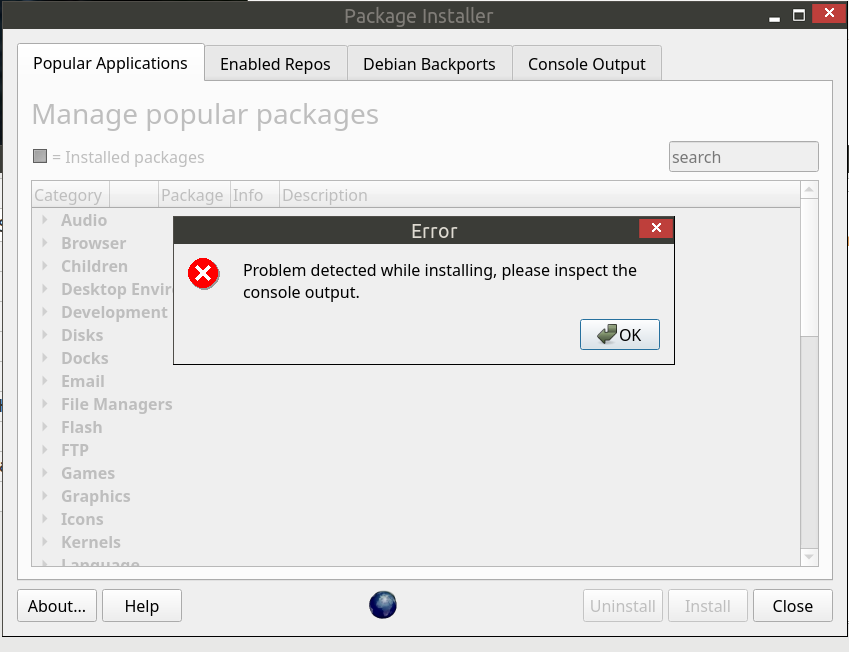
The Software Installer is another area, particularly in the Web Browser category, where several of the entries are not working correctly. I checked out several other areas of the Software Installer (with more to test) and the other categories I checked were okay, at least the others I’ve checked. I’ll try to cover more of them today.
--
Brian Masinick
Alternate "Search B":
This search pageDecember 24, 2025 at 8:50 am #192383Brian MasinickModeratorI just saw a reason in one of the package updates why something wasn’t working right – and it snuck by quickly, but I think I can tell you where:
I was trying to install the non-free codecs, and I also selected the Adobe Reader – not 100% positive, but I believe it was the Adobe Reader that brought up a buster repository – that’s TWO releases ago!
Anyway, neither the non-free codecs nor the Adobe Reader properly installed, so those packages deserve some attention if they are going to remain in the Software Installer.
I’ll keep checking the Software Installer today.
Another one in that same category: Open Dictionary, exits quickly – “Unable to apply some actions, aborting”.
Good stuff, which lets me know that some categories in the Software Installer are working fine:
mplayer, smplayer, all four themes – Adapta, ArcEvoPro2, Numix, and Obsidian, install correctly.
Deluge and qBittorent install correctly.- This reply was modified 9 months ago by Brian Masinick.
--
Brian Masinick
Alternate "Search B":
This search pageDecember 24, 2025 at 11:29 am #192389rej
MemberHi –
Thank you all, for your hard work on antiX 25!
GIMP does not open on my laptop after downloading from Synaptic and the Package installer.
GIMP opened with Beta 1 (same device) without issues.
Also, microphone light on function key stays on indicating it is off. Light does not turn off.
rj@antix25rj-beta2:~
$ inxi -F
System:
  Host: antix25rj-beta2 Kernel: 6.6.101-antix.1-amd64-smp arch: x86_64
    bits: 64
  Desktop: IceWM v: 3.9.0 Distro: antiX-25-b2_x64-full Stephen Kapos 17
    December 2025
Machine:
  Type: Laptop System: LENOVO product: 20BWCTO1WW v: ThinkPad T450s
    serial: <superuser required>
  Mobo: LENOVO model: 20BWCTO1WW v: SDK0E50512 STD
    serial: <superuser required> UEFI-[Legacy]: LENOVO v: JBET48WW (1.13 )
    date: 04/20/2015
Battery:
  ID-1: BAT0 charge: 10.9 Wh (94.6%) condition: 11.6/23.5 Wh (49.2%)
  ID-2: BAT1 charge: 12 Wh (96.2%) condition: 12.5/23.5 Wh (53.1%)
CPU:
  Info: dual core model: Intel Core i5-5200U bits: 64 type: MT MCP cache:
    L2: 512 KiB
  Speed (MHz): avg: 1797 min/max: 500/2700 cores: 1: 1797 2: 1797 3: 1797
    4: 1797
Graphics:
  Device-1: Intel HD Graphics 5500 driver: i915 v: kernel
  Display: server: X.Org v: 21.1.16 driver: X: loaded: modesetting
    unloaded: fbdev,vesa dri: iris gpu: i915 resolution: 1600x900~60Hz
  API: EGL v: 1.5 drivers: iris,swrast platforms: gbm,x11,surfaceless,device
  API: OpenGL v: 4.6 compat-v: 4.5 vendor: intel mesa v: 25.0.7-2
    renderer: Mesa Intel HD Graphics 5500 (BDW GT2)
  Info: Tools: api: eglinfo,glxinfo x11: xdriinfo, xdpyinfo, xprop, xrandr
Audio:
  Device-1: Intel Broadwell-U Audio driver: snd_hda_intel
  Device-2: Intel Wildcat Point-LP High Definition Audio
    driver: snd_hda_intel
  API: ALSA v: k6.6.101-antix.1-amd64-smp status: kernel-api
  Server-1: PulseAudio v: 17.0 status: active
Network:
  Device-1: Intel Ethernet I218-V driver: e1000e
  IF: eth0 state: down mac: 68:f7:28:ac:a8:40
  Device-2: Realtek RTL8192EE PCIe Wireless Network Adapter
    driver: rtl8192ee
  IF: wlan0 state: up mac: ac:e0:10:25:b9:c7
Drives:
  Local Storage: total: 346.55 GiB used: 14.36 GiB (4.1%)
  ID-1: /dev/sda vendor: Kingston model: SA400S37240G size: 223.57 GiB
  ID-2: /dev/sdb vendor: Transcend model: TS128GMTS430S size: 119.24 GiB
  ID-3: /dev/sdc vendor: Kingston model: DT 101 G2 size: 3.73 GiB type: USB
Partition:
  ID-1: / size: 28.67 GiB used: 12.74 GiB (44.4%) fs: ext4 dev: /dev/sda6
Swap:
  ID-1: swap-1 type: file size: 3 GiB used: 0 KiB (0.0%) file: /swap/swap
Sensors:
  System Temperatures: cpu: 38.0 C pch: 43.0 C mobo: N/A
  Fan Speeds (rpm): fan-1: 0
Info:
  Memory: total: 8 GiB note: est. available: 7.48 GiB used: 792.5 MiB (10.4%)
  Processes: 187 Uptime: 54m Shell: Bash inxi: 3.3.39
rj@antix25rj-beta2:~
$
December 24, 2025 at 12:56 pm #192392Brian MasinickModerator@rej I confirm that IF you install the “Latest GIMP Full” from the software installer, it generates an error similar to the one you show. I did, however, successfully install “Latest GIMP Basic” from the Software installer. If you look at the description, this DOES install GIMP, it just doesn’t include the help and plugins.
Try it out and see if that works for you; in the meantime, this is one of several applications that are not yet properly configured for the Trixie release.
--
Brian Masinick
Alternate "Search B":
This search page -
AuthorPosts

- You must be logged in to reply to this topic.