
Forum › Forums › antiX-development › Translations › antiX and antiX Application Program Translation Platforms
Tagged: antiX and antiX Application Program Translation Platforms, AntiX Traduzioni e piattaforme di programmi applicativi antiX, AntiX Translations και antiX Application Programs Platforms, Plataformas de Traduções do antiX e dos Programas Aplicativos do antiX, Plattformen für antiX-Übersetzungen und antiX-Anwendungsprogramme, Traducciones antiX y Plataformas de programas de aplicación antiX, Traductions antiX et plates-formes de programmes d'application antiX, Платформы программных продуктов antiX Translations и antiX
- This topic has 95 replies, 11 voices, and was last updated Aug 30-3:09 pm by kempelen.
-
AuthorPosts
-
March 28, 2025 at 6:15 pm #173678
 marcelocripeMember
Translation of the Celluloid multimedia player can also be done on the translation platform:
A tradução do reprodutor de multimídia Celluloid também pode ser feita na plataforma de tradução:https://hosted.weblate.org/projects/celluloid/.
The main file:
O arquivo principal:https://hosted.weblate.org/projects/celluloid/celluloid/
And the glossary file
E o arquivo do glossárioMarch 28, 2025 at 6:18 pm #173679marcelocripeMemberCUPS (Print Server)
https://hosted.weblate.org/projects/cups/
The full list of projects is on this page
August 24, 2025 at 6:59 pm #184386marcelocripeMemberThe “Public Git Hosting” platform also allows the translation of several GNU/Linux programs, including ROX Filer, QEMU/KVM, old computer emulators, games and game emulators.
I still don’t know how to submit merge requests on this platform.
https://repo.or.cz/?a=project_list
– – – – –
A plataforma “Public Git Hosting” também permite a tradução de vários programas do GNU/Linux, entre eles, o ROX Filer, QEMU/KVM, emuladores de computadores antigos, jogos e emuladores de jogos.
Eu ainda não sei como fazer pedidos de mesclagens nesta plataforma.
August 26, 2025 at 3:42 pm #184507kempelen
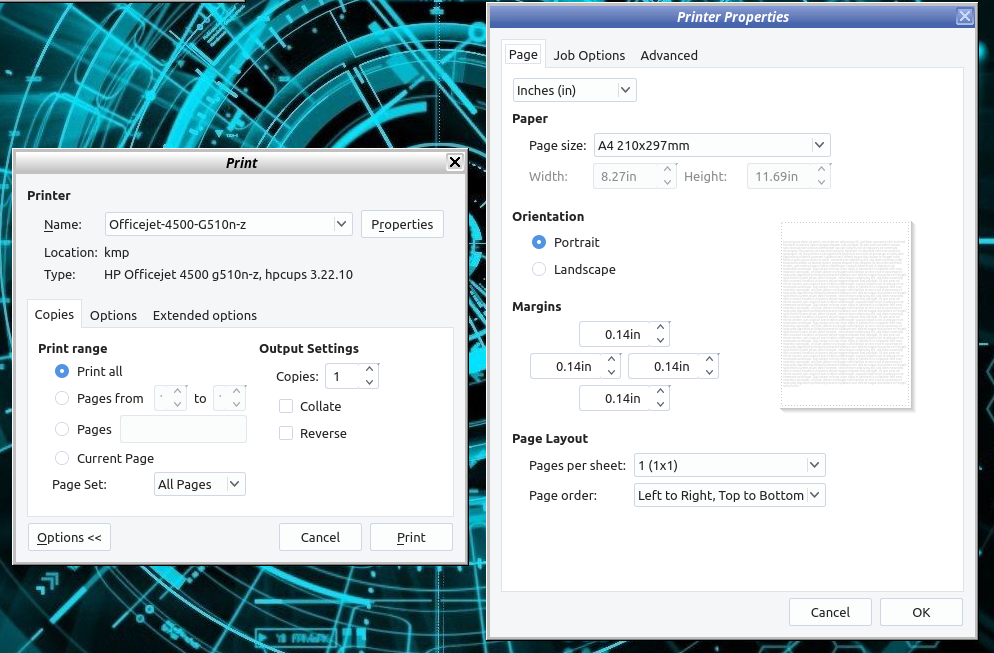
Member@marcelocripe You added a CUPS link above. Do you think that is this printing window? Or is this something different? This “print” and “print properties” is completely English on my antiX.
Thanks in advance!
Attachments:
August 26, 2025 at 6:23 pm #184512Robin
Member@Kempelen: No, that GUI should be provided by some GTK library, not by cups itself, if I’m not mistaken. Most likely it resides in the libgtk-3-0 package.
Edit: Yes, confirmed. On antiX 23.1 full runit 64 bit I get:
$ dpkg-query -L libgtk-3-0
...
/usr/lib/x86_64-linux-gnu/gtk-3.0/3.0.0/printbackends
/usr/lib/x86_64-linux-gnu/gtk-3.0/3.0.0/printbackends/libprintbackend-cups.so
/usr/lib/x86_64-linux-gnu/gtk-3.0/3.0.0/printbackends/libprintbackend-file.so
...
So most likely you want to go here: https://l10n.gnome.org/
More infos: https://wiki.gnome.org/TranslationProject
Windows is like a submarine. Open a window and serious problems will start.
August 26, 2025 at 6:35 pm #184514marcelocripeMemberYou added a CUPS link above. Do you think that is this printing window? Or is this something different? This “print” and “print properties” is completely English on my antiX.
CUPS is a print server and can be accessed through a web browser. But before you can access it, you need to enable CUPS in the “Name[pt_BR]=Configurações de Inicialização” or “Name=Choose Startup Services” settings of the “rc-conf-wrapper.sh” program. Use the up or down arrow keys, position the cursor (the blinking white rectangle on the screen) in column 1 with the CUPS line, and press the “=/+” key. Then, launch your web browser, type “http://localhost:631” in the address bar, and press the “Enter” key.
Unfortunately, I don’t have a printer, and I think that’s why I can’t find the windows in your photos.
What I can view in antiX 23 without a printer is the “Name=Print Settings” or “Name[pt_BR]=Configurações da Impressora” of the “system-config-printer” program.
I still don’t know the translation platform for the “system-config-printer” program. I need to review/correct the current texts for the “pt_BR” translation.
– – – – –
You added a CUPS link above. Do you think that is this printing window? Or is this something different? This “print” and “print properties” is completely English on my antiX.
O CUPS é um servidor de impressão e pode ser acessado por meio do navegador de internet. Mas antes de acessá-lo, você precisa ativar o CUPS nas configurações do “Name[pt_BR]=Configurações de Inicialização” ou “Name=Choose Startup Services” do programa “rc-conf-wrapper.sh”. Utilize as teclas direcionais para cima ou para baixo, posicione o cursor (é o retângulo que fica piscando na tela em cor branca) na coluna 1 com a linha do cups e pressione a tecla “=/+”. Em seguida, inicie o navegador de internet, digite na barra de endereço “http://localhost:631” e pressione a tecla “Enter”.
Infelizmente, eu não tenho uma impressora e acho que é por isso que não consigo encontrar as janelas que estão nas suas fotos.
O que eu posso visualizar no antiX 23 e sem ter uma impressora é o “Name=Print Settings” ou “Name[pt_BR]=Configurações da Impressora” do programa “system-config-printer”.
Eu ainda não sei qual é a plataforma de tradução do programa “system-config-printer”, preciso revisar/corrigir os textos atuais da tradução “pt_BR”.
August 26, 2025 at 6:49 pm #184519marcelocripeMemberdemo@antix1:~
$ apt show system-config-printer
Package: system-config-printer
Version: 1.5.18-1.0nosystemd1
Priority: standard
Section: nosystemd
Maintainer: Debian GNOME Maintainers <pkg-gnome-maintainers@lists.alioth.debian.org>
Installed-Size: 1.078 kB
Depends: gir1.2-gdkpixbuf-2.0, gir1.2-glib-2.0, gir1.2-gtk-3.0, gir1.2-handy-1, gir1.2-notify-0.7, gir1.2-packagekitglib-1.0, gir1.2-pango-1.0, python3-cups (>= 1.9.60), python3-cupshelpers (= 1.5.18-1.0nosystemd1), python3-dbus, python3-gi, system-config-printer-common (= 1.5.18-1.0nosystemd1), python3:any
Recommends: avahi-utils, system-config-printer-udev
Suggests: gnome-software (>= 3.16.5-2)
Homepage: https://github.com/OpenPrinting/system-config-printer
Download-Size: 191 kB
APT-Manual-Installed: yes
APT-Sources: https://mxlinux.c3sl.ufpr.br/mx-workspace/antix/bookworm bookworm/nosystemd amd64 Packages
Description: interface gráfica para configurar o sistema de impressão
System-config-printer é uma GUI escrita em Python usando GTK+ para
configurar o servidor CUPS. Seu principal uso é configurar o sistema de
impressão da máquina local, mas também pode ser usada para configurar
uma impressora remota.
.
Em termos de recursos, seu objetivo é ser tão completa quanto a
ferramenta de administração web do CUPS, enquanto mantém-se integrada à
área de trabalho.N: There is 1 additional record. Please use the ‘-a’ switch to see it
demo@antix1:~
$If the “GNOME” folks are the maintainers of the “system-config-printer” translation, then I won’t waste my time translating or reviewing the “pt_BR” translation texts, because the administrators of the GNOME and Launchpad translation platforms have one thing in common: they don’t want to receive translations, prefer to leave programs untranslated or poorly translated, play politics, and act like dictators.
Find more information in this thread “Unaccepted pull requests – Developers who refused to receive translations” and “Unfinished translations and lack of organization of volunteer Brazilian Portuguese translators“.
– – – – –
Se for o pessoal do “GNOME” os mantenedores da tradução do “system-config-printer”, então, eu não vou perder o meu tempo traduzindo ou revisando os textos da tradução “pt_BR”, porque os administradores da plataforma de tradução do GNOME e do Launchpad tem uma coisa em comum, não querem receber traduções, preferem deixar os programas sem tradução ou mal traduzidos, fazem politicagem e agem como ditadores.
Obtenha mais informações neste tópico “Unaccepted pull requests – Developers who refused to receive translations” e “Unfinished translations and lack of organization of volunteer Brazilian Portuguese translators”.
August 26, 2025 at 7:05 pm #184521Member@Kempelen: All the print dialog messages seem to be translated to hu already, so no need to ask the gnome language team I had linked to above. Have you checked whether on your system libgtk-3-common is installed? It should provide a file gtk3.0.mo, stored in your system folder /usr/share/locale/hu/LC_MESSAGES. It seems to contain precisely the translations you are missing:
Examples:
msgid "C_ollate"
msgstr "_Szétválogatás"

msgid "Page Ordering"
msgstr "Oldalsorrend"

msgid "Page Setup"
msgstr "Oldalbeállítás"

msgid "Page or_dering:"
msgstr "Ol_dalsorrend:"

msgid "Pages"
msgstr "Oldalak"

msgid "Pages Per Sheet"
msgstr "Oldalak laponként"

msgid "Pages per _sheet:"
msgstr "_Oldalak laponként:"

msgid "Pages per _side:"
msgstr "_Lapok oldalanként:"

msgid "Print"
msgstr "Nyomtatás"

msgid "Print Document"
msgstr "Dokumentum nyomtatása"

msgid "Print to File"
msgstr "Nyomtatás fájlba"

msgid "Print to LPR"
msgstr "Nyomtatás LPR-re"

msgid "Print to Test Printer"
msgstr "Nyomtatás tesztnyomtatóra"

msgid "Printer"
msgstr "Nyomtató"

msgid "Printer Default"
msgstr "Nyomtató alapértelmezése"

msgid "Printer offline"
msgstr "A nyomtató nem érhető el"

msgid "Printer “%s” has no toner left."
msgstr "A nyomtatóból („%s”) kifogyott a festék."

msgid "Printer “%s” is currently offline."
msgstr "A nyomtató („%s”) jelenleg nem érhető el."

msgid "Printer “%s” is low on at least one marker supply."
msgstr "A nyomtatóban („%s”) legalább egy szín festéke kevés."

msgid "Printer “%s” is low on developer."
msgstr "A nyomtatóban („%s”) kevés az előhívó."

msgid "Printer “%s” is low on paper."
msgstr "A nyomtatóban („%s”) kevés a papír."

msgid "Printer “%s” is low on toner."
msgstr "A nyomtatóban („%s”) kevés a festék."

msgid "Printer “%s” is out of at least one marker supply."
msgstr "A nyomtatóból („%s”) legalább egy szín festéke kifogyott."

msgid "Printer “%s” is out of developer."
msgstr "A nyomtatóból („%s”) kifogyott az előhívó."

msgid "Printer “%s” is out of paper."
msgstr "A nyomtatóból („%s”) kifogyott a papír."

msgid "Printing %d"
msgstr "%d nyomtatása"
To inspect, you can use the command
$ msgunfmt -o '/usr/share/locale/hu/LC_MESSAGES/gtk30.po' 'gtk30.mo
$ geany gtk30.po'
The file lives in this package:
$ dpkg-query -S  '/usr/share/locale/hu/LC_MESSAGES/gtk30.mo'
libgtk-3-common: /usr/share/locale/hu/LC_MESSAGES/gtk30.mo

$ LANG=C apt-cache policy libgtk-3-common
libgtk-3-common:
  Installed: 3.24.38-2~deb12u3
  Candidate: 3.24.38-2~deb12u3
  Version table:
 *** 3.24.38-2~deb12u3 500
        500 http://ftp.de.debian.org/debian bookworm/main amd64 Packages
        500 http://ftp.de.debian.org/debian bookworm/main i386 Packages
        100 /var/lib/dpkg/status
Windows is like a submarine. Open a window and serious problems will start.
August 26, 2025 at 7:23 pm #184522Member@Kempelen: Sorry, the above is only half of the truth. There are some more gtk common packages, and even when the translations live in the 3.0 package, they are not used by the print dialog. By temporarily renaming the gtk30.mo, gtk40.mo and gtk20.mo files one by one on my system I managed to locate the true package you need:
$ dpkg-query -S  '/usr/share/locale/hu/LC_MESSAGES/gtk20.mo'
libgtk2.0-common: /usr/share/locale/hu/LC_MESSAGES/gtk20.mo

$ LANG=C apt-cache policy libgtk2.0-common
libgtk2.0-common:
  Installed: 2.24.33-2+deb12u1
  Candidate: 2.24.33-2+deb12u1
  Version table:
 *** 2.24.33-2+deb12u1 500
        500 http://ftp.de.debian.org/debian bookworm/main amd64 Packages
        500 http://ftp.de.debian.org/debian bookworm/main i386 Packages
        100 /var/lib/dpkg/status
So make sure to have libgtk2.0-common package installed, then all the strings of the system wide gtk print dialog from your screenshot should be translated to hu.
The Hungarian gtk20.mo file from this package also contains all the translations for the print dialog:
msgid "C_ollate"
msgstr "_Szétválogatás"

msgid "Two Sided"
msgstr "Kétoldalas"

msgid "_Paper size:"
msgstr "_Papírméret:"

msgid "Print"
msgstr "Nyomtatás"

msgid "Print Document"
msgstr "Dokumentum nyomtatása"

msgid "Print at"
msgstr "Nyomtatás ekkor:"

msgid "Print at time"
msgstr "Nyomtatás adott időben"

msgid "Print to File"
msgstr "Nyomtatás fájlba"

msgid "Print to LPR"
msgstr "Nyomtatás LPR-re"

msgid "Print to Test Printer"
msgstr "Nyomtatás tesztnyomtatóra"

msgid "Printer"
msgstr "Nyomtató"

msgid "Printer '%s' has no toner left."
msgstr "A nyomtatóból („%s”) kifogyott a festék."

msgid "Printer '%s' is currently offline."
msgstr "A nyomtató („%s”) nem érhető el."

msgid "Printer '%s' is low on at least one marker supply."
msgstr "A nyomtatóban („%s”) legalább egy szín festéke kevés."

msgid "Printer '%s' is low on developer."
msgstr "A nyomtatóban („%s”) kevés az előhívó."

msgid "Printer '%s' is low on paper."
msgstr "A nyomtatóban („%s”) kevés a papír."

msgid "Printer '%s' is low on toner."
msgstr "A nyomtatóban („%s”) kevés a festék."

msgid "Printer '%s' is out of at least one marker supply."
msgstr "A nyomtatóból („%s”) legalább egy szín festéke kifogyott."

msgid "Printer '%s' is out of developer."
msgstr "A nyomtatóból („%s”) kifogyott az előhívó."

msgid "Printer '%s' is out of paper."
msgstr "A nyomtatóból („%s”) kifogyott a papír."

msgid "Printer Default"
msgstr "Nyomtató alapértelmezése"

msgid "Printer offline"
msgstr "A nyomtató nem érhető el"

msgid "Printing %d"
msgstr "%d nyomtatása"
I wonder why this package should be missing on your system, here on antiX 23.1 full runit 64 bit and 32 bit it is present by default. (Or do I actually have installed it for some reason before without remembering?) What antiX version are you running?
Windows is like a submarine. Open a window and serious problems will start.
August 26, 2025 at 7:45 pm #184523MemberI still don’t know the translation platform for the “system-config-printer” program.
Marcelo @marcelocripe, this is an openprinting.org program, merely the debian package is maintained by gnome:
$ which system-config-printer
/usr/bin/system-config-printer

$ dpkg-query -S /usr/bin/system-config-printer
system-config-printer: /usr/bin/system-config-printer

$ apt-cache show system-config-printer
Package: system-config-printer
Version: 1.5.18-1.0nosystemd1
Architecture: all
Maintainer: Debian GNOME Maintainers <pkg-gnome-maintainers@lists.alioth.debian.org>
Homepage: https://github.com/OpenPrinting/system-config-printer
From: https://github.com/OpenPrinting/system-config-printer :
»Translations are available at Fedora Weblate. If you want to update translations, please update it in Weblate. The Weblate then creates automatic PR, which keeps upstream project and Weblate project in synch.«
So you’ll have to ask the people at fedora weblate project, not the gnome maintainers.
Here is where you want to go: https://translate.fedoraproject.org/projects/system-config-printer/
And specifically for pt_BR: https://translate.fedoraproject.org/projects/system-config-printer/-/pt_BR/ (translation only 93% completed currently)
Further information: https://docs.fedoraproject.org/en-US/localization/weblate/(path to follow: create an account, log in, and start translating)
Windows is like a submarine. Open a window and serious problems will start.
August 26, 2025 at 8:06 pm #184525Member@Kempelen: Additional note, in case you’ll find these gtk translations in need of fixes in Hungarian language:
gtk30.po states:
"Language-Team: Hungarian <openscope at fsf dot hu>\n"gtk20.po states:
"Language-Team: Hungarian <gnome at fsf dot hu>\n"And since there exists a third file for gtk common translations,
gtk40.po states:
"Language-Team: Hungarian <gnome-hu-list at gnome dot org>\n"So obviously there are three separate translation teams involved in the same translations.
Windows is like a submarine. Open a window and serious problems will start.
May 31, 2026 at 5:26 pm #205752marcelocripeMemberTranslation Project
https://translationproject.org/html/welcome.html
The Translation Project (the TP, for short) aims to get maintainers and translators of free (open-source) software packages together, so that most computer programs gradually become able to speak many languages.
On these pages you find a list of packages for which translations are handled by the Translation Project, and a list of teams that handle the different languages. Each team page offers contact information, pointing to mailing lists and home pages.
There is an explanation of why translators need to disclaim the copyright on their translations for the FSF (not assign it, just disclaim it), and an explanation of how to deal with the robot that handles the PO-file submissions.
There are also detailed explanations for package maintainers, for team coordinators, and for individual translators. If you still have any questions, you can write to the TP coordinators.
July 17, 2026 at 4:17 am #208594BobC
ModeratorFrom Marcelocripe
Hello valued volunteer translators of the antiX community.
To register on the various translation platforms, please provide a valid email address, as you will receive an activation message there. Without completing the account activation process, you will not be able to access the platform.
To translate various antiX Linux programs, register on the Transifex translation platform. Open your web browser, go to https://app.transifex.com/signup/, enter your username, password, and a valid email address (please note that this email will appear in the translator credits and be visible to everyone), check the box agreeing to Transifex’s terms of service and privacy policy (if applicable), and click the “Sign up” button. There is no cost to use the Transifex translation platform.
After confirming your registration by clicking the link sent to your email by Transifex, go to https://app.transifex.com/signin/ and enter your username and password. Then, visit https://app.transifex.com/anticapitalista/antix-development/dashboard/, select the language team you are interested in, and repeat this process at https://app.transifex.com/antix-linux-community-contributions/antix-contribs/dashboard/.
To translate the IceWM Window Manager, you must create an account at https://idp-portal.suse.com/univention/self-service/#page=createaccount. Then, go to http://l10n.opensuse.org/projects/icewm/, click “Login,” enter your username and password, select the language team you are interested in, and begin translating into your language. To request the merging of your translation, visit the page https://github.com/ice-wm/icewm/tree/master/po.
To translate the JWM Window Manager, you need to create a GitHub account at https://github.com/signup; then, visit http://github.com/joewing/jwm/blob/master/po/, download the “.po” file for your language, edit the “.po” file using the Geany or Leafpad text editor, and submit a merge request on the JWM project page.
To translate the Fluxbox Window Manager, you need to create a GitHub account at https://github.com/signup; then, visit https://github.com/fluxbox/fluxbox/tree/master/nls, download the “Translation.m” file for your language, edit the “Translation.m” file using the Geany or Leafpad text editor, and submit a merge request on the Fluxbox project page.
The Herbstluftwm Window Manager can be found at http://github.com/herbstluftwm/herbstluftwm.
The CMST ConnMan Network Connection Manager (or the ConnMan GUI used in antiX Linux) can be found at http://translate.lxqt-project.org/projects/andrew-bibb/cmst/.
marcelocripe
(Original text in Brazilian Portuguese language)Here is the link to SEARCH THE FORUM >> http://www.antixforum.com/search-forums
July 17, 2026 at 4:20 am #208596ModeratorFrom Marcelocripe
The text in Portuguese is below
Olá caros tradutores voluntários da comunidade antiX.
Para realizar o seu cadastro nas diversas plataformas de tradução, informe um endereço de e-mail válido, porque você receberá uma mensagem no seu e-mail para ativar a sua conta. Sem o procedimento de ativação da conta, você ficará impedido de ter acesso à respectiva plataforma.
Para traduzir vários programas do antiX Linux, faça o seu cadastro na plataforma de tradução do Transifex. Utilize o navegador de internet, acesse a página https://app.transifex.com/signup/, insira o seu nome de usuário, a sua senha e um endereço de e-mail válido (saiba que este e-mail será inserido nos créditos do tradutor e todas as pessoas poderão ver este endereço) marque ou selecione a caixa “Concordo com os termos de serviço e a política de privacidade da Transifex” (se houver) e clique no botão “Registrar-se”. Não é necessário pagar para utilizar a plataforma de tradução do Transifex.
Após confirmar o seu cadastro com o clique na ligação ou vínculo (link) que foi enviado para o seu e-mail pelo Transifex, acesse a página https://app.transifex.com/signin/, insira o seu nome de usuário e a sua senha, acesse a página https://app.transifex.com/anticapitalista/antix-development/dashboard/, escolha a equipe do idioma do seu interesse e repita este procedimento na página https://app.transifex.com/antix-linux-community-contributions/antix-contribs/dashboard/.
Para traduzir o Gerenciador de Janelas IceWM é necessário criar a sua conta na página https://idp-portal.suse.com/univention/self-service/#page=createaccount, em seguida, acesse a página http://l10n.opensuse.org/projects/icewm/, clique na opção “Login”, insira o seu nome de usuário, a sua senha, escolha a equipe do idioma do seu interesse e comece a traduzir o seu idioma. Para solicitar a mesclagem da sua tradução acesse a página https://github.com/ice-wm/icewm/tree/master/po.
Para traduzir o Gerenciador de Janelas JWM é necessário criar a sua conta no GitHub na página https://github.com/signup, em seguida, acesse a página http://github.com/joewing/jwm/blob/master/po/, baixe o arquivo no formato “.po” do seu idioma, edite o arquivo “.po” com o Editor de Texto Geany ou o Editor de Texto Leafpad e depois faça o pedido de mesclagem na página do projeto do JWM.
Para traduzir o Gerenciador de Janelas Fluxbox é necessário criar a sua conta no GitHub na página https://github.com/signup, em seguida, acesse a página https://github.com/fluxbox/fluxbox/tree/master/nls, baixe o arquivo “Translation.m” do seu idioma, edite o arquivo “Translation.m” com o Editor de Texto Geany ou o Editor de Texto Leafpad e depois faça o pedido de mesclagem na página do projeto do Fluxbox.
O Gerenciador de Janelas Herbstluftwm está na página http://github.com/herbstluftwm/herbstluftwm.
O Gerenciador de Conexões de Rede CMST ConnMan (ou interface gráfica do ConnMan que é utilizada no antiX Linux) está na página http://translate.lxqt-project.org/projects/andrew-bibb/cmst/.
marcelocripe
(Texto original em idioma Português do Brasil)Here is the link to SEARCH THE FORUM >> http://www.antixforum.com/search-forums
July 19, 2026 at 4:15 pm #208749MemberThanks for that updated guide guys.
@robin sorry, I forgot to subscribe to this topic and just returned now. Thank you for testing that for me. The window you sent screenshot of are a different window, and that’s mostly Hungarian for me too. The original window that I posted can be invoked from “qpdfview” for example (Crtl-P). But good news: In antiX 26 those windows are also mostly Hungarian. I still don’t know from where that comes from. 🙂 Since it starts from “Q-pdfview”, I’d expect it to be part of Qt, not GTK?
ps: Today I translated Memory Manager fully, and progressed a bit with antixscreenshot2 (from screenshot2 only the help is missing you know, the program GUI is OK long time ago). Unfortunately I didn’t take notes on how to test “help dialog” translation of screenshot2, if you have a direct link to that post, I’d be thankful for that!
-
AuthorPosts


- You must be logged in to reply to this topic.