
Forum › Forums › General › Software › Do you have todo software that you would recommend? Time tracking a huge plus
Tagged: calendar, project management, timetable
- This topic has 9 replies, 6 voices, and was last updated May 27-11:16 am by j_luz.
-
AuthorPosts
-
May 24, 2025 at 9:15 pm #177844
j_luz
MemberHello. Over last week I had chance to see two of my peers works. Their project tasks are meticulously laid out on a service called ClickUp. It looks like a todo list. Each task has a field for description, due date, priority, comment. It looks like they can make a tag for each task and also give that tag its own color so the resulting board is very pretty with colorful tags that they have themed nicely and also easy to sort by tag. It all looked very impressive. Usually I just jot things down on a napkin or scrap of paper.
I was looking for a libre and opensource todo app. I found one that looks nice called Super Productivity. It has a web version and an app. For the app it gives an option to download an appimage or a deb package. Question 1: I assume the appimage is safe but is the deb package likely to contain systemd? I glanced at the repo and it seems both the deb and appimage are built from Electron.
Question 2 I was thinking a lot of you here probably use or have used some todo list apps. Does anyone have some favorites to recommend?
Really nice points of Super Productivity though I haven’t played with the web app much (waiting to see what to download, the appimage or deb):
Time tracker
Boards and Lists and can turn lists into boards
WebApp so in theory you can access it away from pc by your phone but since I don’t have dropbox not sure how useful that will be in practice.
MIT license- This topic was modified 1 year, 4 months ago by j_luz.
May 24, 2025 at 11:37 pm #177849Robin
MemberThis
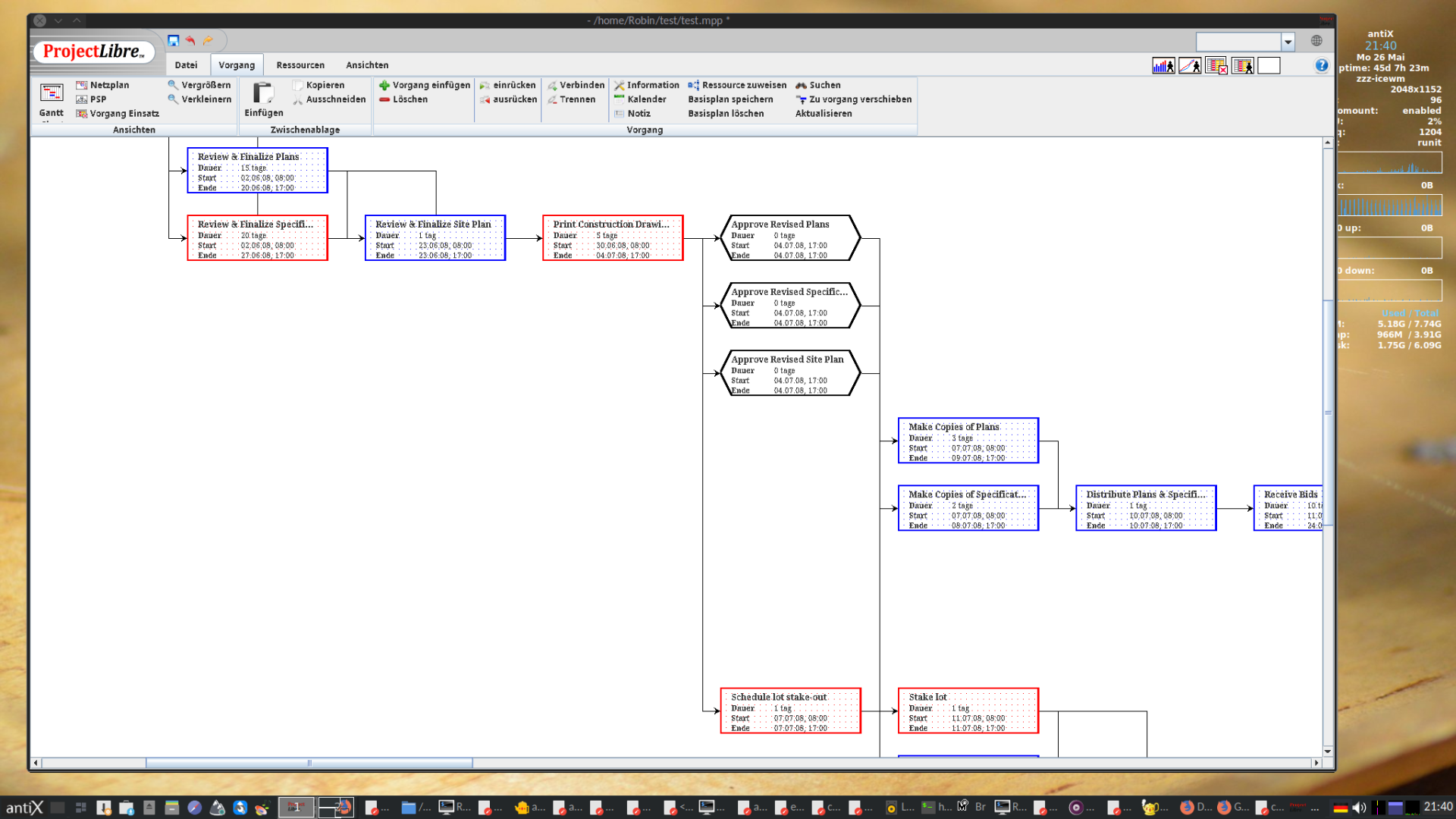
HickUpClickUp tool you mentioned looks to me like classic project management. See https://en.wikipedia.org/wiki/Category:Free_project_management_software for some more of them. I guess Projectlibre is very similar. See https://en.wikipedia.org/wiki/ProjectLibre .Windows is like a submarine. Open a window and serious problems will start.
May 25, 2025 at 1:31 am #177850Xunzi_23
Memberhi j-luz,
the super productivity appimage can be unpacked for inspection, just add .zip to the name.
Inside you will find chrome plus extras. You can also open a deb easily. Plenty of howtos on the web.
Just look in the depends list. As the application runs chrome it is unlikely to have a sys d depend.For testing antiX has the very useful run live no persist option, if really unsure disconnect internal
drives, that greatly reduces any attack vectors.I do not like that downloads are provided without checksums.
Redmine is worth looking at.
There is also a free version of open project, but there is the project was financed by taxpayers and is pushing hard in a commercial direction.
Not cheap either as a pay per user per month job.
Sources are hard to find, there is also a statement that builds for newer distro versions will not be provided. Regulation is badly needed
to keep such projects on a narrow path ensureing all sources can be easily found and build instructions provided.May 25, 2025 at 9:00 am #177858 punrangerMember
I have to admit, this looks like spam to me.
antiX linux: The best way to revive an old computer - http://www.youtube.com/watch?v=JCTaUAP6sSg
May 25, 2025 at 10:03 am #177859 vitforlinuxMember
How old I am! For things to do and appointments, I use a chalkboard (the stone one) and chalk… markers have not yet been invented in my time.
I know perfectly well what I need to do on June 3rd and that I have to give a pot of peppers to a friend.
Sorry for my spaghetti english, i'm italian. Happy XORG user. GNOME? No thanks!
May 25, 2025 at 6:19 pm #177894MemberThis HickUp tool you mentioned looks to me like classic project management
Redmine is worth looking at.
There is also a free version of open project
Thank you both. Yes originally I was searching the internet for “free and opensource project management software” but I was frustrated with the results. These were for most part team oriented, many only hosted on someone else’s platform and seeming to be based on the same “freemium” model as the original inspiration for my quest that I was trying to avoid.
Then I started searching for “todo” apps because really what I was looking for is more like a project management software for a solo dev, ie a todo app with some nice features. I had better results with this term, as that did lead me to Super Productivity which I think will do nicely for me, once I was sure I’d not be bringing in systemd with it.
However, since it was an Electron based app, I figured it would be pretty heavy for many antiX users. Since I was asking here to check if the .deb could bring in systemd anyway, I decided I would also open the topic to get recommendations from other members, since so many people on this forum have spent decades in the technical field that they’ve probably used or have a nodding acquaintance with way more “todo” or similar productivity apps than the average person. Besides, some of the people here have hand curated the apps that come on antiX full, all suitable for running with a smaller footprint on sometimes dubious hardware than an Electron based app. I had hoped the collective forum members would know some old school or modern light weight todo apps to suggest. That way when other antiX users search the apps installed on their antiX Full and then look in the Software Installer list for a “todo” app and come up empty handed, like I did, they can come here and get some nice leads, and avoid a frustrating internet search.
the super productivity appimage can be unpacked for inspection
Thank you @xunzi_23 also for these instructions and the other helpful information you gave me.
I have to admit, this looks like spam to me.
Posts about software can look like spam to me, too.
For things to do and appointments, I use a chalkboard (the stone one) and chalk
Haha that’s the spirit – you don’t need a computer or even electricity! Maybe that makes you the wisest one of all….
May 26, 2025 at 2:06 am #177905 sybokMember
Also, there was a yad calendar script by @PPC (not sure about its reminder capabilities).
For things to do and appointments, I use a chalkboard (the stone one) and chalk
I sometimes use paper with occasional losses or misses (not a foolproof method unless you check the pieces every-day in the morning), mobile phone calendar or alarm.
May 26, 2025 at 2:15 am #177906MemberPun Ranger wrote: I have to admit, this looks like spam to me.
Often what looks like it might be spam is not, unfortunately It is very easy to jump to
wrong conclusions based on content of a single post.I answered taking in to account previous postings by j-luz, all of which I had read.
Thank you vitforlinux worth 5 iq points for sure.
Chalkboard is excellent, when my daughter was small we used ours a lot. Sadly it has
disappeared. I think I will look for a fitting replacement now.Kanboard is very lightweight, maybe useful.
anecdotal:
In the company I worked for Kanban was hated by those expected to actually work instead of
playing corporate bullshit bingo. The bosses treated every entry as final dates rather than
guidelines. It led to massive financial damage, both in house and at customers.
Putting in dates with double projected time soon was common, hey boss, I finished early.
look how efficient I am :-))- This reply was modified 1 year, 4 months ago by Xunzi_23.
- This reply was modified 1 year, 4 months ago by Xunzi_23.
May 26, 2025 at 1:18 pm #177948MemberThe advantage of ProjectLibre, and that’s why I had recommended it, is: It is fully compatible to Microsoft Project, so you can share and cooperate easily with others who don’t care for FOSS.
It installs fine on antiX 23: (tested)
1.) fetch the matching java version (from debian is only java 17 available for bookworm, which is not enough to run their jar file)
$ wget 'https://download.oracle.com/java/21/latest/jdk-21_linux-x64_bin.deb'
$ wget 'https://download.oracle.com/java/21/latest/jdk-21_linux-x64_bin.deb.sha256'
2.) Make sure the download was not damaged:
$ shasum -a256 -b ./jdk-21_linux-x64_bin.deb
$ cat ./jdk-21_linux-x64_bin.deb.sha256
The Checksums MUST match.
3.) Install java 21 and check the new version is active:
$ sudo apt-get install ./jdk-21_linux-x64_bin.deb

$ java --version
java 21.0.7 2025-04-15 LTS
Java(TM) SE Runtime Environment (build 21.0.7+8-LTS-245)
Java HotSpot(TM) 64-Bit Server VM (build 21.0.7+8-LTS-245, mixed mode, sharing)
4.) Now, from ProjectLibre at Sourceforge fetch this one:
https://sourceforge.net/projects/projectlibre/files/ProjectLibre/1.9.8/projectlibre-1.9.8.tar.gz/download
(Don’t use their .deb package, it is buggy and comes with unfulfillable dependencies, see: Bug #195)5.) Check the checksum (You can find it when clicking the circled i next to the download line at sourceforge.)
$ md5sum ./projectlibre-1.9.8.tar.gz
3eede07564f8b46a826264bc8f3f0d0b
The result must match with the checksum provided.
5.) Extract it to a folder of your choice and enter this folder:
$ tar -xzf ./projectlibre-1.9.8.tar.gz
$ cd ./projectlibre-1.9.8
6.) Start the ProjectLibre Program:
$ java -jar projectlibre.jarSeems to work fine on antiX 23 full runit 64 bit, (but it looks like that the most recent version can only be run on 64 bit? Not sure about that)
_________________
P.S.: Like Vitforlinux and others I also am used to do project management with pencil and paper, chalkboard, and later then used spreadsheets on Excel/Libreoffice. If you write some macros, Libreoffice Calc may be closest to what you are after. But the ProjectLibre Desktop install looks also perfectly fine to me as an classic project management tool.Windows is like a submarine. Open a window and serious problems will start.
May 27, 2025 at 11:16 am #178018MemberAlso, there was a yad calendar script by @PPC (not sure about its reminder capabilities).
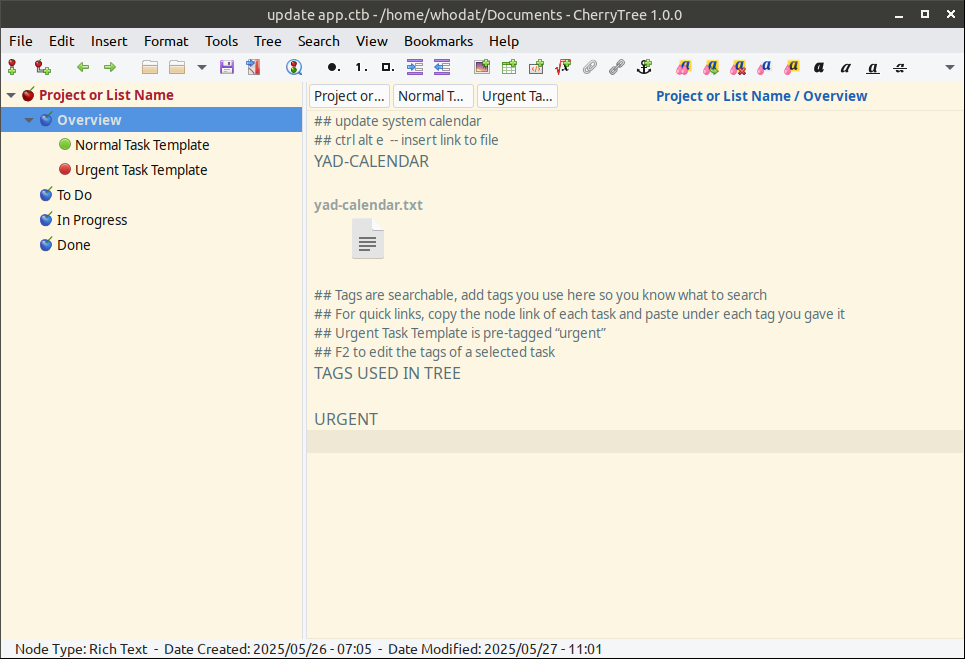
It does not seem to do reminders but actually this was an awesome suggestion and I’m glad you thought of it, it is still useful to have dates you can check on your system calendar. I have implemented the yad-calendar file into a side project I have going of how anyone, even with no technical skills and with few system resources to spare, can turn CherryTree that comes installed with antiX into a very reasonable personal productivity app.
Often what looks like it might be spam is not, unfortunately It is very easy to jump to
wrong conclusions based on content of a single post.Absolutely my fault. I am so used to asking questions by giving background for context and by expanding on what features or points are most pertinent to hopefully give people a clear idea of what exactly I am asking or looking for. This usually saves time from people having to come into the topic to ask clarifying questions, saves time from people giving suggestions that are nowhere near what I meant, and also is super helpful if I was asking the wrong question or there was a solution I had not thought of and people can say “hey, you don’t need an app like that, you can implement the x y and z features that already come installed!” or whatever. But in hindsight I can see that how listing the features I most liked in Super Productivity to give readers a clearer idea of what apps to suggest as alternative, it might have looked like glowing endorsement for that product.
Kanboard is very lightweight, maybe useful.
Thank you so much for putting this on my radar! This is a solid recommendation for the topic. I’ve watched a few videos and I gather it’s simple to set up too.
The advantage of ProjectLibre, and that’s why I had recommended it, is: It is fully compatible to Microsoft Project, so you can share and cooperate easily with others who don’t care for FOSS.
Great point and this will be huge benefit to people coming in this topic looking for FOSS solution that does have this compatibility. I took another look at ProjectLibre and I have to say I think you’ve sold me on it. This would be another one I would give a shot, especially thanks to your detailed instructions which are very helpful to me and anyone else coming into this topic so thank you for taking the time to include them. I think I would have been too intimidated to try it otherwise, but now I say this is another solid recommendation for our topic.
Now on my side project, I’ve been working with CherryTree which came with my antiX Full install. It’s very easy to set up as a todo list or mini personal project manager. It’s a very reasonable and lightweight solution for people who watch their resources out of necessity or just for fun. It has drag and drop support which makes it a breeze to move tasks to different categories. I have set it up where the list is also the board, so to speak, as you can drag your tasks from say a To Do to In Progress just like you would on a board. On the notes side it supports links to other nodes, websites, files. It has searchable tags which can be augmented by copying the links of each task node and pasting them in an Overview category under their appropriate tag/s category. I have some screenshots of a simple setup with suggested categories. In an advanced project, I would also suggest adding a Backlog node to so you don’t overwhelm your board with “everything ever that needs done” and can just keep the most relevant current content in the active categories. All this was easily set up using regular CherryTree usage and no technical skills. It doesn’t have a lot of automatic bells and whistle but I have to say the simplicity is somewhat appealing to me.
EDIT to add, you can of course copy or duplicate the Task Templates you make, put them in the category you want and edit their name etc.
- This reply was modified 1 year, 4 months ago by j_luz.
- This reply was modified 1 year, 4 months ago by j_luz.
-
AuthorPosts



- You must be logged in to reply to this topic.