
Forum › Forums › New users › New Users and General Questions › GRUB installation to AntiX
- This topic has 51 replies, 7 voices, and was last updated Nov 12-5:39 am by BobC.
-
AuthorPosts
-
March 27, 2021 at 12:42 pm #56442
BobC
ModeratorYeah, it’s old hardware. Maybe you have a bad chip or the drive is going bad.
Maybe you can identify which chip is bad by swapping them out if that’s the problem. . Another possibility is that a chip isn’t mounted well and isn’t making a good connection.
Here is the link to SEARCH THE FORUM >> http://www.antixforum.com/search-forums
March 27, 2021 at 11:28 pm #56463Lluga
Memberwell I’ll try to make a point here and post some screenshots
If my suspects are correct, the Issue is basically solved. And after years of problems with this machine believe me.
First I tried to run the command you said me to run, but don’t know why when it asks me the password I simply cannot write it to the Terminal.
Maybe I have to run the Terminal as administrator or whatever.
Then I applied the suggestion 56192, that after some Issues in the meanwhile, I suspect it actually worked.
As a matter of fact the machine doesn’t freeze anymore when trying to do sensitive tasks like updating or opening several Firefox pages at the same time. The Memory test I still haven’t perform it to the end at this phase, but I think the machine still have difficulties to perform it, from the last attempt result.
The Keyboards Issue is also solved
So I’m very grateful to you and very happy !Nevertheless like many technical things it doesn’t end here
Some Issues that I still would like to solve/understand are :
So it’s probably not an Hardware Issue. But anyway if it was, how should I swap out the Chips ? And are we talking about Intel 8259A IRQ Chip or which one ? The HDD I can easy substitute.
How do I tape the password to the command line as asked ?
I can’t find any Diagnostic Tool at My BIOS ?! weird. Can I do it from the OS environment ?
How do I update my BIOS ?Thanks a lot once more and for reply
Lluga
March 27, 2021 at 11:31 pm #56464MemberPS : would like also to ask you how can I download a free electronic circuit software to try to create some basic circuits ?
to Linux of course
- This reply was modified 5 years, 6 months ago by Lluga.
March 27, 2021 at 11:38 pm #56466Memberno no no, sorry I rushed again
The machine still freezes :(( god damn it !!!
Even after everything already correctly installed
must continue working …
March 27, 2021 at 11:51 pm #56467MemberMarch 27, 2021 at 11:54 pm #56468Memberso the machine works basically ok, makes the updates right, runs the apps, it’s clearly better than before
but continues freezing somewhere
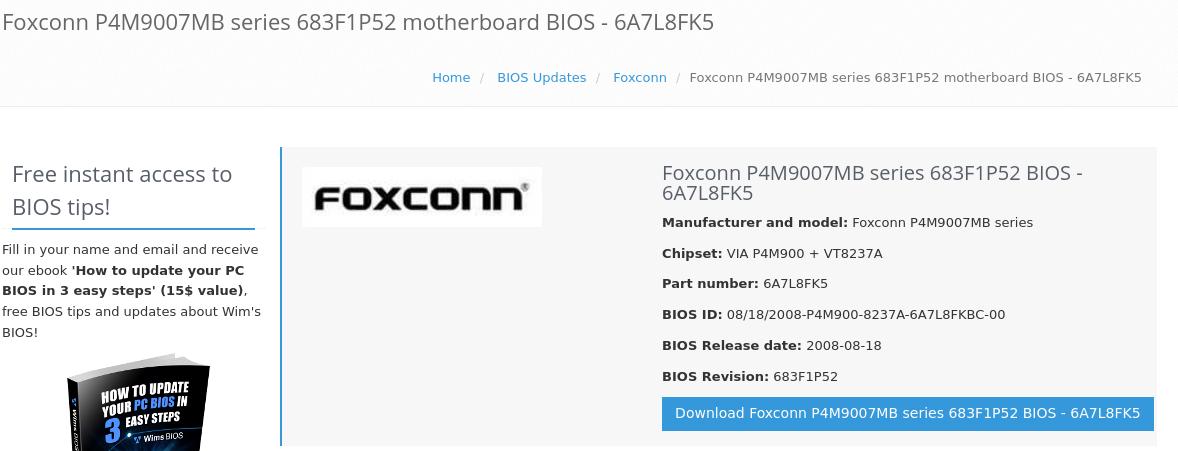
March 28, 2021 at 1:17 am #56470ModeratorI found a newer BIOS at http://www.wimsbios.com/biosupdates/foxconn/6A7L8FK5 (see pic) You will need to figure out how to download and install it. I didn’t see a Linux version of the updating software there, but you could investigate that and find a way to update it, perhaps by booting it with DOS.
If you aren’t sure the hardware is good, diagnose and fix it. Software is impossible to fix if hardware is broken. Are you really sure your keyboard is Ok? Why can’t you type certain things? That makes no sense. I think maybe you don’t have the keyboard you are telling your computer that you have. Maybe you booted and installed as a US keyboard but really have something different…
Once you really think the hardware is good and setup correctly…
Please follow these instructions and don’t do anything else until its completed.
1. Boot from the USB, you don’t need to login. Your user id is demo and the password is demo.
2. Open a terminal
3. Paste in this command, again, your user id is demo and the password is demo
sudo apt update && sudo apt reinstall bootrepair-antix
4. Open the Control Centre, go to the Maintenance tab, run Boot Repair
5. Try installing to MBR. If Boot Repair is successful, go to the Logout menu and take the Shutdown option.
6. Remove the USB after it shuts down. Restart from the hard drive and login normally.
7. If it works, open a terminal
8. Paste in this command and use your password
sudo apt update && sudo apt dist-upgrade
9. If you weren’t able to get this far, you can try the list again using the PBR option at step 5. If the PBR options fails also, I would suggest a complete reinstall is the next logical option.- This reply was modified 5 years, 6 months ago by BobC.
Attachments:
Here is the link to SEARCH THE FORUM >> http://www.antixforum.com/search-forums
March 28, 2021 at 1:41 am #56472ModeratorBTW, when I suggested swapping chips I was referring to the Memory chips. It says you have 2 gb of memory, if it is all on one chip and you are getting memory errors, I would just reseat it (be sure to find instructions and use a grounding strap).
Here is the link to SEARCH THE FORUM >> http://www.antixforum.com/search-forums
March 28, 2021 at 2:00 am #56474ModeratorOne more thing, in your pictures the machine was having problems with the floppy drive fd0, so it is still possible your disk drive is jumpered or cabled wrong, or failing, or maybe it is configured to boot from floppy but its broken or missing.
- This reply was modified 5 years, 6 months ago by BobC. Reason: reworded
Here is the link to SEARCH THE FORUM >> http://www.antixforum.com/search-forums
March 30, 2021 at 1:34 pm #56615MemberHi and thanks again for the persistence,
the keyboard is no big problem I already found a way to manage that
I already reseated the memory Sticks and even changed the SATA connection from the HDDI followed your instructions till step 8 with MBR installation, in this case it didn’t allow me to tape the second command line
I think it’s no Keyboard problem, cause I can tape it wherever I want at the desktop, BUT NOT in the Terminal !!! weirdso I tried to do till step 8 with the PBR (that I don’t think the machine has that option) and went stuck even earlier at step 3, again with no permission to
tape any password to conclude the process, as you can see from the screenshotsSo am I having here an administration problem now ?!?
I didn’t tried yet to update BIOS, I have to do it also
thanks for reply
Lluga
March 30, 2021 at 1:35 pm #56616MemberMarch 30, 2021 at 1:41 pm #56617Memberso the first is when I achieved till step 8 with MBR installation
and the 2nd when I tried the installation again from the beginning and trying to install to PBR, so with boot repair to MBR already done beforeMarch 30, 2021 at 1:53 pm #56619MemberPS :two more Topics :
1 – I already achieved to run a memory test successfully with no errors
2 – I have already Skype installed to my desktop but I can’t find it :)),
could you tell me how to find an already installed app that is not in the usual places ? at AntiXthanks a lot
Lluga
March 30, 2021 at 2:16 pm #56621MemberOh yeah ! now the machine turned off without saying nothing in advance :)))
that’s the first time it happens with this machine :))By the way, the machine has no floppy disk, it has yes, a front port with Smart Media, Micro drive, Memory Stick and an SD Multi card connections
but no such a floppy disk Drive like the ones from the 1990sMarch 30, 2021 at 2:21 pm #56622ModeratorOnce you installed the boot to MBR and were able to boot you don’t need to install it to PBR. Your boot problem looks to be solved.
When typing the password it does not display any characters, you type the password and press enter. If it is the correct password, it runs the command, if it was wrong it asks again. I don’t think you have a keyboard problem, either.
I don’t think its critical to update the BIOS.
I think you need to find a friend to help you learn or watch videos on youtube to learn about basic Linux command line operation.
I can’t help with Skype as I don’t have it installed. I would suggest running it from a terminal, and if that works, then add an icon to your toolbar to run it.
Here is the link to SEARCH THE FORUM >> http://www.antixforum.com/search-forums
-
AuthorPosts
- You must be logged in to reply to this topic.