
Forum › Forums › antiX-development › antiX Respins › [Solved] Installer look and feel : “gksu -S” vs “su-to-root -X -c”
- This topic has 14 replies, 3 voices, and was last updated Jun 15-10:06 am by melodie.
-
AuthorPosts
-
June 11, 2025 at 8:49 am #179087
 melodieMember
Hello,
I have been trying to setup the Bento antiX respin project in a way allowing to remove the need for a root account. When Polkit rules exist, I use them. Else, I change the Exec line in the launcher (desktop file) and use “gksu -S” instead of “su-to-root -X -c”. (And save the file in /etc/skel/.locale/share/applications if necessary).
But when I tried to do that with the minstall.desktop, I got a black background for the installer : not that it was not pretty, but it revealed difficult to read. So I wonder if there could be another way to use it without a root password, or even without a password at all, without sacrifying the usual look and feel?
Thanks for your insights!
- This topic was modified 1 year, 3 months ago by melodie.
June 11, 2025 at 9:53 am #179093anti-apXos
Membersu-to-root is just a wrapper script for various authentication methods and it uses gksu by default with -X. Also, gksu uses the -S (--sudo-mode) by default. So I don’t understand why you need to do anything. Does using polkit somehow get in the way of this?
Anyway, I can’t reproduce what you described even if I do set it up the same. My guess is it’s related to your settings in /etc/sudoers. The installer uses Qt, so you may need to add
defaults env_keep+='QT_QPA_PLATFORMTHEMEThat’s assuming you even use qt5ct or have some other Qt theme set in this respin.
So I wonder if there could be another way to use it without a root password, or even without a password at all
/usr/sbin/minstall is already listed as NOPASSWD in the /etc/sudoers.d/antixers file, so it shouldn’t require a password.
It sounds like your respin is quite different from the standard antiX setup, though, so if you don’t have that file, you’d have to set up NOPASSWD for minstall yourself.
- This reply was modified 1 year, 3 months ago by anti-apXos.
"--"
June 11, 2025 at 10:37 am #179098melodieMemberDoes using polkit somehow get in the way of this?
Hello anti-apXos,
I don’t see how Polkit could be involved, as antix-installer does not provide a rule for Polkit-1 (I checked, using “dpkg -L”, there is no “/usr/share/polkit-1/actions” file in the package).
Anyway, I can’t reproduce what you described even if I do set it up the same. My guess is it’s related to your settings in /etc/sudoers. The installer uses Qt, so you may need to add
defaults env_keep+='QT_QPA_PLATFORMTHEMEI have
QT_QPA_PLATFORMTHEME=qt5ctin /etc/environment.That’s assuming you even use qt5ct or have some other Qt theme set in this respin.
qt5ct is installed.
/usr/sbin/minstall is already listed as NOPASSWD in the /etc/sudoers.d/antixers file, so it shouldn’t require a password
Right, I can see it in the live system.
It sounds like your respin is quite different from the standard antiX setup, though, so if you don’t have that file, you’d have to set up NOPASSWD for minstall yourself.
I tried again “sudo”, “sudo -S”, and even “minstall” from the command line. Just “minstall” triggers a window requesting “root access”, while both sudo commands act as I sayd before.
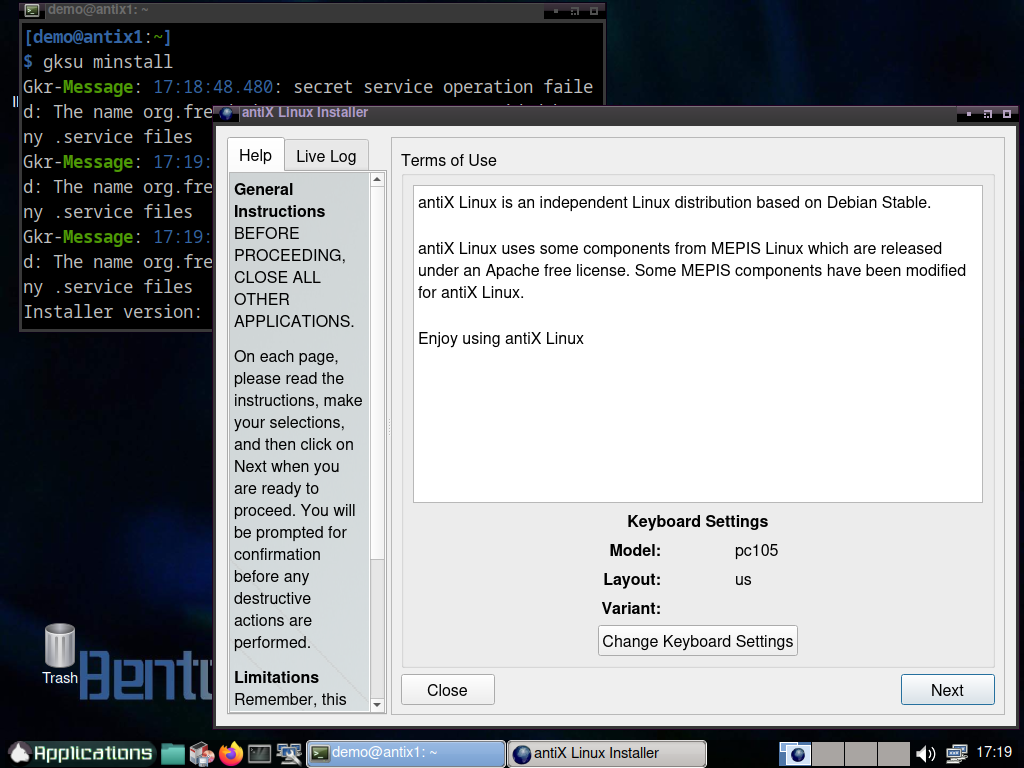
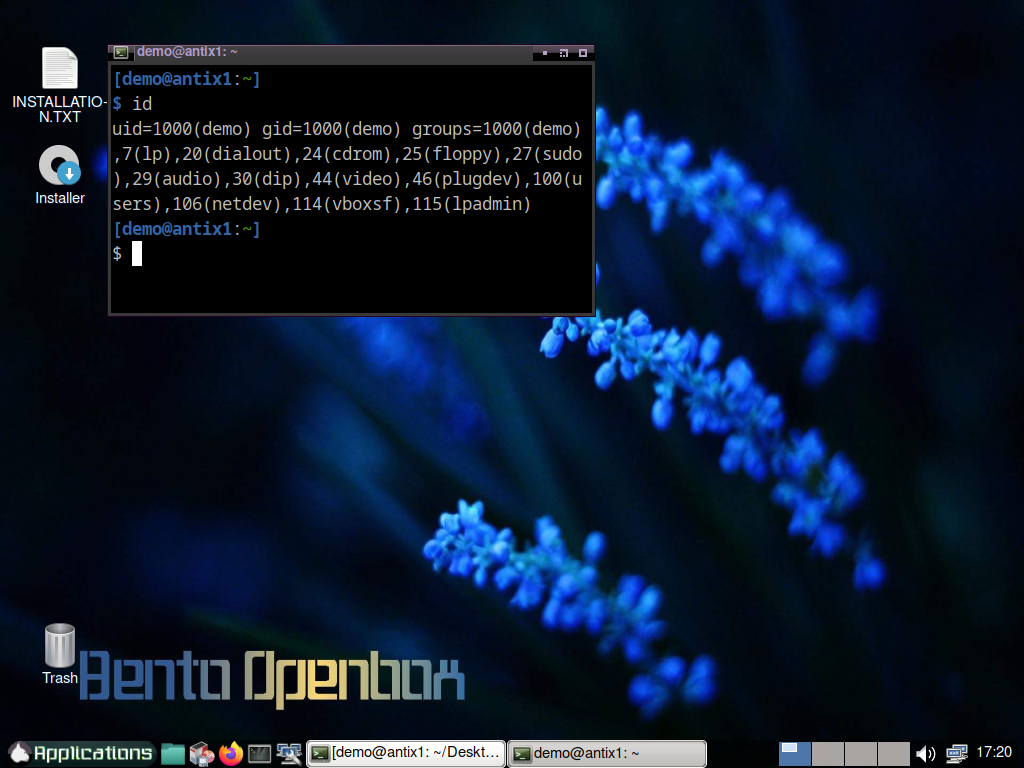
I did a few screenshots in the live, showing them now.
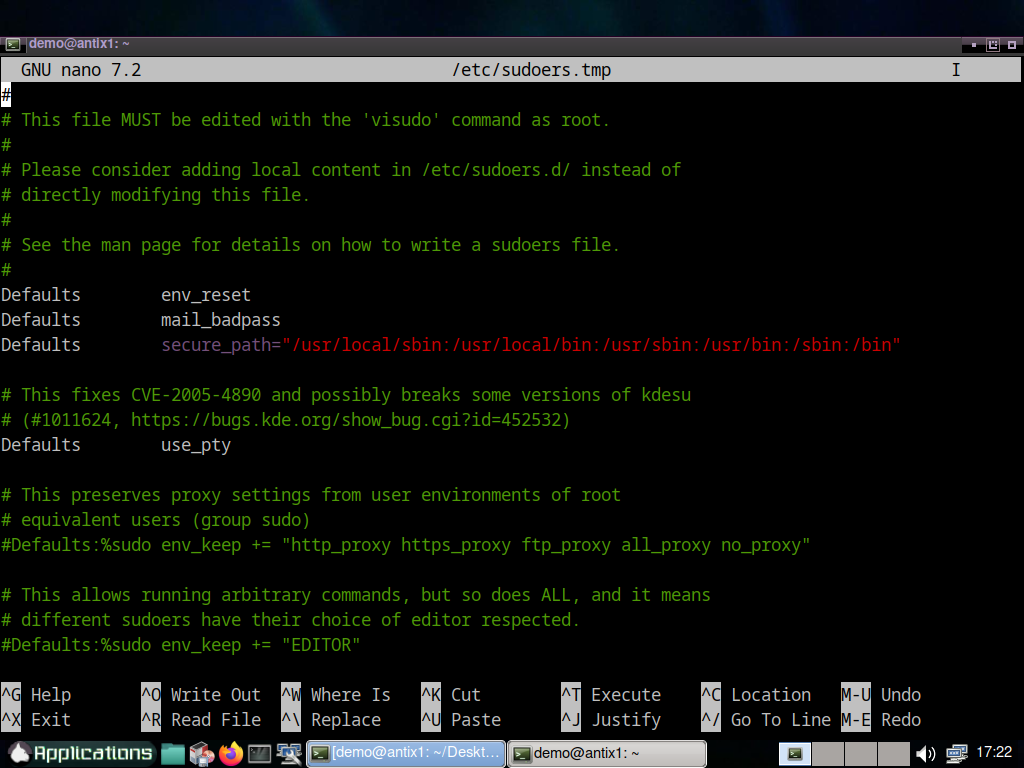
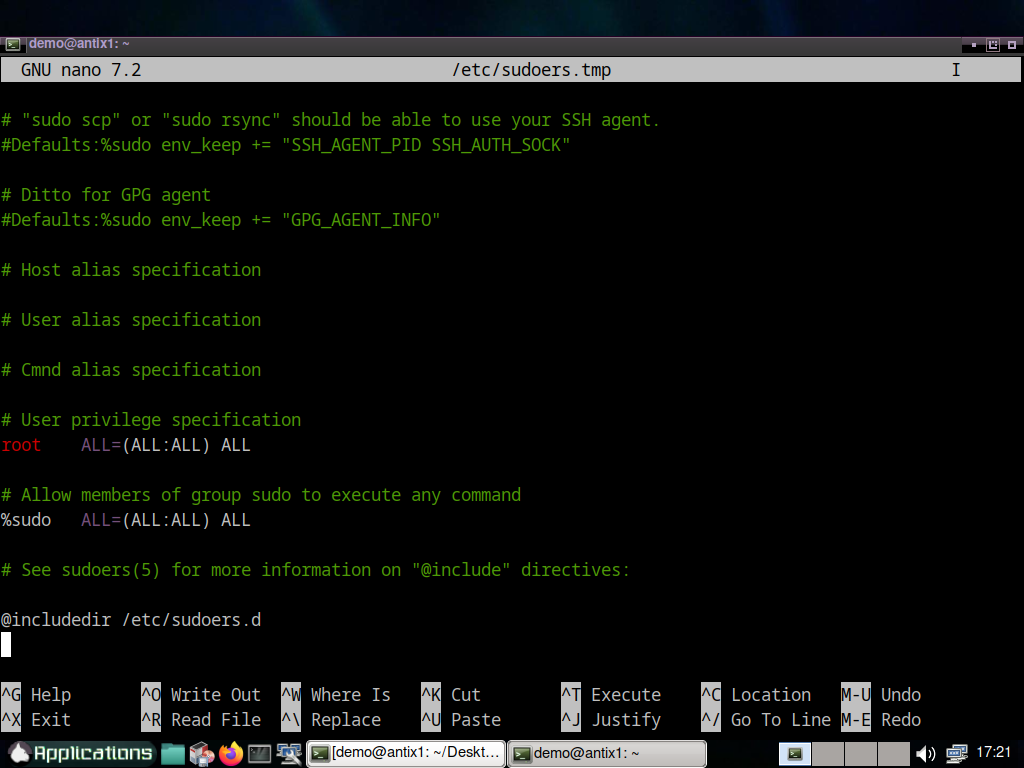
June 11, 2025 at 10:39 am #179103melodieMemberAs you can see, when I am granted to start it without a password, then the background installer is black. I have also done two screenshots for the sudoers file, in my VM.
June 11, 2025 at 10:53 am #179107abc-nix
MemberLooking at the su-to-root script,
su-to-root -X -cequates to
gksudo -u root
and possibly
gksu -S -u rootDo you get a different result with
gksu -S -u root minstall?- This reply was modified 1 year, 3 months ago by abc-nix.
Corruption has two hands: the Right and the Left. Don't let them squeeze you.
June 11, 2025 at 10:55 am #179108MemberI tried again “sudo”, “sudo -S”, and even “minstall” from the command line. Just “minstall” triggers a window requesting “root access”, while both sudo commands act as I sayd before.
Even with NOPASSWD set, you still have to use sudo or gksu, but it just won’t require a password. It seems like this is working based on your first screenshot since the gksu box says you didn’t need to enter a password.
I have QT_QPA_PLATFORMTHEME=qt5ct in /etc/environment.
But sudo is set up to reset the environment (shown in your last screenshot: “env_reset”), so you would still need to add the line I suggested in sudoers if you want to use the qt5ct theme with applications started by sudo. Even without that, you should not have a totally broken theme, though. It should just be the default Qt theme, but maybe something’s wrong with how that’s set up. I don’t know much about Qt themes, so can’t suggest where to look exactly.
You can set root’s qt5ct theme by running
sudo qt5ctAlso, you may have changed the default behavior of gksu to use –-su-mode. That can be done (or undone) by running
gksu-properties"--"
June 11, 2025 at 11:01 am #179111melodieMemberI tried different things following the leads/ideas anti-apXos gave me, nothing changes. I someone wants to try, this experimental edition can be found here : https://downloads.linuxvillage.org/experimental/
(For now, the Install.txt file on the desktop will do, if a more straightforward solution can’t be found).
June 11, 2025 at 11:21 am #179112melodieMemberIt seems like this is working based on your first screenshot since the gksu box says you didn’t need to enter a password.
I haven’t sayd it does not work, I sayd the antiX installer then gets a black background. (If you haven’t, please click on the images)
How can I test what you are suggesting? Is it possible to test in the Live Virtualbox, or do the suggested changes (sudo as in visudo) require to restart fully the system? I have the same question as for the gksu-properties command line (to be executed as root, I guess?)
As for now I tried all your suggestions and the ones provided by abc-nix : in the Live session, nothing helped, I always get the black background when I am able to start minstall without providing any password.
- This reply was modified 1 year, 3 months ago by melodie.
June 11, 2025 at 12:12 pm #179121Memberdo the suggested changes (sudo as in visudo) require to restart fully the system? I have the same question as for the gksu-properties command line (to be executed as root, I guess?)
No, none of things I suggested requires restarting. gksu-properties should not be run as root, though (unless you wanted to change how gksu works when using it as root, which I don’t think anyone does).
"--"
June 11, 2025 at 2:10 pm #179127melodieMemberantix-apXos,
In a fresh start of the live, as simple user, started gksu-properties, then from the same console, gksu -S minstall : minstall starts without a root password, but the background is still black.
I’d add whatever you say in /etc/sudoers (using visudo) but for this one, I’d need to change it in an installed system before rebuidling using ISO snapshot : right? wrong?
June 11, 2025 at 5:35 pm #179147MemberAs I said, none of things I suggested requires restarting. That includes changes to sudoers, which take effect immediately after closing the visudo editor.
You can always run
sudo envto see the environment of sudoed commands if you’re unsure.
- This reply was modified 1 year, 3 months ago by anti-apXos.
"--"
June 11, 2025 at 5:53 pm #179153melodieMemberAs I said, none of things I suggested requires restarting. That includes changes to sudoers, which take effect immediately after closing the visudo editor.
Yes, alright. I still could not get the light background using any other commands than those requesting the root password.
You can always run
sudo envto see the environment of sudoed commands if you’re unsure.In the machine from where I build:
COLORTERM=truecolor
XAUTHORITY=/home/bento/.Xauthority
LANG=fr_FR.UTF-8
LS_COLORS=rs=0:di=01;34:ln=01;36:mh=00:pi=40;33:so=01;35:do=01;35:bd=40;33;01:cd=40;33;01:or=40;31;01:mi=00:su=37;41:sg=30;43:ca=00:tw=30;42:ow=34;42:st=37;44:ex=01;32:*.tar=01;31:*.tgz=01;31:*.arc=01;31:*.arj=01;31:*.taz=01;31:*.lha=01;31:*.lz4=01;31:*.lzh=01;31:*.lzma=01;31:*.tlz=01;31:*.txz=01;31:*.tzo=01;31:*.t7z=01;31:*.zip=01;31:*.z=01;31:*.dz=01;31:*.gz=01;31:*.lrz=01;31:*.lz=01;31:*.lzo=01;31:*.xz=01;31:*.zst=01;31:*.tzst=01;31:*.bz2=01;31:*.bz=01;31:*.tbz=01;31:*.tbz2=01;31:*.tz=01;31:*.deb=01;31:*.rpm=01;31:*.jar=01;31:*.war=01;31:*.ear=01;31:*.sar=01;31:*.rar=01;31:*.alz=01;31:*.ace=01;31:*.zoo=01;31:*.cpio=01;31:*.7z=01;31:*.rz=01;31:*.cab=01;31:*.wim=01;31:*.swm=01;31:*.dwm=01;31:*.esd=01;31:*.avif=01;35:*.jpg=01;35:*.jpeg=01;35:*.mjpg=01;35:*.mjpeg=01;35:*.gif=01;35:*.bmp=01;35:*.pbm=01;35:*.pgm=01;35:*.ppm=01;35:*.tga=01;35:*.xbm=01;35:*.xpm=01;35:*.tif=01;35:*.tiff=01;35:*.png=01;35:*.svg=01;35:*.svgz=01;35:*.mng=01;35:*.pcx=01;35:*.mov=01;35:*.mpg=01;35:*.mpeg=01;35:*.m2v=01;35:*.mkv=01;35:*.webm=01;35:*.webp=01;35:*.ogm=01;35:*.mp4=01;35:*.m4v=01;35:*.mp4v=01;35:*.vob=01;35:*.qt=01;35:*.nuv=01;35:*.wmv=01;35:*.asf=01;35:*.rm=01;35:*.rmvb=01;35:*.flc=01;35:*.avi=01;35:*.fli=01;35:*.flv=01;35:*.gl=01;35:*.dl=01;35:*.xcf=01;35:*.xwd=01;35:*.yuv=01;35:*.cgm=01;35:*.emf=01;35:*.ogv=01;35:*.ogx=01;35:*.aac=00;36:*.au=00;36:*.flac=00;36:*.m4a=00;36:*.mid=00;36:*.midi=00;36:*.mka=00;36:*.mp3=00;36:*.mpc=00;36:*.ogg=00;36:*.ra=00;36:*.wav=00;36:*.oga=00;36:*.opus=00;36:*.spx=00;36:*.xspf=00;36:*~=00;90:*#=00;90:*.bak=00;90:*.old=00;90:*.orig=00;90:*.part=00;90:*.rej=00;90:*.swp=00;90:*.tmp=00;90:*.dpkg-dist=00;90:*.dpkg-old=00;90:*.ucf-dist=00;90:*.ucf-new=00;90:*.ucf-old=00;90:*.rpmnew=00;90:*.rpmorig=00;90:*.rpmsave=00;90:
TERM=xterm-256color
DISPLAY=:0
PATH=/usr/local/sbin:/usr/local/bin:/usr/sbin:/usr/bin:/sbin:/bin
MAIL=/var/mail/root
LOGNAME=root
USER=root
HOME=/root
SHELL=/bin/bash
SUDO_COMMAND=/usr/bin/env
SUDO_USER=bento
SUDO_UID=1000
SUDO_GID=1000
The live environment looks a lot the same, except for the default user, of course:
COLORTERM=truecolor
XAUTHORITY=/home/demo/.Xauthority
LANG=fr_FR.UTF-8
LS_COLORS=rs=0:di=01;34:ln=01;36:mh=00:pi=40;33:so=01;35:do=01;35:bd=40;33;01:cd=40;33;01:or=40;31;01:mi=00:su=37;41:sg=30;43:ca=00:tw=30;42:ow=34;42:st=37;44:ex=01;32:*.tar=01;31:*.tgz=01;31:*.arc=01;31:*.arj=01;31:*.taz=01;31:*.lha=01;31:*.lz4=01;31:*.lzh=01;31:*.lzma=01;31:*.tlz=01;31:*.txz=01;31:*.tzo=01;31:*.t7z=01;31:*.zip=01;31:*.z=01;31:*.dz=01;31:*.gz=01;31:*.lrz=01;31:*.lz=01;31:*.lzo=01;31:*.xz=01;31:*.zst=01;31:*.tzst=01;31:*.bz2=01;31:*.bz=01;31:*.tbz=01;31:*.tbz2=01;31:*.tz=01;31:*.deb=01;31:*.rpm=01;31:*.jar=01;31:*.war=01;31:*.ear=01;31:*.sar=01;31:*.rar=01;31:*.alz=01;31:*.ace=01;31:*.zoo=01;31:*.cpio=01;31:*.7z=01;31:*.rz=01;31:*.cab=01;31:*.wim=01;31:*.swm=01;31:*.dwm=01;31:*.esd=01;31:*.avif=01;35:*.jpg=01;35:*.jpeg=01;35:*.mjpg=01;35:*.mjpeg=01;35:*.gif=01;35:*.bmp=01;35:*.pbm=01;35:*.pgm=01;35:*.ppm=01;35:*.tga=01;35:*.xbm=01;35:*.xpm=01;35:*.tif=01;35:*.tiff=01;35:*.png=01;35:*.svg=01;35:*.svgz=01;35:*.mng=01;35:*.pcx=01;35:*.mov=01;35:*.mpg=01;35:*.mpeg=01;35:*.m2v=01;35:*.mkv=01;35:*.webm=01;35:*.webp=01;35:*.ogm=01;35:*.mp4=01;35:*.m4v=01;35:*.mp4v=01;35:*.vob=01;35:*.qt=01;35:*.nuv=01;35:*.wmv=01;35:*.asf=01;35:*.rm=01;35:*.rmvb=01;35:*.flc=01;35:*.avi=01;35:*.fli=01;35:*.flv=01;35:*.gl=01;35:*.dl=01;35:*.xcf=01;35:*.xwd=01;35:*.yuv=01;35:*.cgm=01;35:*.emf=01;35:*.ogv=01;35:*.ogx=01;35:*.aac=00;36:*.au=00;36:*.flac=00;36:*.m4a=00;36:*.mid=00;36:*.midi=00;36:*.mka=00;36:*.mp3=00;36:*.mpc=00;36:*.ogg=00;36:*.ra=00;36:*.wav=00;36:*.oga=00;36:*.opus=00;36:*.spx=00;36:*.xspf=00;36:*~=00;90:*#=00;90:*.bak=00;90:*.old=00;90:*.orig=00;90:*.part=00;90:*.rej=00;90:*.swp=00;90:*.tmp=00;90:*.dpkg-dist=00;90:*.dpkg-old=00;90:*.ucf-dist=00;90:*.ucf-new=00;90:*.ucf-old=00;90:*.rpmnew=00;90:*.rpmorig=00;90:*.rpmsave=00;90:
TERM=xterm-256color
DISPLAY=:0
PATH=/usr/local/sbin:/usr/local/bin:/usr/sbin:/usr/bin:/sbin:/bin
MAIL=/var/mail/root
LOGNAME=root
USER=root
HOME=/root
SHELL=/bin/bash
SUDO_COMMAND=/usr/bin/env
SUDO_USER=demo
SUDO_UID=1000
SUDO_GID=1000
I am still opened to suggestion, but if the background can’t stay light without the root password, well make it do (I added a text file on the desktop in the live, created from a “welcome.sh” script, which provides necessary information on passwords).
June 11, 2025 at 5:58 pm #179154MemberNeither of those envs includes QT_QPA_PLATFORMTHEME, so it seems you didn’t actually add the line. I don’t know for sure, but possibly you need to put it after the ‘Defaults env_reset’ line.
By the way, do you have the same issue with other MX-derived Qt apps that run as root, like ISO Snapshot and Live USB Creator? If not, then the issue must be something else, though I can’t imagine what. Maybe try purging and reinstalling the minstall package.
"--"
June 11, 2025 at 8:19 pm #179161melodieMemberHi,
this is the sudoers file:# # This file MUST be edited with the 'visudo' command as root. # # Please consider adding local content in /etc/sudoers.d/ instead of # directly modifying this file. # # See the man page for details on how to write a sudoers file. # Defaults env_reset Defaults mail_badpass Defaults secure_path="/usr/local/sbin:/usr/local/bin:/usr/sbin:/usr/bin:/sbin:/bin" # This fixes CVE-2005-4890 and possibly breaks some versions of kdesu # (#1011624, https://bugs.kde.org/show_bug.cgi?id=452532) Defaults use_pty # This preserves proxy settings from user environments of root # equivalent users (group sudo) #Defaults:%sudo env_keep += "http_proxy https_proxy ftp_proxy all_proxy no_proxy" # This allows running arbitrary commands, but so does ALL, and it means # different sudoers have their choice of editor respected. #Defaults:%sudo env_keep += "EDITOR" # Completely harmless preservation of a user preference. #Defaults:%sudo env_keep += "GREP_COLOR" # While you shouldn't normally run git as root, you need to with etckeeper #Defaults:%sudo env_keep += "GIT_AUTHOR_* GIT_COMMITTER_*" # Per-user preferences; root won't have sensible values for them. #Defaults:%sudo env_keep += "EMAIL DEBEMAIL DEBFULLNAME" # "sudo scp" or "sudo rsync" should be able to use your SSH agent. #Defaults:%sudo env_keep += "SSH_AGENT_PID SSH_AUTH_SOCK" # Ditto for GPG agent #Defaults:%sudo env_keep += "GPG_AGENT_INFO" # Host alias specification # User alias specification # Cmnd alias specification # User privilege specification root ALL=(ALL:ALL) ALL # Allow members of group sudo to execute any command %sudo ALL=(ALL:ALL) ALL # See sudoers(5) for more information on "@include" directives: @includedir /etc/sudoers.dWhere and how would you add “QT_QPA_PLATFORMTHEME”?
June 15, 2025 at 10:06 am #179369melodieMemberSolved, with a
sudo visudo /etc/sudoers.d/keep_qt_envand addedDefaults env_keep += “QT_QPA_PLATFORMTHEME”
in the file. Now, with minstall using *gsku -S* it is ok to start with just the demo passwd, and it shows its normal white background.
Thanks for the pointers!
- This reply was modified 1 year, 3 months ago by melodie.
- This reply was modified 1 year, 3 months ago by melodie.
- This reply was modified 1 year, 3 months ago by melodie.
-
AuthorPosts


- You must be logged in to reply to this topic.