
Tagged: emulator Kega Fusion library
- This topic has 16 replies, 4 voices, and was last updated Jun 9-7:38 am by marcelocripe.
-
AuthorPosts
-
May 31, 2025 at 10:33 am #178308
Beppo
MemberHello,
I am trying to install Kega Fusion, a Sega Master system and Genesis emulator. I played a lot to those consoles when I was a kid and a teenager.
I have downloaded it on
https://www.carpeludum.com/kega-fusion/
I have taken Kega Fusion.x Linux (703,2 KiB). It comes as a taz.gz file which is downloaded in the /tmp/mozilla_Beppo0.
Doesn’t matter (I think) since I have unzipped it in
/home/Beppo/Téléchargements/FusionIt comes as 3 files : Fusion, History.txt and Readme.txt.
If I double-click on Fusion, antiX asks me to choose an application cause the file seems to be an executable. Since I don’t know which app to choose I leave it here.
If I try to launch it with ROXTerm when I am in ~/Téléchargements/Fusion I got the following message :
Bash : Fusion : command could not be found
(Téléchargements meaning Downloads in French).I thought it would much more simple. Thanks to anyone helping or trying to help.
Sometimes, an up to date system is the best way to avoid problems.
May 31, 2025 at 11:16 am #178309abc-nix
MemberOption 1:
Open the file manager (zzzfm) and navigate to the folder containing the Fusion binary.Open a terminal emulator (roxterm or other)
Drag and drop the Fusion file to the terminal. It will paste the path of the binary. Hit enter and try to run it.
Option 2:
Open the file manager (zzzfm) and navigate to the folder containing the Fusion binary.With the Fusion file selected, hit the F4 key on your keyboard to open a terminal emulator in the current directory.
Execute:
./FusionCorruption has two hands: the Right and the Left. Don't let them squeeze you.
May 31, 2025 at 12:32 pm #178317MemberIf I am trying Option 1 – drag and dropping the Fusion file into the terminal, the command line is :
‘/home/Beppo/Téléchargements/Fusion/Fusion/Fusion’
then antiX opens a window inviting me to choose an application as if I were in the file manager double-clicking on it.Option 2 : If I am the file manager in
/home/Beppo/Téléchargements/Fusion
press F4 and then in ROXTerm type
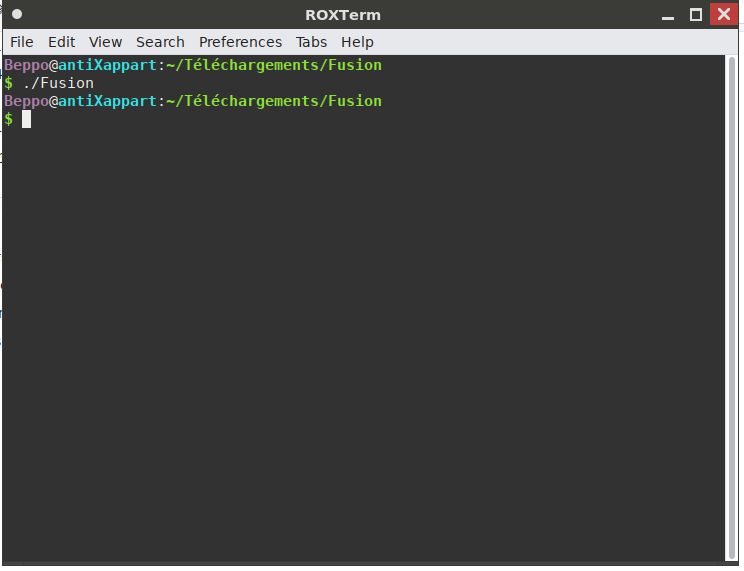
./Fusion
I have no other message, in ROXTerm I am again at
Beppo@antiXappart:~/Téléchargements/Fusion
as in screenshot.At least I don’t have the menu to choose an application to open the Fusion file with. But it’s as if nothing had happened.
Attachments:
Sometimes, an up to date system is the best way to avoid problems.
May 31, 2025 at 12:58 pm #178320 marcelocripeMember
Hi Beppo
The Kega Fusion requires PulseAudio for the sound to work on 64-bit antiX, and the sound works perfectly on 32-bit antiX. PulseAudio is not the best solution and only causes problems for antiX.
There are other emulators that I managed to repackage from “.rpm” to “.deb” that work perfectly on antiX 19, 21 or 22 and 23. You can download all of them from my GitLab or from my Internet Archive page.
In all programs, games or game emulators that are on my pages, there is a text file in Brazilian Portuguese, in some there is a text file in French. Use the automatic internet translator to translate the text file in Brazilian Portuguese to your language, review the automatic translation and consider sending me your file so that I can make it available to other people.
My pages are:
https://archive.org/details/@marcelocripe
https://gitlab.com/marcelocripeSee the text file “Shortcut Icons for Game Emulators for antiX pt-BR.txt” and “Configuracoes dos Emuladores de Jogos para o antiX pt-BR.txt” in the topic “Shortcut Icons for Game Emulators for antiX”, read the two long tutorials that explain step by step how to install and configure the list of emulators and games:
See the text file “Game Emulator Shortcut Icons for antiX pt-BR.txt” (Configuracoes dos Emuladores de Jogos para o antiX pt-BR.txt) and “Game Emulator Settings for antiX pt-BR.txt” (Configuracoes dos Emuladores de Jogos para o antiX pt-BR.txt) in the topic “Game Emulator Shortcut Icons for antiX” (Ícones de Atalho dos Emuladores de Jogos para o antiX), read the two long tutorials that explain step by step how to install and configure the list of emulators and games:
Name of the file or package and the description of the game emulator:
BlastEm – Sega Game Emulator (Master System, Game Gear, Mega Drive or Genesis, Mega CD or Sega CD, Sega 32X)
DeSmuME – Nintendo DS Game Emulator
DGen – Mega Drive or Sega Genesis Game Emulator
duckstation-qt-x64.AppImage – Playstation or PS Game Emulator, also known as PlayStation 1 or PS1
Fceux – Nintendo or NES Game Emulator (or “Nintendinho” as it is known in some regions of Brazil)
GnGeo – Neo Geo Game Emulator (SNK Arcade or Arcade Game Emulator)
Javatari – Atari 2600 Game Emulator
Kega Fusion – Sega Game Emulator (Master System, Game Gear, Mega Drive or Genesis, Mega CD or Sega CD, Sega 32X, SG-1000, SC3000, SF7000, SVP and Pico)
MAME – Arcade or Arcade Game Emulator
mGBA-0.9.2-x86_64.AppImage – Game Boy Advance Game Emulator
Mupen64Plus-Qt – Nintendo 64 Game Emulator
MelosDS – Nintendo DS Game Emulator
OpenBOR – Fighting Games, stands for ‘Open Beats of Rage’ or ‘beat freely with anger’, allows you to play, modify or create “beat ’em up” or ‘street fighting’ style games
PCSXR – Playstation or PS Game Emulator, also known as PlayStation 1 or PS1, etc.
Phoenix Emu – 3DO, Atari Jaguar, Coleco Vision, SG-1000, Master System and Game Gear game emulator
PicoDrive – Sega game emulator (Master System, Mega Drive or Genesis, Mega CD or Sega CD and Sega 32X)
PPSSPP-x86_64.AppImage – PlayStation Portable or PSP game emulator
Project64-i386works.AppImage – Nintendo 64 game emulator
Raine-x86_64.AppImage or Raine-3db15c1-i386.AppImage – Arcade game emulator
RetroCopy – Nintendo or NES (or “Nintendinho” as it is known in some regions of Brazil), Master System, Game Gear, SG-1000, Mega Drive and Sega System E arcade or arcade game emulator
ScummWM – Virtual Game Machine ScummVM
Snes9x – Super Nintendo or Super NES or Super Famicom Game Emulator
Snes9x-1.62.3-x86_64.AppImage – Super Nintendo or Super NES or Super Famicom Game Emulator
Stella – Atari 2600 Game Emulator
ZSNES – Super Nintendo or Super NES or Super Famicom Game Emulator
ZesarUX – Multi-Platform Game Emulator (emulates ZX machines for Unix, including all Sinclair MK14, ZX80, ZX81, ZX Spectrum, QL, Z88 computers, as well as Timex TS 2068, Sam Coupe, Pentagon, Chloe 140 SE, 280 SE, Chrome, Prism, ZX-Uno, ZX-Evolution TS-Conf, TBBlue/ZX Spectrum Next, Jupiter Ace, Amstrad CPC 464, Colecovision, Sega SG1000 and Sega Master System)If you need to watch videos to install game emulators, you can watch the videos I produced for the antiX Linux in Portuguese (antiX Linux em Português) channel on YouTube. Turn on the subtitles, click on the gear, Subtitles C/C, Translate automatically and click on your language to activate the automatic translation of the subtitles. And don’t let the language difference stop you from learning from those who can’t read or write in English.
30 – How to install programs, games and game emulators on antiX Linux? – Part 2 (Installation of the MAME arcade game emulator)
31 – How to install programs, games and game emulators on antiX Linux? – Part 3 (Installation of the Nintendo Fceux game emulator)
34 – How to install programs, games and game emulators on antiX Linux? – Part 4 (Installing DeSmuME and GnGeo game emulators with Terminal Emulator)
35 – How to install programs, games and game emulators on antiX Linux? – Part 5 (Installing PicoDrive game emulator with Deb Installer)
36 – How to install programs, games and game emulators on antiX Linux? – Part 6 (Installing Mupen64Plus-Qt game emulator with “Text Interface Application Manager” or “APT CLI Text Interface Program Manager” or “aptiX CLI”)
37 – How to run or start programs, games and game emulators with AppImage format on antiX Linux? – Part 7 (Running PPSSPP game emulator with shortcut icon)
38 – How to uninstall programs, games and game emulators on antiX Linux? – Part 8 (Uninstallation process with the tools: “Package Installer and Uninstaller”; “Synaptic Package Manager”; “APT CLI Text Interface Program Manager” or “Text Interface Application Manager”; and with the command line tools “ROXTerm Terminal Emulator” and “Rxvt Unicode Terminal Emulator”; How to Automatically Clean antiX)
marcelocripe
(Original text in Portuguese language of Brazil)– – – – –
Olá, Beppo
O Kega Fusion exige o PulseAudio para o som funcionar no antiX de 64 bits e o som funciona perfeitamente no antiX de 32 bits. O PulseAudio não é a melhor solução e só trás problemas ao antiX.
Existem outros emuladores que consegui reempacotar de “.rpm” para “.deb” que funcionam perfeitamente no antiX 19, 21 ou 22 e no 23. Você pode baixar todos eles no meu GitLab ou na minha página do Internet Archive.
Em todos os programas, jogos ou emuladores de jogos que estão nas minhas páginas, tem um arquivo de texto em idioma português do Brasil, em alguns tem o arquivo de texto em idioma francês. Utilize o tradutor automático da internet para traduzir o arquivo de texto em idioma português do Brasil para o seu idioma, revise o tradução automática e considere a possibilidade de me enviar o seu arquivo para eu poder disponibilizá-lo para as outras pessoas.
As minhas páginas são:
https://archive.org/details/@marcelocripe
https://gitlab.com/marcelocripeConsulte o arquivo de texto “Icones de Atalho dos Emuladores de Jogos para o antiX pt-BR.txt” e “Configuracoes dos Emuladores de Jogos para o antiX pt-BR.txt” no tópico “Ícones de Atalho dos Emuladores de Jogos para o antiX”, leia os dois longos tutoriais que explico passo a passo em como instalar e configurar a lista de emuladores e jogos:
Nome do arquivo ou do pacote e a descrição do emulador de jogos:
BlastEm – Emulador de Jogos da Sega (Master System, Game Gear, Mega Drive ou Genesis, Mega CD ou Sega CD, Sega 32X)
DeSmuME – Emulador de Jogos do Nintendo DS
DGen – Emulador de Jogos do Mega Drive ou Sega Genesis
duckstation-qt-x64.AppImage – Emulador de Jogos do Playstation ou PS, também conhecido como PlayStation 1 ou PS1
Fceux – Emulador de Jogos do Nintendo ou NES (ou “Nintendinho” como é conhecido em algumas regiões do Brasil)
GnGeo – Emulador de Jogos do Neo Geo (Emulador de Jogos de Fliperama ou Arcade da SNK)
Javatari – Emulador de Jogos do Atari 2600
Kega Fusion – Emulador de Jogos da Sega (Master System, Game Gear, Mega Drive ou Genesis, Mega CD ou Sega CD, Sega 32X, SG-1000, SC3000, SF7000, SVP e Pico)
MAME – Emulador de Jogos de Fliperama ou Arcade
mGBA-0.9.2-x86_64.AppImage – Emulador de Jogos do Game Boy Advance
Mupen64Plus-Qt – Emulador de Jogos do Nintendo 64
MelosDS – Emulador de Jogos do Nintendo DS
OpenBOR – Jogos de Luta, significa ‘Open Beats of Rage’ ou ‘bater livremente com raiva’, permite jogar, modificar ou criar jogos no estilo “beat ’em up” ou ‘briga de rua’
PCSXR – Emulador de Jogos do Playstation ou PS, também conhecido como PlayStation 1 ou PS1, etc.
Phoenix Emu – Emulador de Jogos do 3DO, Atari Jaguar, Coleco Vision, SG-1000, Master System e Game Gear
PicoDrive – Emulador de Jogos da Sega (Master System, Mega Drive ou Genesis, Mega CD ou Sega CD e Sega 32X)
PPSSPP-x86_64.AppImage – Emulador de Jogos do PlayStation Portátil ou PSP
Project64-i386works.AppImage – Emulador de Jogos do Nintendo 64
Raine-x86_64.AppImage ou Raine-3db15c1-i386.AppImage – Emulador de Jogos de Fliperama ou Arcade
RetroCopy – Emulador de Jogos do Nintendo ou NES (ou “Nintendinho” como é conhecido em algumas regiões do Brasil), Master System, Game Gear, SG-1000, Mega Drive e de Fliperama ou Arcade da Sega System E
ScummWM – Máquina Virtual de Jogos ScummVM
Snes9x – Emulador de Jogos do Super Nintendo ou Super NES ou Super Famicom
Snes9x-1.62.3-x86_64.AppImage – Emulador de Jogos do Super Nintendo ou Super NES ou Super Famicom
Stella – Emulador de Jogos do Atari 2600
ZSNES – Emulador de Jogos do Super Nintendo ou Super NES ou Super Famicom
ZesarUX – Emulador de Jogos de Várias Plataformas (emula as máquinas ZX para Unix, incluindo todos os computadores Sinclair MK14, ZX80, ZX81, ZX Spectrum, QL, Z88 e também Timex TS 2068, Sam Coupe, Pentagon, Chloe 140 SE, 280 SE, Chrome, Prism , ZX-Uno, ZX-Evolution TS-Conf, TBBlue/ZX Spectrum Next, Jupiter Ace, Amstrad CPC 464, Colecovision, Sega SG1000 e Sega Master System)Se precisar assistir vídeos para conseguir instalar os emuladores de jogos, você pode assistir os vídeos que produzi para o canal antiX Linux em Português no YouTube. Ative as legendas, clique na engrenagem, Legendas C/C, Traduzir automaticamente e clique no seu idioma para ativar a tradução automática das legendas. E não deixe que a diferença dos idiomas o impeçam de aprender com quem não sabe ler ou escrever em idioma inglês.
30 – Como instalar programas, jogos e emuladores de jogos no antiX Linux? – Parte 2 (Instalação do emulador de jogos de fliperama MAME)
31 – Como instalar programas, jogos e emuladores de jogos no antiX Linux? – Parte 3 (Instalação do emulador de jogos do Nintendo Fceux)
34 – Como instalar programas, jogos e emuladores de jogos no antiX Linux? – Parte 4 (Instalação dos emuladores de jogos DeSmuME e GnGeo com o Emulador de Terminal)
35 – Como instalar programas, jogos e emuladores de jogos no antiX Linux? – Parte 5 (Instalação do emulador de jogos PicoDrive com o instalador Deb Installer)
36 – Como instalar programas, jogos e emuladores de jogos no antiX Linux? – Parte 6 (Instalação do emulador de jogos Mupen64Plus-Qt com a ferramenta “Gerenciador de Aplicativos por Interface de Texto” ou “Gerenciador de Programas por Interface de Texto CLI APT” ou “CLI aptiX”)
37 – Como executar ou iniciar os programas, os jogos e os emuladores de jogos com o formato AppImage no antiX Linux? – Parte 7 (Execução do emulador de jogos PPSSPP com o ícone de atalho)
38 – Como desinstalar programas, jogos e emuladores de jogos no antiX Linux? – Parte 8 (Processo de desinstalação com as ferramentas: “Instalador e Desinstalador de Programas” (Package Installer); “Gerenciador de Pacotes Synaptic”; “Gerenciador de Programas por Interface de Texto CLI APT” ou “Gerenciador de Aplicativos por Interface de Texto”; e com as ferramentas por linha de comando “Emulador de Terminal ROXTerm” e o “Emulador de Terminal Rxvt Unicode”; Como fazer a Limpeza Automática do antiX)
marcelocripe
(Texto original em idioma Português do Brasil)May 31, 2025 at 8:31 pm #178339anti-apXos
MemberAccording to this page:
https://gist.github.com/itsmattkc/bda39e4a962919b3722f866d51dbb3d7
it’s because the only Linux version of Kega Fusion is a 32-bit binary. Apparently, you can just install a list of 32-bit dependencies and it should work, though.
There’s also a comment on that page with a fix for the sound, which is using ALSA not Pulse. (Recent versions of Pipewire do have much improved support for the ALSA api, so audio oughta work well once the fixes described there are made.)
Disclaimer: I have not tried installing these 32-bit dependencies, so I have no idea if any of it will actually work.
The alternate emulator recommended by the author of that github page, and also mentioned above by Marcelo, BlastEm, is available in the Debian repos, so that seems like a much better option to me.
"--"
June 1, 2025 at 10:07 am #178381marcelocripeMemberThe alternate emulator recommended by the author of that github page, and also mentioned above by Marcelo, BlastEm, is available in the Debian repos, so that seems like a much better option to me.
The version of BlastEm that is in the Debian repository did not work on the antiX editions that I tested. In the text file “Shortcut Icons for Game Emulators for antiX pt-BR.txt” I indicate the most recent version that works on antiX 23. However, the best ones for 64-bit antiX are: PicoDrive, Phoenix Emu and DGen (with the game launcher that creates a graphical interface to start games from a list). For 32-bit antiX, Kega Fusion works very well and the sound works immediately and without the need for Pulse Audio, the bad thing is the large amount of dependencies that are installed for Kega Fusion to work.
I appreciate you linking to the GitHub topic on the subject.
– – – – –
The alternate emulator recommended by the author of that github page, and also mentioned above by Marcelo, BlastEm, is available in the Debian repos, so that seems like a much better option to me.
A versão do BlastEm que está no repositório do debian não funcionou nas edições do antiX que testei. No arquivo de texto “Icones de Atalho dos Emuladores de Jogos para o antiX pt-BR.txt” eu indico a versão mais recente que funciona no antiX 23. Contudo, os melhores para o antiX de 64 bits são: PicoDrive, Phoenix Emu e o DGen (com o lançador de jogos que cria uma interface gráfica para iniciar os jogos a partir de uma lista). Para o antiX de 32 bits o Kega Fusion funciona muito bem e o som funciona imediatamente e sem a necessidade do Pulse Audio, o que é ruim é a grande quantidade de dependências que são instaladas para o Kega Fusion funcionar.
Eu agradeço por você vincular o tópico do GitHub sobre o assunto.
June 1, 2025 at 11:10 am #178388MemberTo explain in which context I want to install Kega Fusion :
I have played a MegaCD/SegaCD game called Shining Force CD on another computer with Kega Fusion, I am almost at the end (and I have played 20 hours at least) and I have saved the game. My fear therefore is that, should I have to use another emulator, the save wouldn’t be compatible and I couldn’t play the game as I saved it, three battles before the end.
It’s also true that I have used mainly Kega Fusion as a Sega emulator for the last 15 years and I am now used to it.
The other option, as I have Windows 7 on this computer (also with Kega Fusion) is that I could play this Mega/SegaCD game on Windows. I’d prefer to avoid it.
If it’s just a matter of libraries perhaps it can be fixed.
Since I’d prefer Kega Fusion on BlastEm if I have choice my questions now are :
1. How to know if a library is installed (the command line)?
2. If a librairy is missing what is the command line to install it?I wonder if it’s just a matter of libraries because when I type ./Fusion in antiX I have no message in the terminal. I have used a ubuntu derivative called elementary OS for years. When I had tried to install Kega Fusion on elementaryOS I had a message telling me which libraries were missing and I could easily fix it.
Sometimes, an up to date system is the best way to avoid problems.
June 1, 2025 at 12:07 pm #178393MemberThe Debian versions of the packages listed on the Github page should be
libasound2:i386
libglu1-mesa:i386
libgtk2.0-0:i386
libsm6:i386
mpg123:i386You would install these with apt,
but you may first need to enable arch=i386 packages in /etc/apt/sources.list.d/debian-bookworm.list and do an apt update.[EDIT: no, seems I only disabled other archs on my own system, but all are enabled on a default antix install, so you shouldn’t have to do anything else]My fear therefore is that, should I have to use another emulator, the save wouldn’t be compatible and I couldn’t play the game
There’s exceptions, but saves are generally compatible between emulators, just as ROMs are.
However, BlastEm does not support SegaCD games anyway, so that’s not an option if you want to play Shining Force CD. If you can’t get Kega Fusion to work, maybe one of the other Sega emulators Marcelo listed will play SegaCD. At least in RetroArch, Picodrive does. Probably the standalone version does, too.
The version of BlastEm that is in the Debian repository did not work on the antiX editions that I tested.
It works well for me on 64-bit antix23. It does only support Genesis, Master System, and (sort of) Game Gear, though. It also doesn’t have as many options as some other Sega emulators, but it’s enough for me. I generally prefer to install something with apt if it’s an option.
- This reply was modified 1 year, 3 months ago by anti-apXos.
"--"
June 1, 2025 at 1:56 pm #178407MemberI have downloaded it on
https://www.carpeludum.com/kega-fusion/
I have taken Kega Fusion.x Linux (703,2 KiB). It comes as a taz.gz file which is downloaded in the /tmp/mozilla_Beppo0.
This page you linked also has a deb installer, which should get all the dependencies you need without any additional work on your part.
Why don’t you just use that?
"--"
June 1, 2025 at 2:22 pm #178408marcelocripeMemberI wonder if it’s just a matter of libraries because when I type ./Fusion in antiX I have no message in the terminal. I have used a ubuntu derivative called elementary OS for years. When I had tried to install Kega Fusion on elementaryOS I had a message telling me which libraries were missing and I could easily fix it.
In antiX 23 you can use the Deb Installer to install the “.deb” package, by right-clicking on the “.deb” package and left-clicking on the Open > Deb Installer option (Installateur Deb – Deb Installer) and all dependencies will be installed. Or use the Terminal with the commands I explained in the file “Shortcut Icons for Game Emulators for antiX pt-BR.txt” (Icones de Atalho dos Emuladores de Jogos para o antiX pt-BR.txt).
nome de usuario@antix1:~
$ sudo apt updatenome de usuario@antix1:~
$ sudo apt upgradenome de usuario@antix6:~
$ sudo apt install ‘/home/nome de usuario/Downloads/kega-fusion_3.63-2_i386.deb’The state file you saved the game in should work in Kega Fusion, but you will need to configure the ROM and save state folders. If it works, come back to this thread and confirm for us.
– – – – –
I wonder if it’s just a matter of libraries because when I type ./Fusion in antiX I have no message in the terminal. I have used a ubuntu derivative called elementary OS for years. When I had tried to install Kega Fusion on elementaryOS I had a message telling me which libraries were missing and I could easily fix it.
No antiX 23 você poderá utilizar o Deb Installer para instalar o pacote “.deb”, com um clique do botão direito em cima do pacote “.deb” e um clique do botão esquerdo na opção Abrir > Deb Installer (Installateur Deb – Deb Installer) que todas as dependências serão instaladas. Ou utilizar o Terminal com os comandos que expliquei no arquivo de “Icones de Atalho dos Emuladores de Jogos para o antiX pt-BR.txt”
nome de usuario@antix1:~
$ sudo apt updatenome de usuario@antix1:~
$ sudo apt upgradenome de usuario@antix6:~
$ sudo apt install ‘/home/nome de usuario/Downloads/kega-fusion_3.63-2_i386.deb’O arquivo do estado que você salvou o jogo deve funcionar no Kega Fusion, mas você precisará configurar as pastas das Roms e dos estados de salvamento. Se funcionar, retorne neste tópico e confirme para nós.
June 1, 2025 at 3:55 pm #178412MemberThis page you linked also has a deb installer, which should get all the dependencies you need without any additional work on your part.
Why don’t you just use that?
Well, when I installed Kega Fusion on elementary OS I had the same question on an ubuntu forum. The answer might be, I’m not used to .deb files.
So, I downloaded the .deb file from carpe ludum as suggested.
I double-clicked on it. It opened an archive manager and I unzipped it in
/home/beppo/KegaFusionIn this folder there are archive files, control.tar.gz and data.tar.xz.
I double-clicked on both to unzip them.
The, I tried to doucle-click on Fusion in
/home/Beppo/KegaFusion/data/usr/lib/kega-fusion
The system asks me which app I want to open it with.I then try in ROXTerm
./Fusion
in
/home/Beppo/KegaFusion/data/usr/lib/kega-fusion
which doesn’t work.I then try
sudo apt install Fusion
in
/home/Beppo/KegaFusion/data/usr/lib/kega-fusion
Result :
Impossible to find the Fusion packageThen
sudo apt install kega-fusion_3.63-2_i386.deb
in
/home/Beppo/Téléchargements
Same result :
Impossible to find the kega-fusion_3.63-2_i386.deb packagePerhaps it’s easy, just me not used to install deb files or packages.
Sometimes, an up to date system is the best way to avoid problems.
June 1, 2025 at 4:30 pm #178416MemberDont run the command yet. Just type in the terminal:
sudo apt install
leave a space after “install”.Now drag and drop the .deb file to the terminal. It will paste the full path of the .deb file. Now you can execute the command.
Corruption has two hands: the Right and the Left. Don't let them squeeze you.
June 1, 2025 at 6:02 pm #178423Memberabc-nix : I did what you propose.
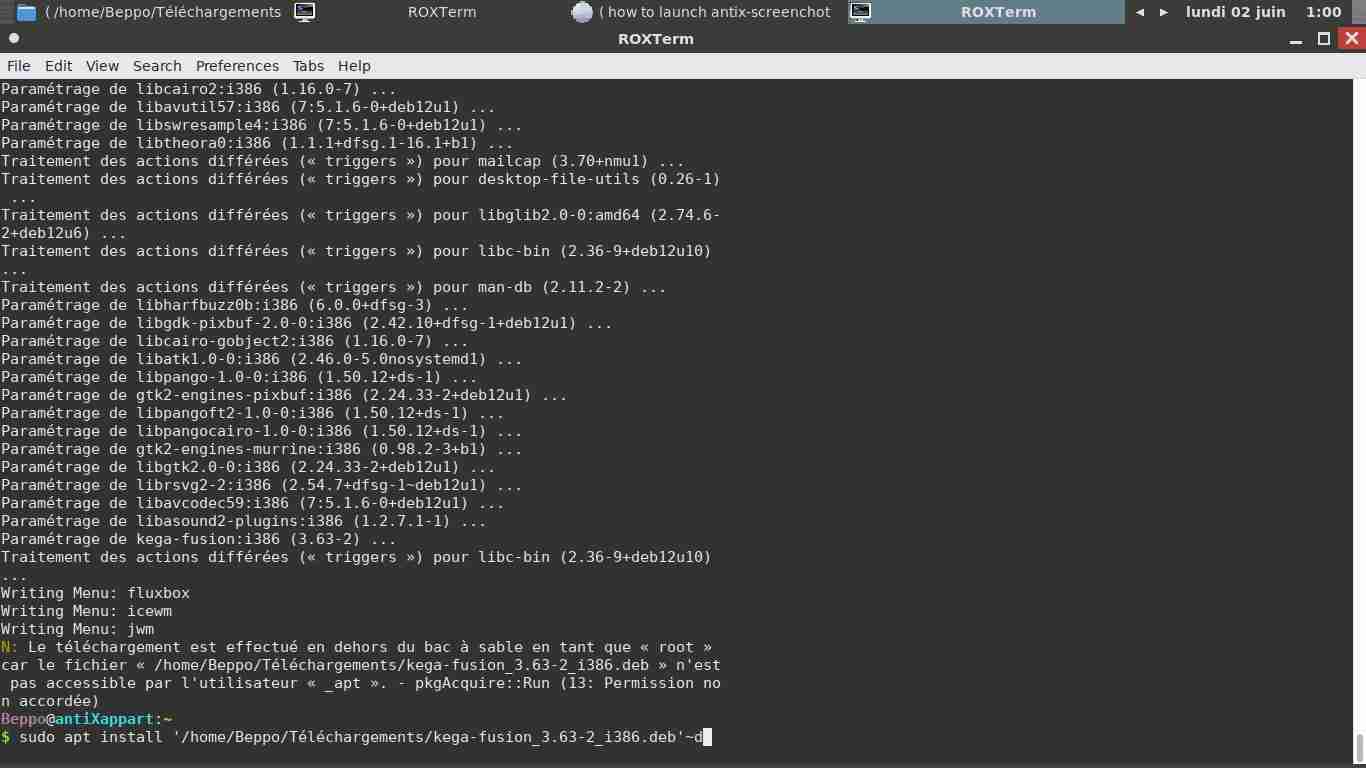
It seems to have worked. It told me in terminal that numerous packages would be installed, that it would take a memory of 207 Mo (I said yes of course). I had many, many packets installed and it took more than a minute.
So, thank you very much. But the question now is, how to launch it.
Attachments:
Sometimes, an up to date system is the best way to avoid problems.
June 1, 2025 at 7:17 pm #178425MemberSo, thank you very much. But the question now is, how to launch it.
I would look in your Applications menu or try ‘kega-fusion’ from a terminal.
It told me in terminal that numerous packages would be installed, that it would take a memory of 207 Mo (I said yes of course).
Yikes. Well, at least no one will ever be able to doubt your loyalty to Kega Fusion again.
So, I downloaded the .deb file from carpe ludum as suggested.
I double-clicked on it…
You know, @marcelocripe had already given good, clear instructions for how to install a deb in the post before this. You could slow down and read before barreling into everything maybe.
"--"
June 1, 2025 at 7:53 pm #178427marcelocripeMemberBeppo, the other way to install the package with the Terminal Emulator is by accessing the folder where the package with zzzFM is, for example, “/home/Beppo/Téléchargements”. Click on the “File” menu, “Terminal”. Then type the command below and press the “Enter” key.
nome de usuario@antix1:~/Téléchargements
$ sudo apt updatenome de usuario@antix1:~/Téléchargements
$ sudo apt upgradenome de usuario@antix1:~/Téléchargements
$ sudo apt install ./kega-fusion_3.63-2_i386.debI explained it in detail in the text files I indicated above, but it seems that you don’t want to consult it. The one who loses the most from this is you, because you stop learning.
– – – – –
Beppo, a outra forma de instalar o pacote com o Emulador de Terminal é acessando a pasta que está o pacote com o zzzFM, por exemplo, “/home/Beppo/Téléchargements”. Clique no menu “Arquivo”, “Terminal”. Em seguida digite o comando abaixo e pressione a tecla “Enter”.
nome de usuario@antix1:~/Téléchargements
$ sudo apt updatenome de usuario@antix1:~/Téléchargements
$ sudo apt upgradenome de usuario@antix1:~/Téléchargements
$ sudo apt install ./kega-fusion_3.63-2_i386.debEu expliquei com detalhes nos arquivos de texto que indiquei acima, mas parece que você não quer consultá-lo. Quem mais perde com isso, é você mesmo, porque deixa de aprender.
-
AuthorPosts


- You must be logged in to reply to this topic.