
- This topic has 7 replies, 5 voices, and was last updated Mar 20-3:57 am by LegendG.
-
AuthorPosts
-
December 26, 2021 at 3:17 pm #73715
madibi
MemberDear, ususally I use Megasync from mega.nz, as my main cloud service (file storage and sync on various pc)
The problem is that on Antix 21 I cannot install it.
What I resume below is the result of various tries on 3 different pc(s), with fresh new installation and tries with the live. Please note that the same program is easy to install both on Q4OS 4,7 (debian11) or Ubuntu 18.04.
1st try
I go to the menu – system – package installer and I search for the megasync package
the installation works for about 40 seconds, then I see for 1 second the terminal, and then the messages:
process finished,
do you want to exit package installer?Of course nothing was installed
2nd try
in the terminal I type:
sudo apt update
sudo apt install gdebiwith firefox I go to mega.nz and I download the app for linux debian 11, using gdebi as tool to handle the file to be downloaded
gdebi writes:
error: cannot install ”libudev1”2nd try bis:
in the terminal I type:
sudo apt install libudev1and I receive the following message:
Some packages could not be installed. This may mean that you have
requested an impossible situation or if you are using the unstable
distribution that some required packages have not yet been created
or been moved out of Incoming.
The following information may help to resolve the situation:The following packages have unmet dependencies:
libudev1 : Depends: libeudev1 but it is not going to be installed
E: Unable to correct problems, you have held broken packages.Can someone help me?
- This topic was modified 4 years, 9 months ago by madibi.
December 26, 2021 at 3:26 pm #73716 anticapitalistaForum Admin
I just downloaded the deb from the site
sudo apt install /home/myusername/Downloads/megasync-Debian_11_amd64.deband it worked fine.
Is your antiX-21 up to date?
Did you dosudo apt updatebefore installing the deb?Have you added any third party repos?
inxi -rwill help.Philosophers have interpreted the world in many ways; the point is to change it.
antiX with runit - leaner and meaner.
December 26, 2021 at 3:38 pm #73719Memberdear Mr Anticapitalista, you just teached me another way to use the sudo apt install programm. Thank you very much 🙂
March 17, 2024 at 7:06 pm #136934LegendG
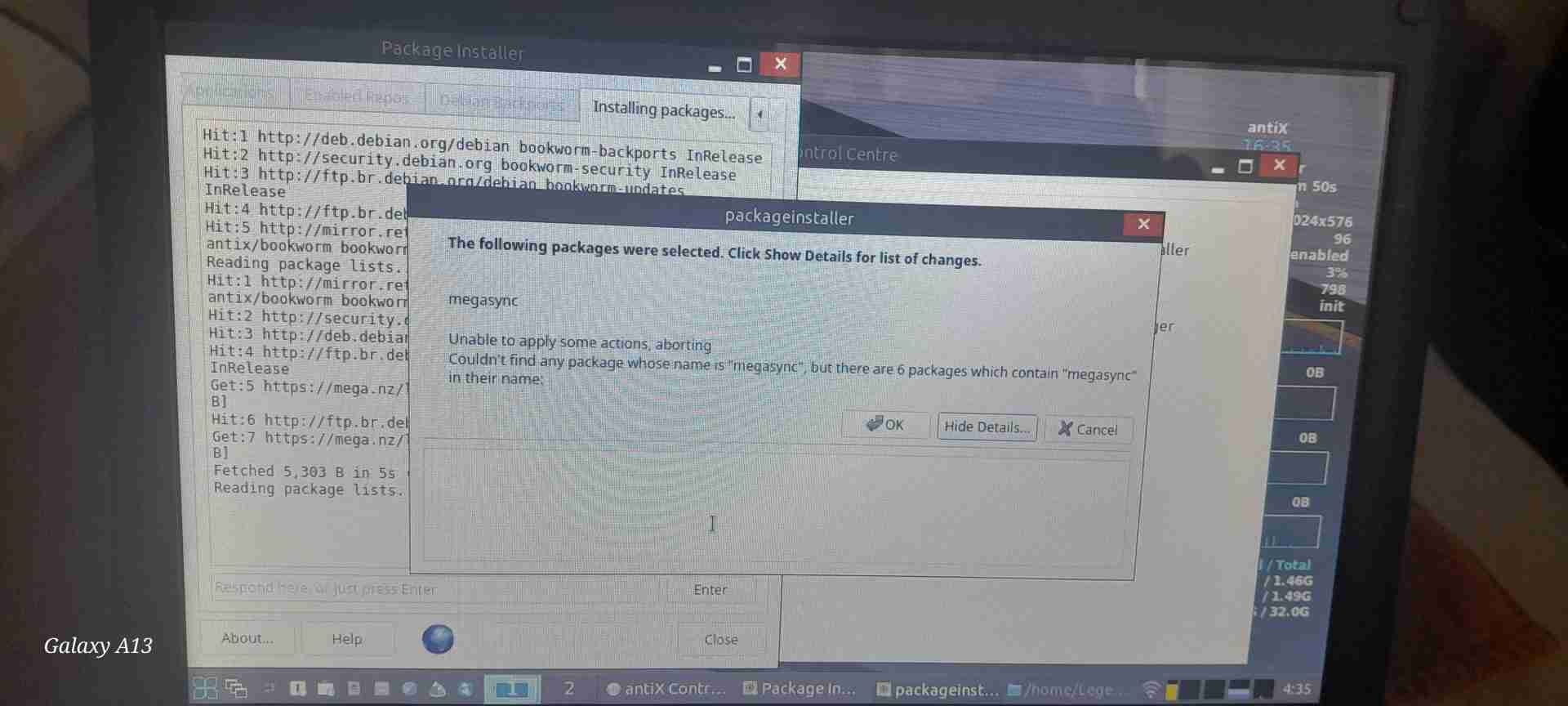
MemberGood day I’m having a similar problem if not abit different as I’m running Antix23.1_386, when I try to install megasync I get an error message.
I have attached the error code as a screenshot pic
Please help…
March 17, 2024 at 7:17 pm #136938Robin
MemberI reckon you have to manually download the package from this New-Zeeland site and install it the way anticapitalista has described and succesfully tested above. Possibly there is no 32 bit package? Then complain at the mega site, it’s up to them what hardware they exclude. There is no way you can use 64bit packages on 32 bit hardware.
Windows is like a submarine. Open a window and serious problems will start.
March 17, 2024 at 7:18 pm #136939PPC
MemberHi- I know, you are new here, but you just did what’s called “necroposting”- you posted on thread that’s been dead for over 3 years.
Usually that is only recomended when you found a solution to a problem described there. When having a similar problem, please, just create a new thread…That said- you are running antiX 23.1 32bits version. At least over at the official megasync site (https://mega.io ), there is no modern version of the application for 32bits Linux, so I assume no 32bits version of that package exists in the Debian 12 and antiX repositories.
If your computer has a 64bits CPU, try running the 64bits version of antiX. Many, many apps are no longer available in (AMD) 32bits- it’s a dead architecture, those computers haven’t been built in the last 10-12 years or so.EDIT: you can try your luck with the old 32bits version of the package, as indicated in megasync site:
wget https://mega.nz/linux/repo/Debian_10.0/i386/megasync-Debian_10.0_i386.deb && sudo apt install "$PWD/megasync-Debian_10.0_i386.deb"P.
- This reply was modified 2 years, 6 months ago by PPC.
March 18, 2024 at 11:05 am #137039Member@LegendG Dear, I confirm you that Mega does not support anymore the 32 bit.
That’s the reason why you don’t find this app in antiX’ app centre.
For that reason on 32 bit pc(s) I use Dropbox, and if I have to make a synch, between Dropbox on the 32 bit machine and a Mega in a 64 bit machine I use Rclone.Please also note that from a 32 bit pc, you can still use Mega from your web browser, better Chromium than Firefox, as far as resourse use are concerned.
Enjoy your antiX 🙂
mMarch 20, 2024 at 3:57 am #137248MemberThanks for the replies, next time I will no beta and create a new thread.
🫡 will try the recommendation… Thanks once again for the help -
AuthorPosts

- You must be logged in to reply to this topic.