
Forum › Forums › New users › New Users and General Questions › Network problem
Tagged: Network/hardware
- This topic has 8 replies, 2 voices, and was last updated May 18-5:01 pm by Brian Masinick.
-
AuthorPosts
-
May 17, 2026 at 8:30 pm #204733
sohayp
MemberHi everyone,
I recently installed antiX-26 Linux on my machine, and I love how lightweight it is. However, I am facing a very frustrating issue with my internet speed.
My internet connection speed is strictly capped/stuck at around half of its actual speed (and sometimes drops much lower, down to around 70 KB/s during downloads).
Crucial Note: On this exact same computer and router, I was using Zorin OS Lite just days ago, and the internet speed was working perfectly at its full speed. This confirms the hardware and the network line are 100% fine.
Here are my system details:
CPU: Intel Core 2 Duo
RAM: 3.5 GB
OS: antiX Linux (SysVinit/runit)
Wi-Fi Adapter: Ralink MT7601U USB Wireless Adapter (using mt7601u driver)
Ethernet: Onboard LAN (eth0 via ConnMan)
The problem happens on BOTH the USB Wi-Fi adapter and the wired LAN (Ethernet cable). It is a global system network limitation, not specific to the Wi-Fi driver.
What I have tried so far:
Disabled IPv6.
Turned off Wi-Fi power saving (iwconfig wlan0 power off and via rc.local).
Added options mt7601u disable_usb_sg=1 auto_power_save=0 to /etc/modprobe.d/mt7601u.conf and updated initramfs.
Changed TCP window sizes and congestion control to bbr in sysctl.conf.
Changed MTU size to 1492.
Unfortunately, none of these steps resolved the issue. It feels like antiX is enforcing a global rate-limiting or TCP buffer limitation to protect CPU/RAM usage on older hardware, which is creating a bottleneck.
How can I remove this network speed restriction and get my full speed back?
Thank you in advance!- This topic was modified 4 months, 1 week ago by sohayp.
May 17, 2026 at 9:16 pm #204736 Brian MasinickModerator
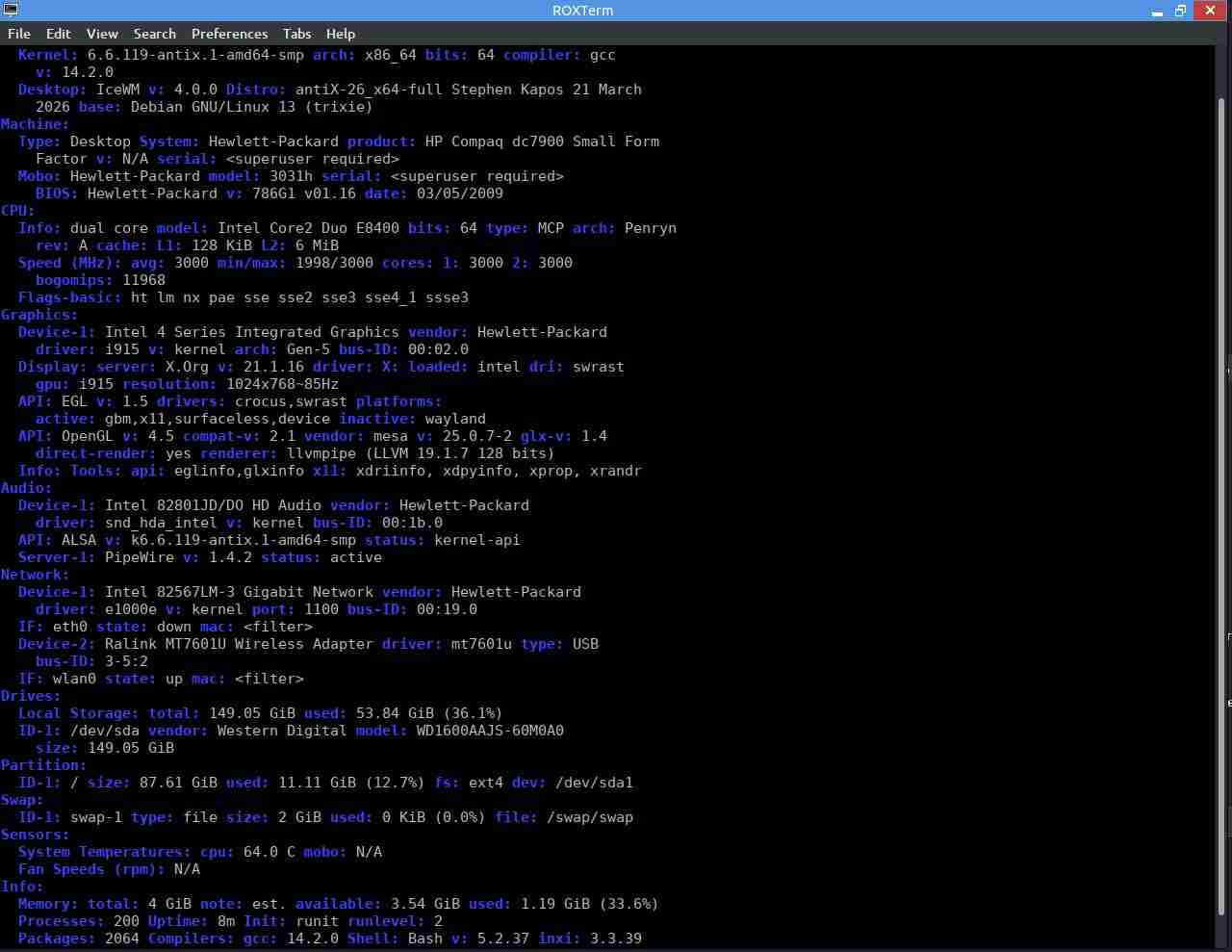
Can you send us the results of an information report:
inxi -Fxz please?--
Brian Masinick
Alternate "Search B":
This search pageMay 17, 2026 at 9:33 pm #204738Memberokay
- This reply was modified 4 months, 1 week ago by sohayp.
Attachments:
May 17, 2026 at 9:42 pm #204741Brian MasinickModeratorThank you. So you are currently using our V6.6 kernel. We have a newer revision of the kernel available, V6.6-137.
Try that. On your old system there’s quite a few kernels available including our old Version 5.10 kernels and the Debian kernels. See if you can locate a kernel version similar to the kernel that works well with Zorin OS Lite and install that.
--
Brian Masinick
Alternate "Search B":
This search pageMay 17, 2026 at 9:51 pm #204742Brian MasinickModeratorI looked up the Zorin kernel; it’s 6.17.
On the Debian Trixie package repository there should be a 6.17 kernel available so try finding and installing a Version 6.17 kernel.
There’s a chance that will work better for you.--
Brian Masinick
Alternate "Search B":
This search pageMay 17, 2026 at 10:01 pm #204744Brian MasinickModeratorhttps://linuxcapable.com/how-to-install-latest-linux-kernel-on-debian-linux/
Can get you up to a 6.19 kernel.https://liquorix.net/ can get you a fresh Version 7 kernel so if this is a system kernel issue there are multiple different kernel options available.
--
Brian Masinick
Alternate "Search B":
This search pageMay 17, 2026 at 10:45 pm #204746MemberThank you, I will see
May 18, 2026 at 4:45 pm #204859MemberThank you for your help! I have updated the kernel to the latest version available in the Package Installer, which is 6.12. The internet speed issue is now completely resolved, and everything is working perfectly
May 18, 2026 at 5:01 pm #204860Brian MasinickModeratorThank you for your help! I have updated the kernel to the latest version available in the Package Installer, which is 6.12. The internet speed issue is now completely resolved, and everything is working perfectly
Excellent! Glad it worked out for you; my guess turned out to work; it was a reasonably educated guess, but it was a guess.
--
Brian Masinick
Alternate "Search B":
This search page -
AuthorPosts
- You must be logged in to reply to this topic.