
Forum › Forums › New users › New Users and General Questions › Problems with installation Gnome Web
- This topic has 20 replies, 4 voices, and was last updated May 15-6:59 am by JK.
-
AuthorPosts
-
May 7, 2022 at 11:11 am #82781
JK
MemberHi !
I am from Czech republic, therfore excuse my english.
Please help me.My first questions is diference between Live Persistence set up in boot menu F5 and creating Live persistent USB Flash disk due Dolphin Oracle video ?
(I made Flash disk with Rufus and set up Persistent static F5.)I tried to install Gnome Web with Package installer, i choosed Browsers and Ephipany and click Install, runned Update and installation, but after item Epiphany is still black.
So i tried to use dpkg, istallation runned, in Package Installer is now grey and in Application Select is, but is not running. I tried command sudo apt install -f and epiphany was removed from Application Select and in Package Installer was black again.
Thanks for answers JK
Attachments:
May 7, 2022 at 11:42 am #82785 capreaModerator
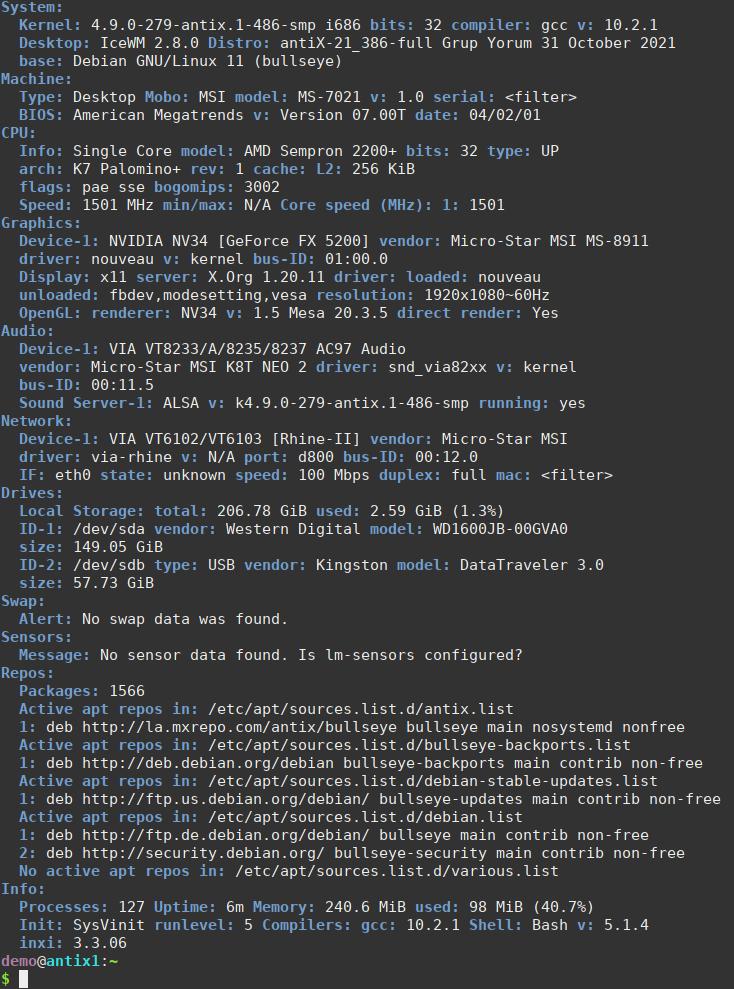
Please post
inxi -FxzrWe can see which version of antiX you are using and if your repos is OK.
It’s not clear where you got the version epiphany-browser 41.2.1-i.386.deb from
On antiX21 it should be epiphany-browser 3.38.2-1+deb11u2
http://packages.debian.org/bullseye/epiphany-browser
and even if you are using testing (bookworm) it should be 42.1-1For 64bit architecture at least epiphany-browser runs fine here installed from package installer (version 3.38.2-1+deb11u2) on antiX21.
May 7, 2022 at 12:18 pm #82786MemberThank you for answer !
I use antiX 21 full and deb file is epiphany-browser_41.2-1_i386.deb
I downloaded from http://www.debian.org- This reply was modified 4 years, 4 months ago by JK.
May 7, 2022 at 4:50 pm #82796capreaModeratorPlease if possible install your packages from package installer or synaptic or with apt from terminal and do not download them from any websites.
epiphany-browser is installable with package installer
control-centre > software > Package Installer > browser
without problems.Otherwise try
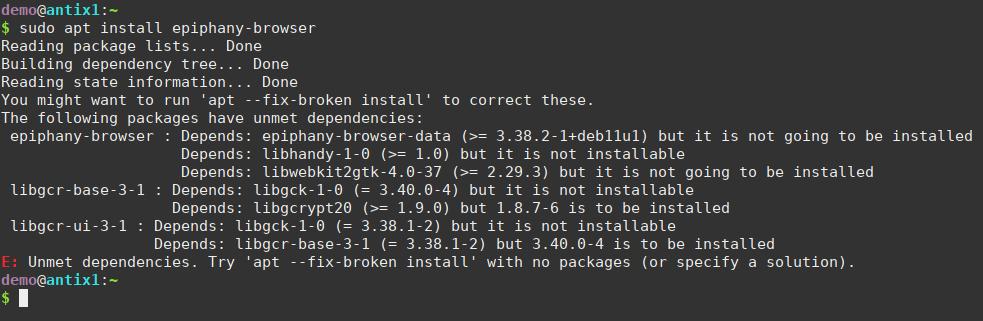
sudo apt update
sudo apt install epiphany-browserand post the output here
Your repos is OK.
I don’t understand what’s your problem with the Live Persistence.
May 7, 2022 at 5:24 pm #82800MemberThanks! Here is result.
With Live Persistence is not problem only question. In video by Dolphin Oracle he use Live USB Maker for create persistent flash disk. I used Rufus and Persistence set up from boot menu F5. It is the same ?
May be here another problem. When i created rootfs i mistakely (i think) set low value 100 MiB and resized antiX dont want (mounted flash disk cannot be resized).
- This reply was modified 4 years, 4 months ago by JK.
Attachments:
May 12, 2022 at 8:03 am #83060MemberHi!
First problem was very low value in rootfs. I fixed it already, resized to 1 GiB. Fo resizing is necessary set no static persistence i set without persistence in boot menu.I restarted again with static persistence and again tried make recommendation of caprea.
In Package Installer instalation again failed.
I tried Terminal sudo apt update
sudo apt install epiphany-browser
installation go and ended but now is problem start application. I look window but application ended.May 12, 2022 at 10:46 am #83065capreaModeratorThe warning message looks like you have to install gnome-keyring or libgnome-keyring0.
May 12, 2022 at 12:02 pm #83067MemberThank you caprea!
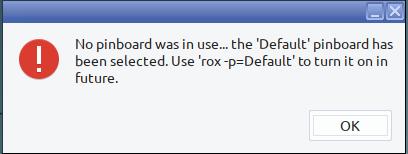
So i installed gnome-keyring, but Gnome Web still open and close window.On start of antiX i look dialog box (I give it below), i dont knnow if it have influence or have not ? rox-p=Default Should i type it in Terminal ?
Attachments:
May 12, 2022 at 2:25 pm #83073 christopheModerator
For the pinboard, see here:
http://www.antixforum.com/forums/topic/rox-pdefault-what-config-file/antiX on everything, since 2017
May 12, 2022 at 3:29 pm #83076MemberThank you christope it fixed problem, antiX dialog box already not show. But Gnome Web is still not running. Influence here was not.
May 12, 2022 at 3:29 pm #83077capreaModeratorJust guessing what’s missing, what about libsecret-1-0 ?
Edit: Forget about the above I see now , the error message is gone but it’s killed nevertheless.
It’s running fine here on 64bit.- This reply was modified 4 years, 4 months ago by caprea.
May 12, 2022 at 4:52 pm #83079MemberIt is possible something to do ? I have 32bit. I choosed due no SSE2 processor, i must use Firefox 48 under Windows XP and there are problems on some pages, i want use antiX with Gnome Web, because it is now only one possibility to have modern browser.
One more possibility it would be damaged flash disk. I have feeling that start of antiX is more slow. Can i check it ?May 12, 2022 at 5:54 pm #83083capreaModeratorPlease try to start epiphany browser from terminal with first doing following command.
export JavaScriptCoreUseJIT=0
Afterwards in the same terminal type
epiphany
Seen here in a thread about otter-browser,, which by the way also worth a try.
http://www.antixforum.com/forums/topic/installing-otter-browser-on-antix/page/2/#post-78355May 12, 2022 at 6:45 pm #83085MemberI tried, but it is the same.
May 14, 2022 at 10:20 am #83114MemberSo i installed Otter browser. It is running (but run very slowly). Is here another problem, when i want use google, page is loaded well, but if i type words for finding and give enter browser itself close.
-
AuthorPosts








- You must be logged in to reply to this topic.