
- This topic has 17 replies, 6 voices, and was last updated Jun 18-9:26 am by lumosorio.
-
AuthorPosts
-
March 26, 2025 at 1:21 pm #173499
abc-nix
MemberI have not been able to find an easy way to replace the strings in a ods file. I think I was wrong, and they are binary files that cannot be edited with a text editor.
About running Office 2013 that you linked on 32-bits, I got it to work following the same steps as described in my other post on a virtual machine. The only difference was installing consolekit libconsolekit1 and libpam-ck-connector (just for a different issue I had on the virtual machine).
As described, I started with the antix 23.2 full 32-bits runit ISO. I first fully updated the system and installed on the virtual machine. After reboot, I then installed playonlinux with recommended packages (it automatically installs wine, etc. with the recommended dependencies), then winbind, (and the consolekit packages), and then followed the playonlinux steps to install it. No issue installing and starting the program from the playonlinux menus.
Biggest difference with your machine is that mine is not really 32-bits (I used a virtual machine), and that you are using the xorg intel graphics driver instead of the kernel modesetting, but I am not sure if this makes a difference.
If you are still having issues, I could try creating a personal snapshot, but that won’t be today.
Attachments:
Corruption has two hands: the Right and the Left. Don't let them squeeze you.
March 26, 2025 at 1:39 pm #173501Robin
MemberI have not been able to find an easy way to replace the strings in a ods file. I think I was wrong, and they are binary files that cannot be edited with a text editor.
odf files are simply a bundle of zipped files and folders. They are not binary. So just extract them before applying sed commands.
For example, a typical .ods file contains:
Configurations2
META-INF
Thumbnails
content.xml
manifest.rdf
meta.xml
mimetype
settings.xml
styles.xml
You can extract them e.g. with file-roller.
Odt files are pretty similar. All the wrong links are in the odt file’s content.xml, but you’ll find it not that clearly structured as one should expect, and moreover the source linked originally to is in xls format, so additional changes might be needed to make the data being accepted from an ods source. In particular the part connectString=Provider%3DMicrosoft.ACE.OLEDB.12.0 will most likely need to read differently when linking to a non microsoft format.
<form:connection-resource xlink:href="file:///C:\Users\Dell\Downloads\automatización%20crédito%20coopesena\Análisis\003%20CESAR%20AUGUSTO%20GARCÍA%20HURTADO\Excel%20automatización%20análisis.xlsx#mainDocumentType=0&linkToQuery=1&dataType=5&connectString=Provider%3DMicrosoft.ACE.OLEDB.12.0;User%20ID%3DAdmin;Data%20Source%3DC:\Users\Dell\Downloads\automatizaci%F3n%20cr%E9dito%20coopesena\An%E1lisis\003%20CESAR%20AUGUSTO%20GARC%CDA%20HURTADO\Excel%20automatizaci%F3n%20an%E1lisis.xlsx;Mode%3DRead;Extended%20Properties%3D%22HDR%3DYES;IMEX%3D1;%22;Jet%20OLEDB:System%20database%3D%22%22;Jet%20OLEDB:Registry%20Path%3D%22%22;Jet%20OLEDB:Engine%20Type%3D37;Jet%20OLEDB:Database%20Locking%20Mode%3D0;Jet%20OLEDB:Global%20Partial%20Bulk%20Ops%3D2;Jet%20OLEDB:Global%20Bulk%20Transactions%3D1;Jet%20OLEDB:New%20Database%20Password%3D%22%22;Jet%20OLEDB:Create%20System%20Database%3DFalse;Jet%20OLEDB:Encrypt%20Database%3DFalse;Jet%20OLEDB:Don't%20Copy%20Locale%20on%20Compact%3DFalse;Jet%20OLEDB:Compact%20Without%20Replica%20Repair%3DFalse;Jet%20OLEDB:SFP%3DFalse;Jet%20OLEDB:Support%20Complex%20Data%3DFalse;Jet%20OLEDB:Bypass%20UserInfo%20Validation%3DFalse;Jet%20OLEDB:Limited%20DB%20Caching%3DFalse;Jet%20OLEDB:Bypass%20ChoiceField%20Validation%3DFalse&query=SELECT%20*%20FROM%20%60'DATOS%20CARTA%20(OUTPUT)$'%60%20&dataSource=C:\Users\Dell\Downloads\automatizaci%F3n%20cr%E9dito%20coopesena\An%E1lisis\003%20CESAR%20AUGUSTO%20GARC%CDA%20HURTADO\Excel%20automatizaci%F3n%20an%E1lisis.xlsx&odsoUdl=Provider%3DMicrosoft.ACE.OLEDB.12.0;User%20ID%3DAdmin;Data%20Source%3DC:\Users\Dell\Downloads\automatizaci%F3n%20cr%E9dito%20coopesena\An%E1lisis\003%20CESAR%20AUGUSTO%20GARC%CDA%20HURTADO\Excel%20automatizaci%F3n%20an%E1lisis.xlsx;Mode%3DRead;Extended%20Properties%3D%22HDR%3DYES;IMEX%3D1;%22;Jet%20OLEDB:System%20database%3D%22%22;Jet%20OLEDB:Registry%20Path%3D%22%22;Jet%20OLEDB:Engine%20Type%3D37;Jet%20OLEDB:Database%20Locking%20Mode%3D0;Jet%20OLEDB:Global%20Partial%20Bulk%20Ops%3D2;Jet%20OLEDB:Global%20Bulk%20Transactions%3D1;Jet%20OLEDB:New%20Database%20Password%3D%22%22;Jet%20OLEDB:Create%20System%20Database%3DFalse;Jet%20OLEDB:Encrypt%20Database%3DFalse;Jet%20OLEDB:Don't%20Copy%20Locale%20on%20Compact%3DFalse;Jet%20OLEDB:Compact%20Without%20Replica%20Repair%3DFalse;Jet%20OLEDB:SFP%3DFalse;Jet%20OLEDB:Support%20Complex%20Data%3DFalse;Jet%20OLEDB:Bypass%20UserInfo%20Validation%3DFalse;Jet%20OLEDB:Limited%20DB%20Caching%3DFalse;Jet%20OLEDB:Bypass%20ChoiceField%20Validation%3DFalse&odsoTable='DATOS%20CARTA%20(OUTPUT)$'&odsoSrc=C:\Users\Dell\Downloads\automatizaci%F3n%20cr%E9dito%20coopesena\An%E1lisis\003%20CESAR%20AUGUSTO%20GARC%CDA%20HURTADO\Excel%20automatizaci%F3n%20an%E1lisis.xlsx&odsoColDelim=9&odsoType=1&odsoFHdr=1&fieldMapColumn=0&fieldMapLid=9226&fieldMapDataEnd=1&fieldMapColumn=0&fieldMapLid=9226&fieldMapDataEnd=2&fieldMapColumn=0&fieldMapLid=9226&fieldMapDataEnd=3&fieldMapColumn=0&fieldMapLid=9226&fieldMapDataEnd=4&fieldMapColumn=0&fieldMapLid=9226&fieldMapDataEnd=5&fieldMapColumn=0&fieldMapLid=9226&fieldMapDataEnd=6&fieldMapColumn=0&fieldMapLid=9226&fieldMapDataEnd=7&fieldMapColumn=0&fieldMapLid=9226&fieldMapDataEnd=8&fieldMapColumn=0&fieldMapLid=9226&fieldMapDataEnd=9&fieldMapColumn=0&fieldMapLid=9226&fieldMapDataEnd=10&fieldMapColumn=0&fieldMapLid=9226&fieldMapDataEnd=11&fieldMapColumn=0&fieldMapLid=9226&fieldMapDataEnd=12&fieldMapColumn=0&fieldMapLid=9226&fieldMapDataEnd=13&fieldMapColumn=0&fieldMapLid=9226&fieldMapDataEnd=14&fieldMapColumn=0&fieldMapLid=9226&fieldMapDataEnd=15&fieldMapColumn=0&fieldMapLid=9226&fieldMapDataEnd=16&fieldMapColumn=0&fieldMapLid=9226&fieldMapDataEnd=17&fieldMapColumn=0&fieldMapLid=9226&fieldMapDataEnd=18&fieldMapColumn=0&fieldMapLid=9226&fieldMapDataEnd=19&fieldMapColumn=0&fieldMapLid=9226&fieldMapDataEnd=20&fieldMapColumn=0&fieldMapLid=9226&fieldMapDataEnd=21&fieldMapColumn=0&fieldMapLid=9226&fieldMapDataEnd=22&fieldMapColumn=0&fieldMapLid=9226&fieldMapDataEnd=23&fieldMapColumn=0&fieldMapLid=9226&fieldMapDataEnd=24&fieldMapColumn=0&fieldMapLid=9226&fieldMapDataEnd=25&fieldMapColumn=0&fieldMapLid=9226&fieldMapDataEnd=26&fieldMapColumn=0&fieldMapLid=9226&fieldMapDataEnd=27&fieldMapColumn=0&fieldMapLid=9226&fieldMapDataEnd=28&fieldMapColumn=0&fieldMapLid=9226&fieldMapDataEnd=29&fieldMapColumn=0&fieldMapLid=9226&fieldMapDataEnd=30&recipientActive=0&recipientHash=71489417&recipientDataEnd=1"/>Use zip compression afterwards to re-assemble a valid odt or ods file from the modified content.
Windows is like a submarine. Open a window and serious problems will start.
June 18, 2025 at 9:26 am #179599lumosorio
MemberHi, long time no chatting.
I tried to install as you said, installing consolekit, libconsolekit1 and libpam-ck-connector, but it didn’t work.
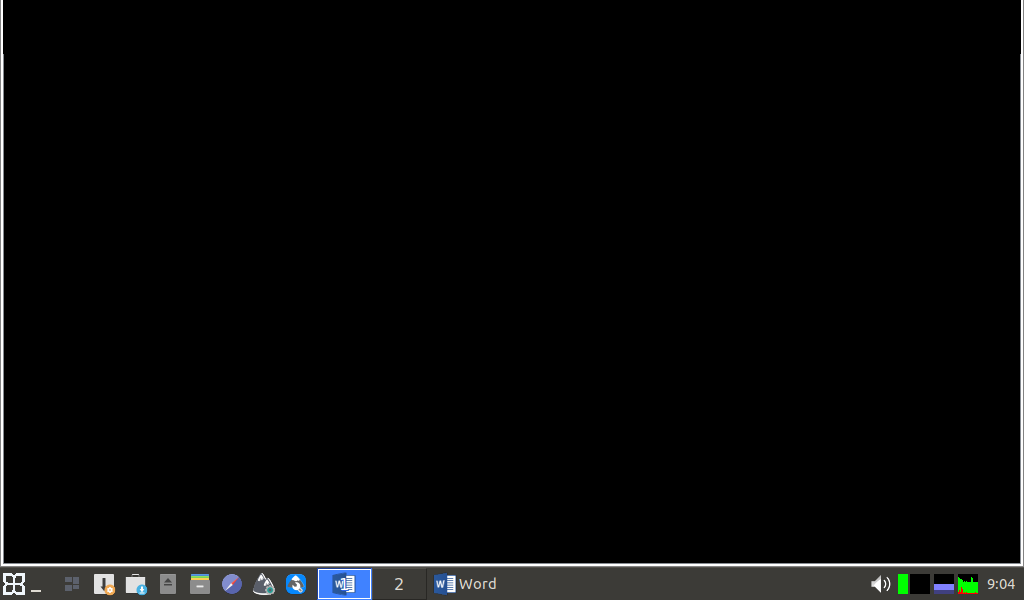
I see the same black screen.
Something else I could do?
Attachments:
-
AuthorPosts

- You must be logged in to reply to this topic.