
Forum › Forums › New users › New Users and General Questions › Qt6 warning messages (a bunch)
- This topic has 2 replies, 2 voices, and was last updated Jun 8-11:30 am by wildstar84.
-
AuthorPosts
-
June 6, 2026 at 9:38 pm #206100
 wildstar84Member
I’m running antiX-26 stable and all of my handful of Qt6 apps always spew the following spam whenever I start any of them up, though everything seems to work properly, including colors & styles. The problem does not happen with Qt5 apps. It also happens regardless of using custom or default settings. The only thing that stops it is unsetting QT_QPA_PLATFORMTHEME, which I normally have set to “qt6ct”, but also produces same spam if set to “qt5ct”. I’ve googled this every way I can think of and have found nothing. Any ideas?
Detected locale "en_US.iso88591" with character encoding "ISO-8859-1", which is not UTF-8.
Qt depends on a UTF-8 locale, and has switched to "en_US.UTF-8" instead.
If this causes problems, reconfigure your locale. See the locale(1) manual
for more information.
virtual const QPalette* Qt6CTPlatformTheme::palette(QPlatformTheme::Palette) const QPlatformTheme::SystemPalette
virtual const QPalette* Qt6CTPlatformTheme::palette(QPlatformTheme::Palette) const QPlatformTheme::ToolButtonPalette
virtual const QPalette* Qt6CTPlatformTheme::palette(QPlatformTheme::Palette) const QPlatformTheme::ButtonPalette
virtual const QPalette* Qt6CTPlatformTheme::palette(QPlatformTheme::Palette) const QPlatformTheme::CheckBoxPalette
virtual const QPalette* Qt6CTPlatformTheme::palette(QPlatformTheme::Palette) const QPlatformTheme::RadioButtonPalette
virtual const QPalette* Qt6CTPlatformTheme::palette(QPlatformTheme::Palette) const QPlatformTheme::HeaderPalette
virtual const QPalette* Qt6CTPlatformTheme::palette(QPlatformTheme::Palette) const QPlatformTheme::ItemViewPalette
virtual const QPalette* Qt6CTPlatformTheme::palette(QPlatformTheme::Palette) const QPlatformTheme::MessageBoxLabelPelette
virtual const QPalette* Qt6CTPlatformTheme::palette(QPlatformTheme::Palette) const QPlatformTheme::TabBarPalette
virtual const QPalette* Qt6CTPlatformTheme::palette(QPlatformTheme::Palette) const QPlatformTheme::LabelPalette
virtual const QPalette* Qt6CTPlatformTheme::palette(QPlatformTheme::Palette) const QPlatformTheme::GroupBoxPalette
virtual const QPalette* Qt6CTPlatformTheme::palette(QPlatformTheme::Palette) const QPlatformTheme::MenuPalette
virtual const QPalette* Qt6CTPlatformTheme::palette(QPlatformTheme::Palette) const QPlatformTheme::MenuBarPalette
virtual const QPalette* Qt6CTPlatformTheme::palette(QPlatformTheme::Palette) const QPlatformTheme::TextEditPalette
virtual const QPalette* Qt6CTPlatformTheme::palette(QPlatformTheme::Palette) const QPlatformTheme::TextEditPalette
virtual const QPalette* Qt6CTPlatformTheme::palette(QPlatformTheme::Palette) const QPlatformTheme::TextLineEditPalette
virtual const QPalette* Qt6CTPlatformTheme::palette(QPlatformTheme::Palette) const QPlatformTheme::ToolTipPalette
virtual QVariant Qt6CTPlatformTheme::themeHint(QPlatformTheme::ThemeHint) const
virtual const QPalette* Qt6CTPlatformTheme::palette(QPlatformTheme::Palette) const QPlatformTheme::SystemPalette
virtual QVariant Qt6CTPlatformTheme::themeHint(QPlatformTheme::ThemeHint) const
virtual QVariant Qt6CTPlatformTheme::themeHint(QPlatformTheme::ThemeHint) const
Thanks,
Jim
June 7, 2026 at 1:51 am #206103Robin
MemberSeems you have set up your system with a non-utf8 locale, which can and will cause lots of trouble these days.
Check:
$ locale
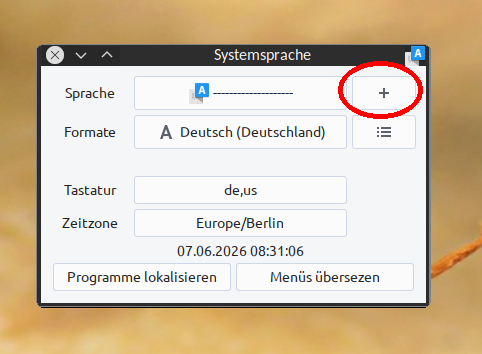
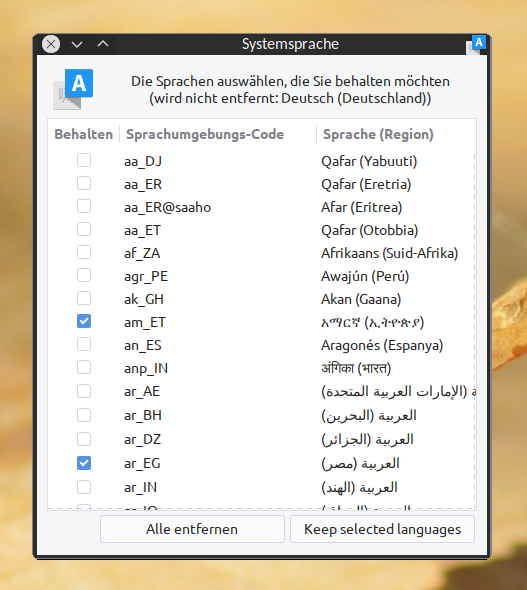
If something different than settings ending with .UTF-8 show up, run the User Language tool in antiX Control Centre, section System, and therein click the + button right next to the current language (screenshot 1) to select a proper UTF-8 locale (screenshot 2).Alternatively do what the error message suggests already: reconfigure your locale on command line. If you want to do it that way, check with
$ sudo debconf-show locales
what is currently set on your system. Then:
$ sudo dpkg-reconfigure locales
(search forum, how to apply this had been discussed already several times)In any case, make sure to set an UTF-8 locale instead of the iso88591 you are obviously using on your system for some strange reason, if the error message is correct.
Windows is like a submarine. Open a window and serious problems will start.
June 8, 2026 at 11:30 am #206210wildstar84MemberOk, I’ve applied the suggested solution which fixes the locale warnings, but all the “QPalette” warnings still remain, any other ideas or anyone else experiencing this?
-
AuthorPosts
- You must be logged in to reply to this topic.