
Forum › Forums › New users › New Users and General Questions › URL link does not open browser
Tagged: browser
- This topic has 13 replies, 5 voices, and was last updated Jul 18-3:50 am by symbol.
-
AuthorPosts
-
July 4, 2021 at 8:48 pm #62766
jbeck
MemberHi,
I have a strange problem: URL links from applications do not open the default browser anymore, but try to mount a removable device with udevil !
I checked the favorite applications program for the browser (firefox-esr), the galternatives for x-www-browser, and the mime types without anything abnormal found.
What could lead url links to such a false direction ?
Many thanks indeed for your help !July 5, 2021 at 1:00 am #62767 christopheModerator
I understand that ‘galternatives for x-www-browser’ is correct — but if you are specific, and tell us the exact web site, then maybe we can figure it out…
antiX on everything, since 2017
July 5, 2021 at 7:41 am #62772MemberThank you Christophe.
This happens with all links within applications, for example links to the on-line help file, when pushing the application help button, or any other.
I run Antix 19.3 (fully up to date) and kernel is 4.9.0-264
Would this be Windows, I would suspect a virus. But could this be possible with Antix ?July 5, 2021 at 7:43 am #62773 XecureMember
Hi, jbeck.
URL links from applications do not open the default browser anymore, but try to mount a removable device with udevil !
Is it with all applications or only some? If it is only one app, then it may require you to go to the configuration window of that app to change the “open with” behavior.
Most applications will open files and URLs with either xdg-open or mimeopen
xdg-open http://www.antixlinux.com
xdg-open is really the correct way, and mime-open is alternatively used for files inside the system.
Test the above command out and let us know if it gives the same strange result that you experienced. We will try to help fix it.- This reply was modified 5 years, 2 months ago by Xecure.
antiX Live system enthusiast.
General Live Boot Parameters for antiX.July 5, 2021 at 8:23 am #62774MemberThanks Xesure,
This happens with all applications (Libreoffice, CHerrytree, OBS Studio, GIMP, etc… to mention a few). The URL open SpaceFM, and then udevil tries to mount a media taking the URL as media name.
I’m attaching the screen shot of galternatives for x-www-desktop, although this looks correct…Attachments:
July 5, 2021 at 8:43 am #62777MemberThis is the result of xdg-open in terminal. It reacts exactly like links within applications:
________________________________________________________
$ xdg-open http://www.antixlinux.com(spacefm:11735): SpaceFM-WARNING **: 10:40:16.554: No root settings found in /etc/spacefm/ Setting a root editor in Preferences should remove this warning on startup. Otherwise commands run as root may present a security risk.
special mount changed: /dev/fuse (0:29) on /run/user/1000/docSelected Protocol Handler ‘http & webdav’: MOUNT http [https] webdav davfs davs dav mtab_fs=davfs*
TASK_COMMAND(0x558428c36000)=fm_url_proto=’https’; fm_url=’http://www.antixlinux.com’; fm_url_host=’www.antixlinux.com’; fm_url_port=”; fm_url_user=”; fm_url_pass=”; fm_url_path=”; fm_mtab_fs=”; fm_mtab_url=”
# This handler opens http:// and webdav://# Set your web browser in Help|Options|Browser
# set missing_davfs=1 if you always want to open http in web browser
# set missing_davfs=0 if you always want to mount http with davfs
missing_davfs=if [ -z “$missing_davfs” ]; then
grep -qs ‘^[[:space:]]*allowed_types[[:space:]]*=[^#]*davfs’ \
/etc/udevil/udevil.conf 2>/dev/null
missing_davfs=$?
fi
if [ “$fm_url_proto” = “webdav” ] || [ “$fm_url_proto” = “davfs” ] || \
[ “$fm_url_proto” = “dav” ] || [ “$fm_url_proto” = “davs” ] || \
[ $missing_davfs -eq 0 ]; then
fm_url_proto=”${fm_url_proto/webdav/http}”
fm_url_proto=”${fm_url_proto/davfs/http}”
fm_url_proto=”${fm_url_proto/davs/https}”
fm_url_proto=”${fm_url_proto/dav/http}”
url=”${fm_url_proto}://${fm_url_host}${fm_url_port:+:}${fm_url_port}${fm_url_path:-/}”
[[ -z “$fm_url_user$fm_url_password” ]] && msg=”” || \
msg=”Warning: user:password in URL is not supported by davfs.”
# attempt davfs mount in terminal
spacefm -s run-task cmd –terminal \
“echo $msg; echo ‘udevil mount $url’; udevil mount ‘$url’ || ” \
“( echo; echo ‘Press Enter to close:’; read )”
exit
fi
# open in web browser
spacefm -s run-task web “$fm_url”SPAWN=/bin/bash /tmp/spacefm-Jacques-364a42df.tmp/66f5337c-tmp.sh run
pid = 11757TASK_COMMAND(0x558428c36150)=echo ; echo ‘udevil mount http://www.antixlinux.com/’; udevil mount ‘http://www.antixlinux.com/’ || ( echo; echo ‘Press Enter to close:’; read )
SPAWN=/usr/bin/roxterm –disable-sm –separate -e /bin/bash /tmp/spacefm-Jacques-364a42df.tmp/46efa889-tmp.sh run
pid = 11761
child finished pid=11757 exit_status=0async child finished pid=11761
_____________________________________July 5, 2021 at 9:06 am #62778XecureMemberOk.
First test: Output of:
xdg-settings get default-web-browser
If it says “firefox-esr.desktop”, then that is OK. If it doesn’t, then do
xdg-settings set default-web-browser firefox-esr.desktopEDIT: Ignore file attached (has a bug)
- This reply was modified 5 years, 2 months ago by Xecure.
- This reply was modified 5 years, 2 months ago by Xecure. Reason: moving the seconfd recommendation o next reply
Attachments:
antiX Live system enthusiast.
General Live Boot Parameters for antiX.July 5, 2021 at 9:21 am #62781XecureMemberIf that doesn’t fix it,
Second test: run a (slightly) modified preferred applications app. (see attachments)
You just need to uncompress it, run it, click OK, and see if this sets the correct mime configuration.
If it doesn’t, then we will explore editing the $HOME/.config/mimeapps.list(Disregard the file attached in my previous reply. I had a small bug in the script.
File attached is the correct one.)- This reply was modified 5 years, 2 months ago by Xecure. Reason: clarification experiment 2
Attachments:
antiX Live system enthusiast.
General Live Boot Parameters for antiX.July 5, 2021 at 9:24 am #62785MemberMany thanks Xecure.
The command: xdg-settings set default-web-browser firefox-esr.desktop completely fixed the problem.
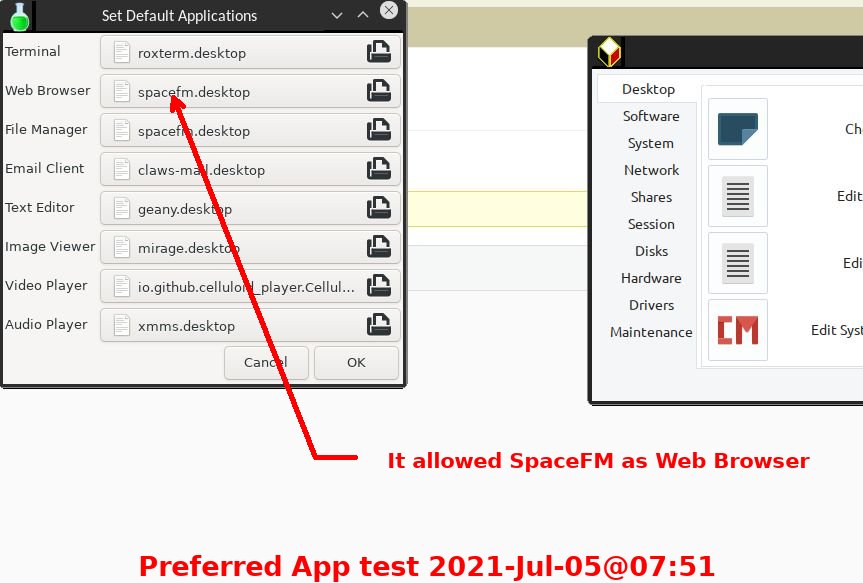
Don’t know why the default-web-browser became spacefm.desktop. But neither mind, now it works.I appreciate your great help
July 5, 2021 at 10:04 am #62786XecureMemberThat is great. I will see if I can experiment a bit with the preferred applications script and propose a fix so that this issue can easily be solved running the program instead of running an obscure command.
Thanks for reporting the resolution of the problem.
antiX Live system enthusiast.
General Live Boot Parameters for antiX.July 5, 2021 at 12:47 pm #62794BobC
ModeratorI wonder if the script that is used to change the preferred application checks the desktop entry to see if it provides browser ability? I would guess maybe what happened wasthat spacefm was accidentally selected as the browser rather than file manager.
If it would check the desktop entry’s Categories for “WebBrowser;”, only valid ones would be allowed.
Categories=Network;WebBrowser;- This reply was modified 5 years, 2 months ago by BobC. Reason: Add screenshot of likely cause
- This reply was modified 5 years, 2 months ago by BobC. Reason: added wrong pic initially
- This reply was modified 5 years, 2 months ago by BobC.
Here is the link to SEARCH THE FORUM >> http://www.antixforum.com/search-forums
July 5, 2021 at 4:17 pm #62814MemberIndeed, it may be that once upon a time on this computer “spacefm” was selected as the preferred web browser.
However, when I was facing the problem, I first checked the preferred apps list. The web browser line was empty (no preferred browser). I then added firefox-esr on that line. But this did not fix the problem.
Hope this info helps finding an enhancement to “preferred applications” avoiding such incident in the future.
Again, many many thanks to the whole community for your involvement.
JacquesJuly 6, 2021 at 8:29 pm #62838ModeratorI looked at the .desktop files and code, and my idea of looking at the categories entries won’t work. I also don’t see alternatives entries for things like file managers and the other programs covered by preferred applications, so using it probably isn’t a good idea because none of the other programs people have installed would be registered.
One thing I found was in the apt database where the “provides” list does say what functionality the package provides, but unfortunately some packages have more than one desktop entry that provide different programs and functionality. One of them might be a good program to open for browser functionality, another might not.
I guess I didn’t find a good answer. Sometimes having many different ways of doing things is a disadvantage.
Here is the link to SEARCH THE FORUM >> http://www.antixforum.com/search-forums
July 18, 2023 at 3:50 am #111975symbol
Memberin my case hi how to make sure that my chosen x-www-browser is consistent with my default browser
the following command will fix it:
sudo update-alternatives --config x-www-browser$ sudo update-alternatives --config x-www-browser There are 2 choices for the alternative x-www-browser (providing /usr/bin/x-www-browser). Selection Path Priority Status ------------------------------------------------------------ 0 /usr/bin/brave-browser-stable 201 auto mode 1 /usr/bin/brave-browser-stable 201 manual mode * 2 /usr/bin/microsoft-edge-dev 0 manual mode $ xdg-settings get default-web-browser microsoft-edge-dev.desktop- This reply was modified 3 years, 2 months ago by symbol.
- This reply was modified 3 years, 2 months ago by symbol.
-
AuthorPosts


- You must be logged in to reply to this topic.