
Forum › Forums › Official Releases › antiX-23 “Arditi del Popolo › VirtualBox Installation Issue
Tagged: Virtualbox issue
- This topic has 13 replies, 8 voices, and was last updated Nov 10-7:03 am by Robin.
-
AuthorPosts
-
July 31, 2025 at 11:31 am #182675
MnzelDenslw
MemberDear Expert(s)/ Developer(S),
I am facing installion issue in latest VirtualBox-7.1.12-169651-Win. Last working version is VirtualBox-7.0.22-165102-Win. Can you please look into this.
(My host pc in Windows 10 pro latest. Core i3-2100. In virtualbox VDI, Debian x64 selected, Ram 2GB, 2 Core, no EFi selected, Others are default.)Problems are:
1) sysVinit Basex64 iso doesn’t even load live iso in latest virtualbox gives me black screen for like 5min+- then console mode and login comes. But live iso properly loads in safe mode. After install again doesn’t load gives me black screen for like 5min+- then console mode and login comes.
2) Full sysVinit x64 iso can properly load live iso and can install properly. But after bootup it gives me black screen for like 5min+- then console mode and login comes. If i login stays in console mode, then if i type “starts” ut loads thesystems but black screen no wallpaper but menus can be seen ans works. Then if shutdown and bootup again same console mode come.— I installed MX-23.6_x64.iso yesterday in latest virtualbox with no problem no issue, same settings. It seems Antix_x64 isn’t working in latest virtualbox, Antix_x64 in VirtualBox-7.0.22 works (Windows as Host).
— I am a windows user new in Linux so i can only use Antix_x64 in virtualbox to learn it. I am requesting you to help me in this issue. Thanks in advance.Attachments:
July 31, 2025 at 11:55 am #182678Robin
MemberAs a first shot into the blue: Try switching the graphics acceleration and 3d functionality off in the virtual machines settings. Select there a different graphics controller. Virtualbox has issues with their default video controller and in particular with their acceleration and 3d functionality to properly support some OS.
And then: Check its logfiles from the failed run for issues.
If it has worked for you with former Virtualbox versions as you state, you should consider sending them (Oracle) a bug report, so they can fix this new issue.
Windows is like a submarine. Open a window and serious problems will start.
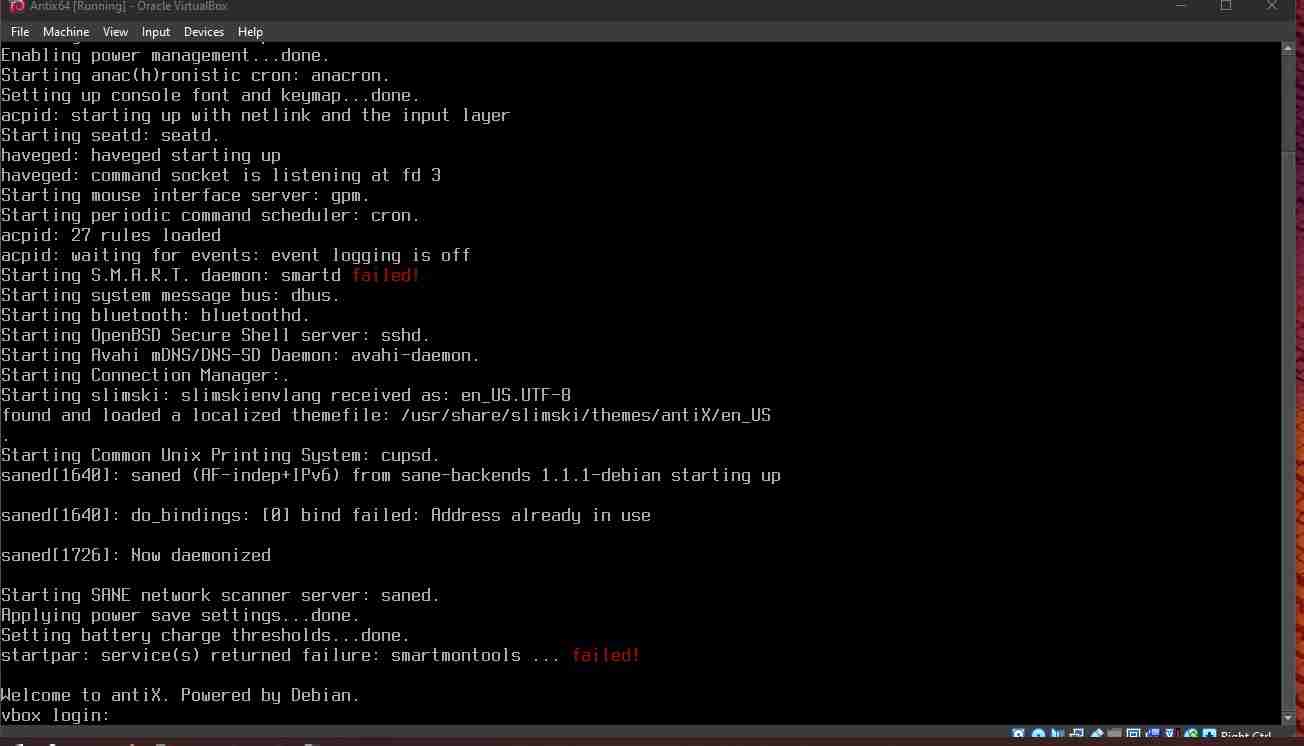
July 31, 2025 at 12:45 pm #182682Member@Robin I tried as you mentioned above but same. It runs but in a console mode login as you see the picture i attached. I installed Mx Linux with no problem but antiX is not working properly. I think its not the virtualbox issue, if it is then Mx Linux would face the same issue or other issue. Requesting developer/ maintiner to look into this. Thank you for replying 🙂
July 31, 2025 at 2:48 pm #182685 christopheModerator
Perhaps if you boot the live USB directly (not in a VM), you could enjoy antiX that way. antiX has a great live system, and many people use only that, not installing it at all.
Just a thought.
antiX on everything, since 2017
July 31, 2025 at 4:53 pm #182688MemberI think its not the virtualbox issue, if it is then Mx Linux would face the same issue or other issue.
No, this is a false conclusion, since there are differences between these OSes, even when they share some technologies.
On the contrary: if it used to work before Oracle has modified something in their virtualbox in a new version, how you come to the strange idea it could be antiX devs who could do something? I mean, Oracle devs must be clearly the single ones knowing what they have changed to make it fail now.But, if you want to investigate anyway, and since you are on the antiX console already, run:
$ sudo dmesg
$ sudo inxi -zv8
For this, the default login in a Live antiX is demo/demo. If you have created your user vbox and assigned a password to him, use these credentials instead.
Attach the complete output here as plain text files, along with the complete virtualbox logs from the failing run. Maybe somebody can spot something obvious, not requiring deeper knowledge about the Oracle software and Windows. Without your virtualbox logs and dmsg/inxi results nobody here has any chance even to guess what blocks your attempt in a virtualbox environment on a windows based machine.
Another possible way around: Retry antiX full instead of base. It comes with some more firmware and drivers preinstalled, which in base you are expected to care for on your own (that’s why it is named “base”.) Again, even then try all graphics controller and acceleration/3d combinations provided by Virtualbox, this is the most likely culprit.
For windows users not familiar with linux and antiX in particular, always the full versions are recommended, for reasons.
Windows is like a submarine. Open a window and serious problems will start.
September 24, 2025 at 5:00 am #185945MikeDeltaBravo
MemberI have experienced the same issue with not being able to get a graphical display with antiX on VirtualBox. This is with a Linux (Mageia) host.
I was able to run the installer in safe mode but the installed antiX will not start a graphical display.
I tried for about 3 hours with all sorts of VirtualBox settings, installing the guest additions via command line, doing updates, etc all to no avail.
I therefore gave up with antiX and tried MX instead. With the same VirtualBox settings as I originally use with antiX, the installer ran fine and I am now using the installed MX.
As there may be other users who are going to encounter this issue with antiX as they move to more recent VirtualBox versions, I am happy to provide info from the two VMs to help developers work out why MX works and antiX doesn’t.
dmesg log for the virtual display device is the same for both apart from the kernel (this is actually the MX one as copying text from antiX with no GUI in VirtualBox is non-trivial):
    BOOT_IMAGE=/boot/vmlinuz-6.1.0-33-amd64
[    3.270523] vmwgfx 0000:00:02.0: vgaarb: deactivate vga console
[    3.272368] vmwgfx 0000:00:02.0: [drm] FIFO at 0x00000000f0000000 size is 2048 kiB
[    3.272469] vmwgfx 0000:00:02.0: [drm] VRAM at 0x00000000e0000000 size is 262144 kiB
[    3.272496] vmwgfx 0000:00:02.0: [drm] Running on SVGA version 2.
[    3.272514] vmwgfx 0000:00:02.0: [drm] Capabilities: rect copy, cursor, cursor bypass, cursor bypass 2, alpha cursor, extended fifo, pitchlock, irq mask, gmr, traces, gmr2, screen object 2, command buffers, gbobject,
[    3.272518] vmwgfx 0000:00:02.0: [drm] DMA map mode: Caching DMA mappings.
[    3.272714] vmwgfx 0000:00:02.0: [drm] Legacy memory limits: VRAM = 262144 kB, FIFO = 2048 kB, surface = 262144 kB
[    3.272718] vmwgfx 0000:00:02.0: [drm] MOB limits: max mob size = 131072 kB, max mob pages = 65536
[    3.272721] vmwgfx 0000:00:02.0: [drm] Max GMR ids is 8192
[    3.272723] vmwgfx 0000:00:02.0: [drm] Max number of GMR pages is 1048576
[    3.272725] vmwgfx 0000:00:02.0: [drm] Maximum display memory size is 262144 kiB
[    3.278695] vmwgfx 0000:00:02.0: [drm] Screen Target display unit initialized
[    3.280060] vmwgfx 0000:00:02.0: [drm] Fifo max 0x00200000 min 0x00001000 cap 0x00000355
[    3.282935] vmwgfx 0000:00:02.0: [drm] Using command buffers with DMA pool.
[    3.282967] vmwgfx 0000:00:02.0: [drm] Available shader model: Legacy.
[    3.282981] [drm:vmw_host_printf [vmwgfx]] *ERROR* Failed to send host log message.
[    3.283646] [drm] Initialized vmwgfx 2.20.0 20211206 for 0000:00:02.0 on minor 0
[    3.286801] fbcon: vmwgfxdrmfb (fb0) is primary device
[    3.297395] vmwgfx 0000:00:02.0: [drm] fb0: vmwgfxdrmfb frame buffer device
This is from sudo dmesg | grep vm
The error re host log message occurs for both MX (working) and antiX (not working).
The issue could, possibly, relate to the kernel version as we have 6.1.0-33 here for MX but 6.1.105 for antiX. However, I’m unconvinced by that as the installer doesn’t work in legacy kernel mode either unless “Safe mode” is chosen.
September 24, 2025 at 7:13 am #185951 sybokMember
You can try any|one of the following:
0) Integrity|Sum-check the downloaded ISO.
1) Log in through the console mode and execute the command ‘sudo startx’; if it does not help, post the output of that command together with the ‘dmesg’ and ‘~/.desktop-session/current.log’ (if the last is present).
2) Install a different kernel and when at it virtualbox-guest-utils.
3) Apply some magic at-boot switches (if some more knowleadgeable people will come up with them, I am a noob in this).
4) Tinker with the virtualbox set-up as already suggested.September 24, 2025 at 9:40 am #185958Membernot being able to get a graphical display with antiX on VirtualBox.
Again and again and again the same question: Full or Base antiX version?
And what is the return from the inxi command from above when stuck on console level?
The dmesg log from the failing antiX. The important part is what precisely is not in it, and what reads different.(You can simply pipe all the output from the console to a file in an additionally attached virtual hard drive, which you can access from another virtual instance with GUI later.)
These are the crucial pieces of information.
I guess, that Oracle has removed some more basic graphics emulation, so frugally configured systems like antiX fail, while distros drawing on abundant system resources satisfy Oracles new setup ideas. But as said, without any of the requested data, this is pure guesswork, waste of time trying to figure out of the blue.
Windows is like a submarine. Open a window and serious problems will start.
September 28, 2025 at 2:02 am #186198Ant17
MemberDid a quick test, can confirm the issue.
Host: MX, (MX-23.6_x64 “ahs”).
Guest: Antix-23.2-Full 64bit, sysVinit
Virtualbox: 7.1.12Installed ok, booted to console after an extremely long wait, as op describes. Startx opens desktop, no backgound image (no biggie imho). First full upgrade: Seems to run ok but ends up exiting X, back to unresponsive console.
Poweroff, reboot (took about five minutes to boot, very unusual), startx, updates seem to have been installed. Tried to sudo apt install virtualbox-guest-dkms virtualbox-guest-x11 virtualbox-guest-utils, but virtualbox-guest-dkms fails.
Strange.
September 29, 2025 at 1:35 am #186283sybokMemberbut virtualbox-guest-dkms fails
Building modules might improve if you install linux-headers-* for your current kernel.
E.g. output of ‘uname -a’ is ‘Linux <hostname> 5.10.240-antix.1-amd64-smp […]’ in my case indicating the current kernel and the headers can be installed as follows ‘sudo apt install linux-headers-5.10.240-antix.1-amd64-smp’
A more fancy|portable way (provided your hostname contains no space) is:
sudo apt install linux-headers-$(uname -a | awk ' { print $3 } ')September 29, 2025 at 1:28 pm #186359anti-apXos
MemberInstalled ok, booted to console after an extremely long wait, as op describes.
I would check in dmesg to see if there’s any messages that explain when or why this wait is happening. I assume it’s happening after GRUB?
On actual hardware, a long delay like this with recent kernels has often been due to an unstable tsc, but I don’t know if that’s likely in a VM. dmesg would show it if it is, though.
Startx opens desktop, no backgound image (no biggie imho).
If you just run ‘startx’ on its own, you’re not getting a full antix session. Instead, try
startx /usr/local/bin/desktop-session icewm‘icewm’ there can be replaced with another sessiontype if you want, e.g. rox-icewm, zzz-fluxbox, whatever.
"--"
September 29, 2025 at 3:13 pm #186372 anticapitalistaForum Admin
Just to say
* I see the issues that people have talked about when using 7.1 series of Virtualbox.
* It is also true that the 7.0 series does not have any such issues.
* I have no idea why this is happening.Philosophers have interpreted the world in many ways; the point is to change it.
antiX with runit - leaner and meaner.
November 9, 2025 at 2:13 pm #189919MemberMy apologies for the delay – for some reason I didn’t on refreshing the page see the initial posts after mine and I’d then not checked back. Also, the “Notify me of follow-up replies via email” mechanism didn’t work for some reason.
antiX is full, not base.
I’ve updated to the latest (sudo apt update & sudo apt upgrade) antiX today and the problem still occurs.
inxi output for both VMs is attached (Forum didn’t allow dmesg for some reason).
- This reply was modified 10 months, 2 weeks ago by MikeDeltaBravo.
Attachments:
November 10, 2025 at 7:03 am #189972MemberIn your inxi readouts there are some significant differences, @MikeDeltaBravo.
From antiX:
Graphics:
  Device-1: VMware SVGA II Adapter driver: vmwgfx v: 2.20.0.0 ports: active: Virtual-1
    empty: Virtual-2, Virtual-3, Virtual-4, Virtual-5, Virtual-6, Virtual-7, Virtual-8
    bus-ID: 00:02.0 chip-ID: 15ad:0405 class-ID: 0300
  Display: server: X.org v: 1.21.1.7 driver: X: loaded: N/A unloaded: vesa gpu: vmwgfx
    tty: 160x50
  Monitor-1: Virtual-1 size-res: N/A in console modes: 1280x800, 4096x2160, 2560x1600,
    1920x1440, 1856x1392, 1792x1344, 2048x1152, 1920x1200, 1920x1080, 1600x1200, 1680x1050,
    1400x1050, 1600x900, 1280x1024, 1440x900, 1280x960, 1366x768, 1360x768, 1280x768, 1280x720,
    1024x768, 800x600, 848x480, 640x480
  API: EGL v: 1.5 platforms: device: 1 drv: swrast gbm: egl: 1.4 drv: kms_swrast surfaceless:
    drv: swrast inactive: wayland,x11,device-0
  API: OpenGL Message: GL data unavailable in console for root.
  Info: Tools: api: eglinfo,glxinfo x11: xdriinfo, xdpyinfo, xprop, xrandr
From MX:
Graphics:
  Device-1: VMware SVGA II Adapter driver: vmwgfx v: 2.20.0.0 ports:
    active: Virtual-1 empty: Virtual-2, Virtual-3, Virtual-4, Virtual-5,
    Virtual-6, Virtual-7, Virtual-8 bus-ID: 00:02.0 chip-ID: 15ad:0405
    class-ID: 0300
  Display: server: X.Org v: 1.21.1.7 compositor: xfwm v: 4.20.0 driver: X:
    loaded: vmware unloaded: fbdev,modesetting,vesa dri: swrast gpu: vmwgfx
    display-ID: :0.0 screens: 1
  Screen-1: 0 s-res: 1920x1063 s-dpi: 96 s-size: 508x281mm (20.00x11.06")
    s-diag: 581mm (22.86")
  Monitor-1: Virtual-1 mapped: Virtual1 res: 1920x1063 hz: 60 size: N/A
    modes: 1920x1063, 4096x2160, 2560x1600, 1920x1440, 1856x1392, 1792x1344,
    2048x1152, 1920x1200, 1920x1080, 1600x1200, 1680x1050, 1400x1050,
    1600x900, 1280x1024, 1440x900, 1280x960, 1366x768, 1360x768, 1280x800,
    1280x768, 1280x720, 1024x768, 800x600, 848x480, 640x480
  API: OpenGL v: 4.5 Mesa 22.3.6 renderer: llvmpipe (LLVM 15.0.6 128 bits)
    direct-render: Yes
Here the crucial lines. As I had expected, in MX a vmware X graphics driver is loaded, while in antiX this driver is not loaded:
driver: X: loaded: vmwaredriver: X: loaded: N/AAs a consequence, no screen is assigned in antiX, while in MX you can see:
screens: 1For further insight why it has failed to load, check the xorg logs in /var/log, and check dmesg; compare the antiX ones to the ones from MX. The differences you find are the clue. (If the forum refuses the direct upload, you simply have to zip the file and use an accepted simple file name for the archive, then the upload will work)
There is a slight chance the new virtualbox can’t do without a compositor enabled? MX obviously enables compositing by default, see below, while antiX does not. From MX:
compositor: xfwmWindows is like a submarine. Open a window and serious problems will start.
-
AuthorPosts
- You must be logged in to reply to this topic.