
Forum › Forums › News › Announcements › antiX-26 released
- This topic has 100 replies, 34 voices, and was last updated Sep 10-2:06 am by andfree.
-
AuthorPosts
-
March 21, 2026 at 7:31 pm #199243
BobC
ModeratorHow to upgrade 32bit from 23.2 to 26?
If its not modified you can just install any additional programs that you had added to 23.2 and then copy your /home data from the 23.2 to 26. If you have modified things you need to deal with each modification. If its heavily modified you are better off using tools. I’m not sure what tools exist that are tested at this point. I’m guessing if there are any, people here will point them out.
Here is the link to SEARCH THE FORUM >> http://www.antixforum.com/search-forums
March 21, 2026 at 7:52 pm #199245enigma9o7
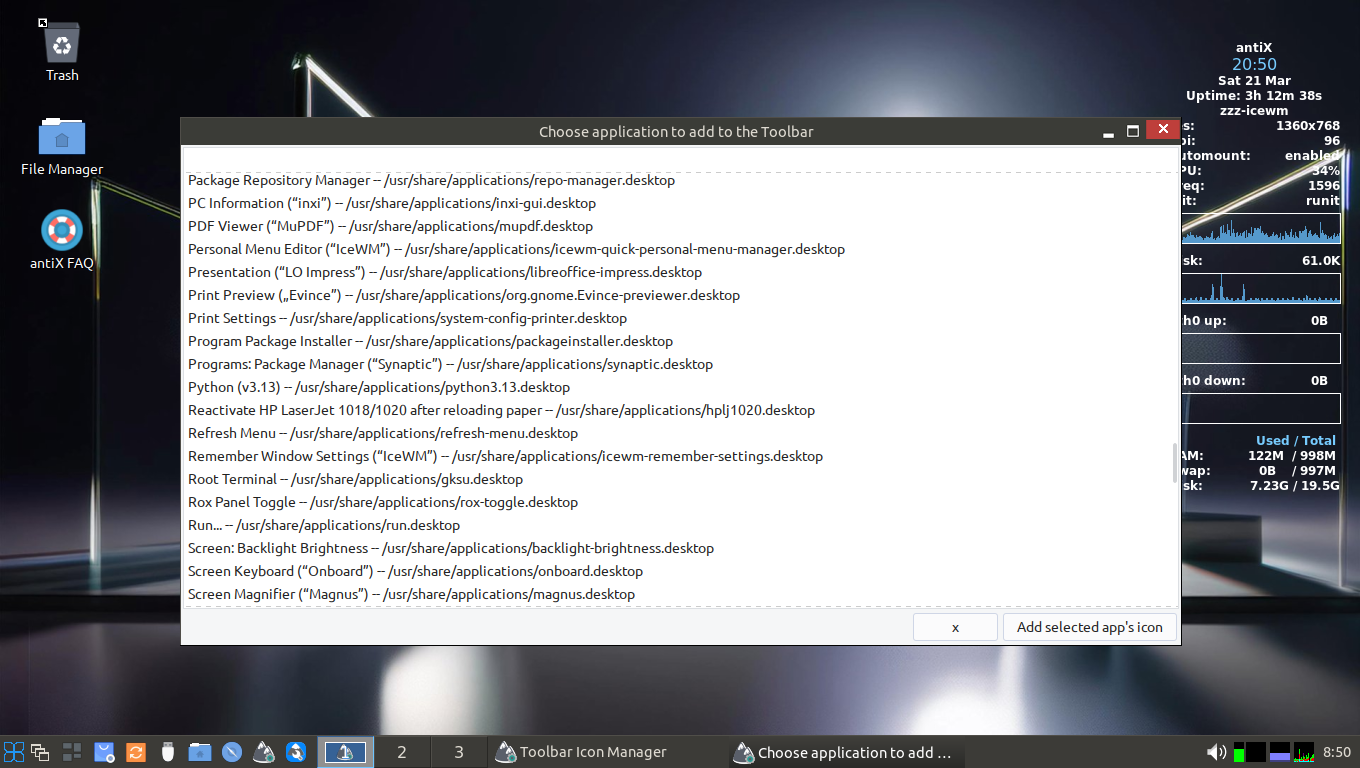
MemberDumb question…. first thing I tried to do on brand new install was add ROXterm to the panel…. but it’s not in the list…. am I missing something?
Attachments:
March 21, 2026 at 8:00 pm #199247ProwlerGr
MemberIt is finally out!
A big thanks to @anticapitalista and all developers, translators, testers, users for helping us achieving this milestone.
March 21, 2026 at 8:13 pm #199248 Empty HandedMember
How to upgrade 32bit from 23.2 to 26?
If its not modified you can just install any additional programs that you had added to 23.2 and then copy your /home data from the 23.2 to 26. If you have modified things you need to deal with each modification. If its heavily modified you are better off using tools. I’m not sure what tools exist that are tested at this point. I’m guessing if there are any, people here will point them out.
its not highly modified.
so i need to clean install?March 21, 2026 at 9:00 pm #199249Larrys4227
MemberantiX23 was the longest installed distro on my 2 SSD drives. After the long wait, I wasted no time overwriting it with this new release. Install went flawless, with SysVinit. Upon reboot, I was very surprised to see all the other inits in the grub menu. Fabulous!
Getting programs and configs squared away. It’s amazing how light this system is … laptop just flys along.
Congrats to everyone involved … stupendous job! Well Done!!
Attachments:
March 21, 2026 at 11:32 pm #199252MemberFirst bug to report
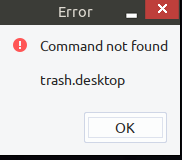
trash.desktop entry seems to be broken after installationTo fix
sudo sed -i 's|^Exec=.*|Exec=sh -c "zzzfm $HOME/.local/share/Trash/files/"|' /usr/local/lib/antiX/antix26-desktop-files/reservoir/trash.desktopAttachments:
March 22, 2026 at 12:55 am #199253anti-apXos
MemberDumb question…. first thing I tried to do on brand new install was add ROXterm to the panel…. but it’s not in the list…. am I missing something?
Apparently all pre-installed applications on antix are now identified by a decription rather than the actal application’s name, so look under “Console Window.”
I get that the point here is to make the first 15 minutes of using the system more intuitive, but why can’t the actual program name be first with the generic description in parentheses after? Programs have names, we should use them so that we know what we’re talking about. This isn’t GNOME.
Also, desktop files already have the “generic name” field in addition to the name, so why not use that instead of totally taking over the name field?
Finally, what the hell is a “Console Window”? It’s universally called a “terminal” window not a “console.”
"--"
March 22, 2026 at 1:17 am #199254MemberApparently all pre-installed applications on antix are now identified by a decription rather than the actal application’s name, so look under “Console Window.”
@anti-apXos if you don’t care about localization (just want the generic english version) you could just run
sudo apt purge antix26-desktop-files
This would get rid of the descriptions & just have the application name (similar to antiX-23)
It would still leave you with a broken trash.desktop though, (maybe a consideration for @Robin & @anticapitalista to move the trash.desktop script either to antix-goodies or to /etc/skel)I hope this helps
March 22, 2026 at 2:08 am #199255 sybokMember
How to upgrade 32bit from 23.2 to 26?
One option is to (backup /etc, list of manually installed packages, possibly content of /home/ and do) reinstall and preserve /home (if separate partition) or restore it as suggested.
The other, which can be more bumpy (and possibly time-demanding disregarding ISO install), is to manually change content of all files in /etc/apt/sources.list.d/ to not point to ‘bookworm’ but newly to ‘trixie’.
Because of antiX 26 being (multi-)init-diversity, the latter way may require more tinkering to get something very close to as-released antiX 26.March 22, 2026 at 2:28 am #199257olsztyn
MemberTop line says just ‘Kernel:’, which is great, without specifying which kernel. So it does not show that annoying ‘Modern kernel 6.6’ anymore, in case someone might upgrade modern kernel to higher version, this is no longer out of sync… Beautiful! Even the kernel menu does not show kernel versions, which is great, for the same reason as above, so both kernel versions can be replaced with no misleading versions showing in the boot menu… Thanks @anticapitalista for this boot menu enhancement!
Unfortunately it seems that the above described boot menu enhancement part about not specifying kernel version is happening only when using the original (Rc1) initrd.gz. I did not replace it when updating to the new boot menu structure so I was under impression that dropping explicit kernel version was an intended enhancement…
Alas, it seems the Final still sticks to specifying explicit kernel version numbers when using the new initrd.gz, as in the published iso.
So for now I prefer to stick with the RC1 version of inird.gz in the Final, particularly that I am using kernel 6.18, so as to not have the ‘kernel 6.6’ show on grub boot menu.
I agree though that in vast majority use cases explicit kernel versions showing up on boot menu is not a detriment as many users do stick to the default kernel versions, so no complaint after all…- This reply was modified 6 months, 1 week ago by olsztyn.
- This reply was modified 6 months, 1 week ago by olsztyn.
- This reply was modified 6 months, 1 week ago by olsztyn.
Live antiX Boot Options (Previously posted by Xecure):
http://antixlinuxfan.miraheze.org/wiki/Table_of_antiX_Boot_ParametersMarch 22, 2026 at 2:44 am #199259Xunzi_23
MemberRe downloading antiX 26, the download link is at the end of the release announcement
some would be users not finding it. Until the antiX website is updated below should help.https://sourceforge.net/projects/antix-linux/files/Final/antiX-26/
Download can be slow due to server load, if you are affected, go to the download page again, click on
problems downloading
you will get a list of mirrors, need to be quick to select one as source forge does not give you much
time to decide.March 22, 2026 at 3:14 am #199260MemberAn issue that seems I missed to notice before, appears to exist also in RC1 after checking:
When booting antiX 26 from USB with syslinux but switching to Grub Bootloader subsequent moving though Grub menu seems noticeably sluggish, especially on older computer and after selecting boot entry it takes very long time before kernel starts loading (perhaps a minute).
From syslinux menu (When not switching to Grub Bootloader), kernel starts loading instantly.
This is not a new issue it seems, as checking on RC1 this behavior is the same, perhaps even Beta 2, or even antiX 23, (I will go back to my archive to verify), just did not notice before…
Any way to fix this? I would not want to drop syslinux, if such would be the answer…Live antiX Boot Options (Previously posted by Xecure):
http://antixlinuxfan.miraheze.org/wiki/Table_of_antiX_Boot_ParametersMarch 22, 2026 at 5:04 am #199263andfree
MemberApparently all pre-installed applications on antix are now identified by a decription rather than the actal application’s name, so look under “Console Window.”
@anti-apXos if you don’t care about localization (just want the generic english version) you could just run
sudo apt purge antix26-desktop-files
This would get rid of the descriptions & just have the application name (similar to antiX-23)IMO, we should think more about all what @anti-apXos wrote. I think it’s important for antiX to make it as easy as possible for each user to identify each application. If there is disagreement regarding the best way, then a more “beginner-friendly” way to switch easier between different “options” might be necessary.
- This reply was modified 6 months, 1 week ago by andfree.
antiX utilities for processing PDF files (posted by ChPol)
March 22, 2026 at 5:12 am #199265Robin
Memberbut why can’t the actual program name be first with the generic description in parentheses after? Programs have names, we should use them so that we know what we’re talking about.
Hi @anti-apXos: There are some reasons. While many program names in Linux are “talking” names for English language users, they are just gibberish for foreign language users in a translated GUI. You’ll understand that something like e.g. “ConnectShares” as program name is fine for a first position for English language users, but not for all the others. Since you need the precise name when talking about the program with others, we can’t simply translate these talking names literally, but have still to provide for the foreign language users the same level of talkativeness like for the English speakers, for which the category is included implicitly in the talking names already.
But the more important reason for the decision of putting the name not in the first place is, that our menus internally do not allow to sort the entries thematically, other than making entries which belong logically to the same sub-(sub)-group starting with the same wording, which is impossible when just using the names and putting the generic behind it, so you have sheer Kraut und Rüben in long menus if starting with the names. I admit, after cleanup of the menus this is no longer strictly that necessary in most menus like before, but still there are menus where it is: If you have installed many audio and video tools for example, it is not really a good idea to get presented with an endless unsorted multimedia menu, where productive audio creation is located in a line next to a dumb videoplayer or and a setup tool, while the next creation entry appears somewhere else. Same if you have installed more than a single Email program, you won’t want to scroll around in an endless menu for looking up them in odd places by their (for non English speakers weird and hard to spell names) instead of having them grouped together so they can be easily spotted and selected, whatever their name may be. This is about ergonomic design and universal, multilingual usability, not just to please an English speaking auditory.
And finally, this was communicated already a dozen of times meanwhile in the context of the antiX desktop file packages: Whoever wants back the traditional menu structure from before can simply uninstall the antix26-desktop-files package, which will restore the original menu immediately. It is designed as an independant container applied the existing menu entries, replacing them as long this package is installed, and thus it can be removed easily. Consider it as an additional service, and just apt purge it if you don’t like it. It’s actually that simple.
Besides this there exists another (currently not implemented) option: Since we have “spare” languages we never are going to use, we can enable one of these at transifex, and whoever wants to read the menu entries differently than the default can then translate them to this language, completely ignoring the original entry structure. So just bark up if you want to start translation to a “Simplified English” idiom at transifex, rearranging the menus the way you prefer having it. (We’ll have to look into this a bit deeper, maybe instead of creating a new language to the existing set we could rather duplicate the ressource as “Simplified antiX Desktop Files” at transifex, providing therein another strategy for menu appearance and translation, resulting in an alternative package antix26-desktop-files-simplified, which can then be installed as an alternative to the original antix26-desktop-files package. This was planned from the beginning, to allow for different user preferences (e.g. a package wherein the menu entries are translated to youth speech instead of standard language), so this can be used for any alternative menu appearance as well. As said, if you want to start translating to this, it’s not a big deal to maintain that in parallel, both will run easily through the same harvester script. There were simply other tasks more pressing to complete for antiX 26, so this was put on hold.
___________________________
Edit:@anti-apXos if you don’t care about localization (just want the generic english version) you could just run
sudo apt purge antix26-desktop-files
This would get rid of the descriptions & just have the application name (similar to antiX-23)Sorry @ProwlerGR, I have only noticed your already complete answer after having replied to anti-apXos while reading the thread posting by posting… Having scanned the rest of the thread would have saved me from parroting you, sorry. Same goes for @andfree.
, then a more “beginner-friendly” way to switch easier between different “options” might be necessary.
This is planned already (you will find precisely this todo being mentioned somewhere in old forum thread about the antix23-desktop-files), either via an antiX Control Centre entry (most likely) or via an additional menu entry in the settings menu like the crowd/uncrowd menu functionality (preferred, but there is already an integrated installer in the control centre, while it would have to be duplicated then into a menu entry wrapper for providing the functionality in an menu entry)
- This reply was modified 6 months, 1 week ago by Robin. Reason: There are already answers... sorry, have missed them
Windows is like a submarine. Open a window and serious problems will start.
March 22, 2026 at 5:30 am #199267Membermaybe a consideration for @Robin & @anticapitalista to move the trash.desktop script either to antix-goodies or to /etc/skel
I wonder how uninstalling the antix26-desktop-files could remove the trash entry, since it is not (should not) live in the desktop-files package at all (besides its .desktop file, for which the package takes over the ownership temporarily) while pointing then to the duplicate living in the reservoire. When removed, the original from the original folder should be restored automatically. Will take a look into this, why this might fail for the trash entry. Thanks for bringing this up @ProwlerGr, I saw your report already
in the RC1 threadsome entries above yesterday, but there was simply no time left to check until now.Windows is like a submarine. Open a window and serious problems will start.
-
AuthorPosts

- You must be logged in to reply to this topic.