
Forum › Forums › Official Releases › antiX-26 “Stephen Kapos” › apt update error after kernel update
- This topic has 53 replies, 8 voices, and was last updated Jul 14-1:40 pm by Brian Masinick.
-
AuthorPosts
-
June 1, 2026 at 12:22 pm #205786
ElCuarteador
MemberI updated yesterday the kernel in my Live antiX 26 64-bit stick to version 6.6.139 following the steps I found recommended in another post:
1- Installed the new kernel using Synaptics
2- Remastered
3- Ran Live-USB Kernel updater
4- Rebooted
I have not seen any error message at any of those steps. I can reboot the notebook normally after that (at least it looks like that to me) and everything I tested so far works well, except for the following.When I try to update the system using the antiX Updater, I get an error message and the update fails. I tried running sudo apt update at the terminal and the output I see is:
sudo apt update
Hit:1 http://security.debian.org trixie-security InRelease
Hit:2 http://deb.debian.org/debian trixie-backports InRelease
Hit:3 http://ftp.de.debian.org/debian trixie InRelease
Hit:4 http://ftp.halifax.rwth-aachen.de/mxlinux/packages/antix/trixie trixie InRelease
Hit:5 http://ftp.us.debian.org/debian trixie-updates InRelease
Write error - write (28: No space left on device)
IO Error saving source cache
The package lists or status file could not be parsed or opened.
Can't call method "policy" on an undefined value at /usr/bin/apt-show-versions line 54.
Reading package lists... Error!
Error: Problem executing scripts APT::Update::Post-Invoke-Success 'test -x /usr/bin/apt-show-versions || exit 0 ; apt-show-versions -i'
Error: Sub-process returned an error code
Error: Write error - write (28: No space left on device)
Error: IO Error saving source cache
Error: The package lists or status file could not be parsed or opened.
How can I solve the problem? It seems something went wrong when upgrading to the new kernel, so I wonder if I need to revert to the previous (6.6.137) or the problem is solvable running the new kernel.
For any of the alternatives I kindly ask for step-by-step instructions, as my knowledge of antiX and Linux in general is very limited and this “kernel business” looks like “open heart surgery” to me…
Thank you very much in advance for any help!
- This topic was modified 3 months, 3 weeks ago by ElCuarteador.
June 1, 2026 at 1:31 pm #205790 christopheModerator
Write error – write (28: No space left on device)
This is the issue. The live system uses “space” in a different way than a “normal” system. And there are different options on setting up and using an antiX live system. So…
How much RAM do you have?
What type of persistence are you using (that is, what parameters are you using)?
How large is your live storage device (usb stick or hdd/ssd)?
How much live storage is unused?Also, go ahead & give us your
inxi -zv8output.- This reply was modified 3 months, 3 weeks ago by christophe.
antiX on everything, since 2017
June 1, 2026 at 3:03 pm #205794MemberHi @christophe,
Thanks for your reply. My computer has 1 Gb of RAM, and I’m using static persistence. Regarding the data for the live storage device, please see the attached screenshot.
And here is the output of the command you suggested:
inxi -zv8
System:
  Kernel: 6.6.139-antix.1-amd64-smp arch: x86_64 bits: 64 compiler: gcc
    v: 14.2.0 clocksource: hpet avail: acpi_pm parameters: persist_static
    tz=Europe/Brussels quiet init=/sbin/init-sysvinit
  Desktop: IceWM v: 4.0.0 tools: avail: slock,xlock dm: slimski v: 1.5.0
    Distro: antiX-26_x64-full Stephen Kapos 21 March 2026 base: Debian
    GNU/Linux 13 (trixie)
Machine:
  Type: Laptop System: ASUSTeK product: 1011PX v: x.x
    serial: <superuser required> Chassis: type: 10 v: x.x
    serial: <superuser required>
  Mobo: ASUSTeK model: 1015PE v: x.xx serial: <superuser required>
    part-nu: 1011PX uuid: <superuser required> BIOS: American Megatrends v: 1401
    date: 08/30/2011
Battery:
  ID-1: BAT0 charge: 38.8 Wh (91.3%) condition: 42.5/56.2 Wh (75.6%)
    volts: 11.73 min: 10.8 model: ASUS 1015PE type: Li-ion serial: N/A charging:
    status: charging cycles: N/A
Memory:
  System RAM: total: 1024 MiB available: 957.8 MiB used: 655.4 MiB (68.4%)
  Message: For most reliable report, use superuser + dmidecode.
  Array-1: capacity: 4 GiB slots: 2 modules: 1 EC: None
    max-module-size: 2 GiB note: est.
  Device-1: DIMM0 type: N/A size: 1024 MiB speed: 667 MT/s volts: N/A
    width (bits): data: 64 total: 64 manufacturer: N/A part-no: N/A serial: N/A
  Device-2: DIMM1 type: no module installed
PCI Slots:
  Permissions: Unable to run dmidecode. Root privileges required.
CPU:
  Info: model: Intel Atom N570 bits: 64 type: MT MCP arch: Bonnell level: v1
    built: 2008-13 process: Intel 45nm family: 6 model-id: 0x1C (28)
    stepping: 0xA (10) microcode: 0x107
  Topology: cpus: 1x dies: 1 clusters: 2 cores: 2 threads: 4 tpc: 2
    smt: enabled cache: L1: 112 KiB desc: d-2x24 KiB; i-2x32 KiB L2: 1024 KiB
    desc: 2x512 KiB
  Speed (MHz): avg: 1000 min/max: 1000/1667 scaling: driver: acpi-cpufreq
    governor: schedutil cores: 1: 1000 2: 1000 3: 1000 4: 1000 bogomips: 13332
  Flags: acpi aperfmperf apic arch_perfmon bts clflush cmov constant_tsc
    cpuid cx16 cx8 de ds_cpl dtes64 dtherm dts est flexpriority fpu fxsr ht
    lahf_lm lm mca mce mmx monitor movbe msr mtrr nopl nx pae pat pbe pdcm
    pebs pge pni pse pse36 rep_good sep ss sse sse2 ssse3 syscall tm tm2
    tpr_shadow tsc vme vmx vnmi vpid xtpr
  Vulnerabilities:
  Type: gather_data_sampling status: Not affected
  Type: indirect_target_selection status: Not affected
  Type: itlb_multihit status: Not affected
  Type: l1tf status: Not affected
  Type: mds status: Not affected
  Type: meltdown status: Not affected
  Type: mmio_stale_data status: Not affected
  Type: reg_file_data_sampling status: Not affected
  Type: retbleed status: Not affected
  Type: spec_rstack_overflow status: Not affected
  Type: spec_store_bypass status: Not affected
  Type: spectre_v1 status: Not affected
  Type: spectre_v2 status: Not affected
  Type: srbds status: Not affected
  Type: tsa status: Not affected
  Type: tsx_async_abort status: Not affected
  Type: vmscape status: Not affected
Graphics:
  Device-1: Intel Atom Processor D4xx/D5xx/N4xx/N5xx Integrated Graphics
    vendor: ASUSTeK Eee PC 1015PX driver: i915 v: kernel arch: PowerVR SGX535
    process: Intel 45-130nm built: 2008-10 ports: active: LVDS-1,VGA-1
    empty: none bus-ID: 00:02.0 chip-ID: 8086:a011 class-ID: 0300
  Device-2: IMC Networks USB 2.0 UVC VGA WebCam driver: uvcvideo type: USB
    rev: 2.0 speed: 480 Mb/s lanes: 1 mode: 2.0 bus-ID: 1-6:4 chip-ID: 13d3:5711
    class-ID: 0e02 serial: <filter>
  Display: server: X.Org v: 21.1.16 driver: X: loaded: intel dri: swrast
    gpu: i915 display-ID: :0.0 screens: 1
  Screen-1: 0 s-res: 1440x900 s-dpi: 96 s-size: 380x237mm (14.96x9.33")
    s-diag: 448mm (17.63")
  Monitor-1: LVDS-1 mapped: LVDS1 model: Seiko Epson 0x3130 built: 2010
    res: N/A dpi: 117 gamma: 1.2 chroma: red: x: 0.553 y: 0.318 green: x: 0.353
    y: 0.588 blue: x: 0.165 y: 0.110 white: x: 0.314 y: 0.329
    size: 223x125mm (8.78x4.92") diag: 256mm (10.1") ratio: 16:9
    modes: 1024x600
  Monitor-2: VGA-1 mapped: VGA1 pos: primary model: Asus VW193D
    serial: <filter> built: 2010 res: mode: 1440x900 hz: 60 scale: 100% (1)
    dpi: 90 gamma: 1.2 chroma: red: x: 0.651 y: 0.341 green: x: 0.290 y: 0.612
    blue: x: 0.149 y: 0.071 white: x: 0.314 y: 0.329
    size: 408x255mm (16.06x10.04") diag: 481mm (18.9") ratio: 16:10
    modes: 1440x900, 1280x1024, 1280x960, 1280x800, 1152x864, 1024x768,
    832x624, 800x600, 640x480, 720x400
  API: EGL v: 1.5 hw: drv: intel i915 platforms: device: 0 egl: 1.4
    drv: i915 device: 1 drv: swrast gbm: egl: 1.4 drv: i915 surfaceless:
    egl: 1.4 drv: i915 x11: drv: swrast inactive: wayland
  API: OpenGL v: 4.5 compat-v: 2.1 vendor: mesa v: 25.0.7-2 glx-v: 1.4
    direct-render: yes renderer: llvmpipe (LLVM 19.1.7 128 bits)
    device-ID: ffffffff:ffffffff memory: 934.6 MiB unified: yes
  Info: Tools: api: eglinfo,glxinfo x11: xdriinfo, xdpyinfo, xprop, xrandr
Audio:
  Device-1: Intel NM10/ICH7 Family High Definition Audio
    vendor: ASUSTeK Eee PC 1015PX driver: snd_hda_intel v: kernel
    bus-ID: 00:1b.0 chip-ID: 8086:27d8 class-ID: 0403
  API: ALSA v: k6.6.139-antix.1-amd64-smp status: kernel-api with: apulse
    type: pulse-emulator tools: alsactl,alsamixer,amixer
  Server-1: PipeWire v: 1.4.2 status: off with: 1: pipewire-pulse
    status: off 2: wireplumber status: off 3: pw-jack type: plugin
    tools: pw-cat,pw-cli,wpctl
Network:
  Device-1: Qualcomm Atheros AR8152 v2.0 Fast Ethernet
    vendor: ASUSTeK Eee PC 1015PX driver: atl1c v: kernel pcie: gen: 1
    speed: 2.5 GT/s lanes: 1 port: ec00 bus-ID: 01:00.0 chip-ID: 1969:2062
    class-ID: 0200
  IF: eth0 state: down mac: <filter>
  Device-2: Qualcomm Atheros AR9285 Wireless Network Adapter
    vendor: AzureWave AW-NE785 / AW-NE785H 802.11bgn driver: ath9k v: kernel
    modules: wl pcie: gen: 1 speed: 2.5 GT/s lanes: 1 bus-ID: 02:00.0
    chip-ID: 168c:002b class-ID: 0280
  IF: wlan0 state: up mac: <filter>
  IP v4: <filter> type: dynamic scope: global broadcast: <filter>
  IP v6: <filter> scope: link
  Info: services: sshd,wpa_supplicant
  WAN IP: <filter>
Bluetooth:
  Message: No bluetooth data found.
Logical:
  Message: No logical block device data found.
RAID:
  Message: No RAID data found.
Drives:
  Local Storage: total: 312.68 GiB used: 14.07 GiB (4.5%)
  SMART Message: Unable to run smartctl. Root privileges required.
  ID-1: /dev/sda maj-min: 8:0 vendor: Seagate model: ST9320325AS
    size: 298.09 GiB block-size: physical: 512 B logical: 512 B speed: 3.0 Gb/s
    tech: HDD rpm: 5400 serial: <filter> fw-rev: SDM1 scheme: GPT
  ID-2: /dev/sdb maj-min: 8:16 vendor: SanDisk model: Cruzer Glide 3.0
    size: 14.59 GiB block-size: physical: 512 B logical: 512 B type: USB
    rev: 2.1 spd: 480 Mb/s lanes: 1 mode: 2.0 tech: N/A serial: <filter>
    fw-rev: 1.00 scheme: MBR
  SMART Message: Unknown USB bridge. Flash drive/Unsupported enclosure?
  Message: No optical or floppy data found.
Partition:
  ID-1: /live/boot-dev raw-size: 14.54 GiB size: 14.25 GiB (97.97%)
    used: 13.9 GiB (97.5%) fs: ext4 dev: /dev/sdb1 maj-min: 8:17
    label: antiX-Live-usb uuid: 29f67ca1-e634-404f-9c56-c9c287f5d0c4
  ID-2: /tmp/.mount_ung-chOdOFGK raw-size: N/A size: 178.9 MiB
    used: 178.9 MiB (100.0%) fs: fuse.ung-chr.appimage source: ERR-102
Swap:
  Kernel: swappiness: 10 (default 60) cache-pressure: 50 (default 100)
    zswap: no
  ID-1: swap-1 type: file size: 1024 MiB used: 0 KiB (0.0%) priority: -2
    file: /live/boot-dev/swap-file
  ID-2: swap-2 type: zram size: 957 MiB used: 273.2 MiB (28.6%)
    priority: 100 comp: zstd avail: lzo,lzo-rle,lz4,lz4hc,842 max-streams: 4
    dev: /dev/zram0
Unmounted:
  ID-1: /dev/sda1 maj-min: 8:1 size: 1024 KiB fs: <superuser required>
    label: N/A uuid: N/A
  ID-2: /dev/sda2 maj-min: 8:2 size: 298.09 GiB fs: ext4 label: rootantiX23
    uuid: 0ff6eb7e-3769-4a0a-9410-c854f7481242
  ID-3: /dev/sdb2 maj-min: 8:18 size: 49 MiB fs: vfat label: ANTIX-UEFI
    uuid: B5C0-0BCE
USB:
  Hub-1: 1-0:1 info: full speed or root hub ports: 8 rev: 2.0
    speed: 480 Mb/s (57.2 MiB/s) lanes: 1 mode: 2.0 chip-ID: 1d6b:0002
    class-ID: 0900
  Device-1: 1-3:3 info: SanDisk Cruzer Glide 3.0 type: mass storage
    driver: usb-storage interfaces: 1 rev: 2.1 speed: 480 Mb/s (57.2 MiB/s)
    lanes: 1 mode: 2.0 power: 224mA chip-ID: 0781:5597 class-ID: 0806
    serial: <filter>
  Device-2: 1-6:4 info: IMC Networks USB 2.0 UVC VGA WebCam type: video
    driver: uvcvideo interfaces: 2 rev: 2.0 speed: 480 Mb/s (57.2 MiB/s)
    lanes: 1 mode: 2.0 power: 500mA chip-ID: 13d3:5711 class-ID: 0e02
    serial: <filter>
  Hub-2: 2-0:1 info: full speed or root hub ports: 2 rev: 1.1
    speed: 12 Mb/s (1.4 MiB/s) lanes: 1 mode: 1.1 chip-ID: 1d6b:0001
    class-ID: 0900
  Device-1: 2-2:2 info: MosArt 2.4G Wireless Mouse type: keyboard,mouse
    driver: hid-generic,usbhid interfaces: 2 rev: 1.1 speed: 12 Mb/s (1.4 MiB/s)
    lanes: 1 mode: 1.1 power: 100mA chip-ID: 062a:4108 class-ID: 0301
  Hub-3: 3-0:1 info: full speed or root hub ports: 2 rev: 1.1
    speed: 12 Mb/s (1.4 MiB/s) lanes: 1 mode: 1.1 chip-ID: 1d6b:0001
    class-ID: 0900
  Hub-4: 4-0:1 info: full speed or root hub ports: 2 rev: 1.1
    speed: 12 Mb/s (1.4 MiB/s) lanes: 1 mode: 1.1 chip-ID: 1d6b:0001
    class-ID: 0900
  Hub-5: 5-0:1 info: full speed or root hub ports: 2 rev: 1.1
    speed: 12 Mb/s (1.4 MiB/s) lanes: 1 mode: 1.1 chip-ID: 1d6b:0001
    class-ID: 0900
Sensors:
  System Temperatures: cpu: 78.0 C mobo: N/A
  Fan Speeds (rpm): N/A
Repos:
  Packages: pm: dpkg pkgs: 2129 libs: 1015
    tools: apt,apt-get,aptitude,synaptic
  Active apt repos in: /etc/apt/sources.list.d/antix.list
    1: deb [signed-by=/etc/apt/keyrings/antix-archive-keyring.gpg] http://ftp.halifax.rwth-aachen.de/mxlinux/packages/antix/trixie trixie main nonfree nosystemd
  Active apt repos in: /etc/apt/sources.list.d/debian-stable-updates.list
    1: deb http://ftp.us.debian.org/debian/ trixie-updates main contrib non-free non-free-firmware
  Active apt repos in: /etc/apt/sources.list.d/debian.list
    1: deb http://ftp.de.debian.org/debian/ trixie main contrib non-free non-free-firmware
    2: deb http://security.debian.org/ trixie-security main contrib non-free non-free-firmware
  No active apt repos in: /etc/apt/sources.list.d/librewolf.list
  No active apt repos in: /etc/apt/sources.list.d/liquorix.list
  Active apt repos in: /etc/apt/sources.list.d/trixie-backports.list
    1: deb http://deb.debian.org/debian trixie-backports main contrib non-free non-free-firmware
Processes:
  CPU top: 5 of 192
  1: cpu: 600% command: ps pid: 30751 mem: 3.45 MiB (0.3%)
  2: cpu: 50.0% command: sh pid: 30750 mem: 1.70 MiB (0.1%)
  3: cpu: 9.0% command: roxterm pid: 30694 mem: 29.8 MiB (3.1%)
  4: cpu: 4.0% command: Xorg pid: 3458 mem: 29.2 MiB (3.0%)
  5: cpu: 4.0% command: chrome pid: 5946 mem: 122.4 MiB (12.7%)
  Memory top: 5 of 192
  1: mem: 122.4 MiB (12.7%) command: chrome pid: 5946 cpu: 4.0%
  2: mem: 120.0 MiB (12.5%) command: chrome pid: 5550 cpu: 2.7%
  3: mem: 58.8 MiB (6.1%) command: chrome pid: 5672 cpu: 1.0%
  4: mem: 44.8 MiB (4.6%) command: chrome pid: 5603 cpu: 2.2%
  5: mem: 40.7 MiB (4.2%) command: chrome pid: 5611 cpu: 0.9%
Info:
  Processes: 192 Power: uptime: 3h 0m states: freeze,mem,disk suspend: deep
    avail: s2idle wakeups: 0 hibernate: platform avail: shutdown, reboot,
    suspend, test_resume image: 368.9 MiB Init: SysVinit v: 3.14 runlevel: 5
    default: 5 tool: service
  Compilers: gcc: 14.2.0 Shell: Bash v: 5.2.37 running-in: roxterm
    inxi: 3.3.39
After seeing that there were two “broken” files and the “available space” seemed to be very low in the Live USB device, I tried to “repair” the two files using the feature in the “antiX Create or Resize Persistence” tool. In both cases I got an initial message that the files were OK, but after that they continued showing up as “broken”. So, I decided to delete those two old files, and now the available space is 5.54 Gb. Then, I tried running sudo apt update, but I get the same error messages as before. Should I try rebooting and running the update again?
Thanks again for your interest in resolving my case.
Attachments:
June 1, 2026 at 3:34 pm #205802Xunzi_23
MemberHi ElC* When you installed a new kernel space was used, you then remastered.
so now you have a rootfilesystem old 2.40 GiB
and a linuxfilesystem old 3.14 GibFree space 69 Mib so nothing left to resize.
No room to update, that means you are out of ram, 1GB is tight even for antiX..
Please try and find a Ram module to fit, you can upgrade to 2GB, the RAM Module
is accessible after opening the bottom hatch cover. It does make a big difference.One step at a time, remove old Kernel and modules, use the purge flag
You will get a message about remaining config files, delete those as root
taking care to only do so for the removed kernel or kernels.
use sudo apt autoremove and sudo apt clean
If you wish, Remove purge anything you do not need. Clear Browser caches, they can be
huge. applies especially to chrome or chromium.
Remove the Linux Filesystem old and rootfilesystem oldthen remaster
If you are still not able to update due low ram you can do so in stages, need help with
that pls ask.June 1, 2026 at 3:55 pm #205803Robin
MemberYou may want to give the advanced persist opts, like
static, or(Edit: you are using already static) the options for setting up the persist drive pointing to your hard disk instead of the boot medium a try. Or you could use frugal install, which means live mode from disk and knows also persistence.You can even now move the existing huge persist files to your hard drive and make the persist drive point to that, which will possibly suffice already to allow the current remaster.
Alternatively you can use remaster instead of persistence in future, not additionally, but that would change your user experience, since then all modifications from a current session will be gone at next reboot, which is what you may want once your system is set up perfectly and you don’t plan further changes for some time to come.
- This reply was modified 3 months, 3 weeks ago by Robin.
Windows is like a submarine. Open a window and serious problems will start.
June 1, 2026 at 3:59 pm #205804anti-apXos
MemberSince ElCuarteador is using ‘persist_static’, I don’t think there’s any storage in memory (/live/aufs-ram) like there usually is on live systems. Everything just gets written either to the rootfs or homefs file immediately. It looks to me like that rootfs file is the problem here since it shows as ~100% full in the sceenshot.
The solution should be either to expand the size of the rootfs persistence file or to remaster again and start a new rootfs.
If you just did a remaster, I wonder why the rootfs is already full, though. It might be a good idea to try mounting it and checking through the ‘upper’ folder to see if there’s something in there taking up a lot of space that you don’t actually need to be persistently saving, like some logfile in /upper/var, and adding it to the excludes list. Actually, is there even excludes if you use static persistence? I guess maybe not, in which case it seems unsuitable to a situation like this.
- This reply was modified 3 months, 3 weeks ago by anti-apXos.
"--"
June 1, 2026 at 4:01 pm #205805christopheModeratorOK. I’m glad you are using static persistence. That’s the method to use for lower RAM amounts like you (and I generally) have.
NOW: Your rootfs is WAY too small. Any changes to your root filesystem (that is not under /home) goes there.
So, this is how I set up my live-USBs when I use static persistence on a 16 GB stick:
1. homefs = 2 GB (that is fine, though I usually use a lower amount. It all depends on your needed space for files. TIP: you can use the ‘Live-usb-storage’ folder under your home folder to store files, and it will be “outside” of your homefs – stored “direcly” on the usb-stick. This allows you to not fill up that homefs.)
2. rootfs = 3 GB (to allow for upgrades)
3. linuxfs = 2-3 GB (perhaps). This is the base system, and is what is “created” during a remster. Its the installation of antiX running on your usb-stick.
(Take a look at your USB’s /live/boot-dev/antiX folder. That’s where all these files are stored.4. This leaves about 6 GB free. This allows space for files for: your new rootfs created after a remaster, your files in your Live-usb-storage folder, and (most importantly) room to remaster (to create your new linuxfs file during a remaster). As you must already know, the old files (that is, linuxfs.old & rootfs.old) can be deleted after your remaster & reboot. These are good to delete, because if you arent going to use these, they are just taking up space. I delete them after I notice everything is working as expected after the remaster.
The space goes fast, on a “small” USB. (I write “small” in quotes, because I use even smaller ones sometimes…) I prefer larger, but we use what we have, right?
But that’s a basic outline & explanation. Ask any further questions as they arise.
- This reply was modified 3 months, 3 weeks ago by christophe.
antiX on everything, since 2017
June 2, 2026 at 8:09 am #205831MemberThank you very much to all for the replies! I’m indeed learning a lot while trying to solve this problem.
I see now that the problem is the size of the rootfs file, too small and full now. It’s so small becuase that was the largest allowed when remastering after the installation of the kernel, I used to have one of 2.3GB or so before. Regarding what might be filling it up now: when I rebooted after running Live-USB Kernel Updater, I just ran antiX-Radio to test internet + audio and then tried running antiX Updater, nothing else. So, I guess rootfs must have something downloaded in the initial steps of the update, or something like that.
I tried the Resize Root Persistence option in the antiX Create or Resize Persistence tool in the CC, but I get an error message reading “Can’t resize %s while it is already mounted”. How do I unmount it? Can I really do that while running Live with static persistence?
Another easy alternative I read in your replies is to try remastering again. The available space now in the USB stick is more than 5 GB, so I could create a new rootfs file of sufficent size. Is it reasonable to try that in this situation? I already backed up all my data in the home folder just in case…
Other possible actions in your suggestions sound more difficult to do to me. I would need more detailed instructions to take them, in particular if they include running commands at the terminal. I know it’s a pain writing step-by-step instructions for more than 2-3 steps but… Perhaps resolving the questions above help solving the problem.
Thanks again to all for your patience and time!
June 2, 2026 at 8:38 am #205832 sybokMember
A question of a noob regarding persistence in antiX:
Would ‘sudo apt-get clean’ or ‘sudo apt autoremove’ help “squash” the size of ‘rootfs’ before remaster (or is ‘/var/cache[/apt/archives/]’ excluded)?BTW, these commands are advised in a completely different setting – reduce space of Linux images before creating containers from them.
June 2, 2026 at 9:22 am #205837christopheModerator@sybok – it’s excluded. /usr/local/share/excludes/live-remaster-excludes.list shows & allows editing.
@ElCuarteador – If you reboot with home persistence (only) or no persistence at all – from the boot menu – you can then resize your rootfs after bootup.
THEN you reboot – setting the boot option to static persistence (and save settings, if desired). antiX will start using the new rootfs during the boot process. Then once you are at the desktop, go ahead and delete the rootfs.old, to reclaim the disk space.
(In my experience, apt update uses about 150-200 mb space in the rootfs just to download what it needs. Just to help your understanding why it filled up so fast.)
antiX on everything, since 2017
June 2, 2026 at 10:08 am #205840MemberThank you @christophe for the detailed instructions!
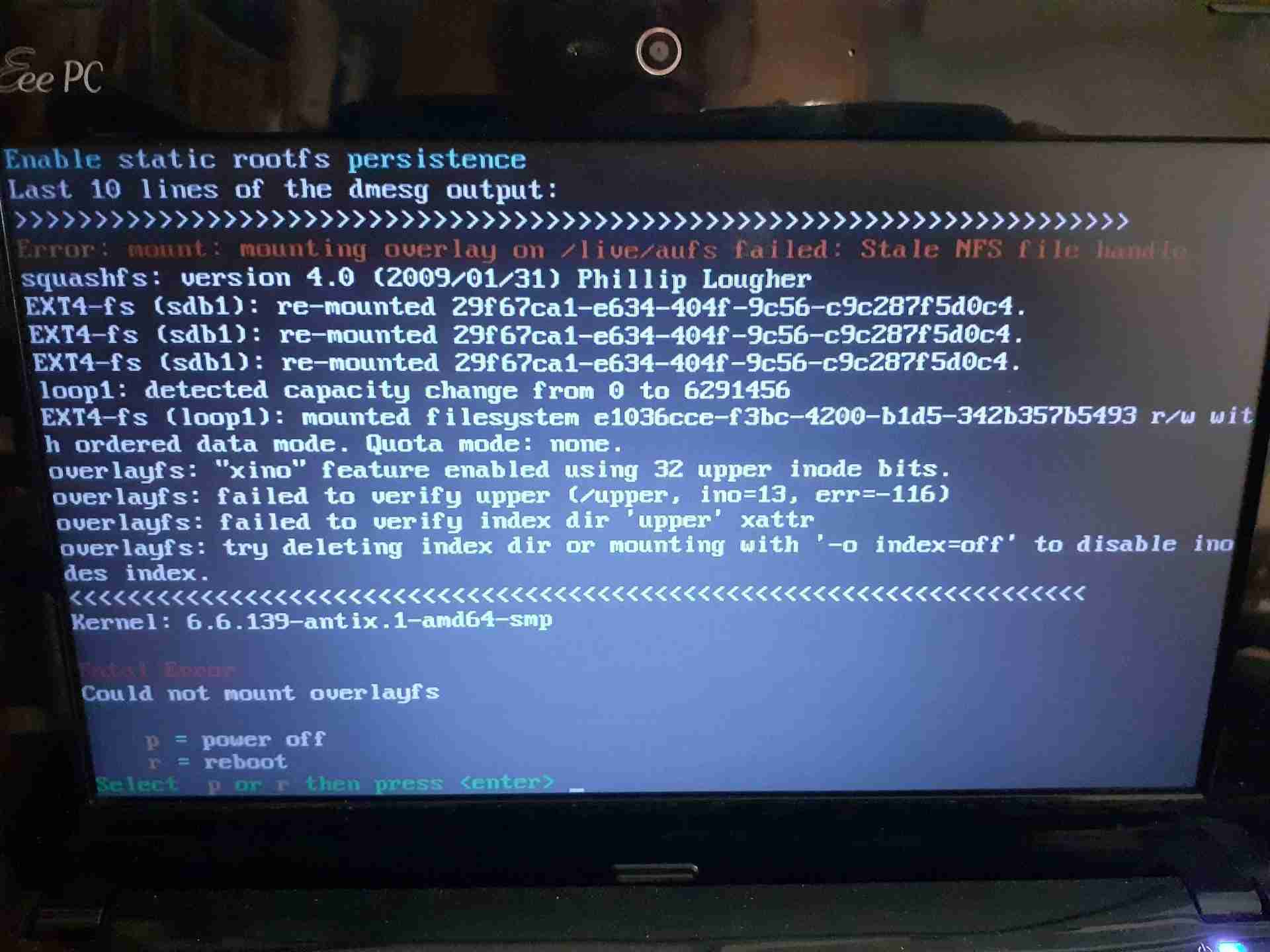
I followed them and resized rootfs to 3 GB with no errors or warnings. After resizing I noticed that the home persistance file showed up as “broken”, so I decided to fix it within the same tool. Then I saw a message reading that there were no errors in that file, after that the “broken” label was gone. I rebooted with the static-persistence option on and it failed rebooting, with “Fatal error” “Could not mount overlayfs” messages (please see the attached screenshot).
Not sure what I did wrong, but looks like my Live-USB stick is ruined, at least its persistence setup. So, unless you see any “emergency rescue” alternative, I think I will have to start over setting up a fresh version of the Live-USB. I will try whatever you suggest even if only useful to learn a bit more from this case. I already learned a good lesson: better use a larger USB stick next time for running Live… not a high price for not knowing very well what I was doing with the update-remaster loops…
Thanks again!!
Attachments:
June 2, 2026 at 10:15 am #205844christopheModeratorI’ve not ever come across that. It may be that the stick is wearing out. But I just dont know.
Before you start fresh, try this:
Reboot without persistence again. Try to “fix” the persistence files.
Then try rebooting with persistence.antiX on everything, since 2017
June 2, 2026 at 10:56 am #205845MemberI rebooted again with no persistence and ran antiX Create or Resize Persistence, but there is nothing to fix (please see the screenshot below). The only action I see under “Fix” is to delete the rootfs.bak file, no repair is available.
One thing I notice running now live with no persistence is that I have the full setup I had with persistence, including the new kernel. Perhaps this is obvious for you, but I thought I was going to see the setup of the last time I remastered before the kernel update. Is there any way I can use “the current setup” as the base point when setting up persistence next time? I was thinking on something like creating an “ISO Snapshot” writing it to another USB stick. It would save me some work resetting everything from the fresh antiX26 ISO. Just an idea…
Attachments:
June 2, 2026 at 11:10 am #205847christopheModeratorIs there any way I can use “the current setup” as the base point when setting up persistence next time? I was thinking on something like creating an “ISO Snapshot”
Yes. That will work.
When you run the ISO Snapshot, you may want to adjust the snapshot folder to save on the hard drive. Just to make sure there is enough room. There is an option on the iso-snapshot opening screen.Alternately, if you want to save the snapshot to the USB stick, just delete the rootfs & homefs from /live/boot-dev/antiX (root privileges needed), to make sure you have enough room on the stick to make the snapshot. This deletion can be done safely so long as you are running without persistence, and everything is as you like while running without persistence.
- This reply was modified 3 months, 3 weeks ago by christophe.
- This reply was modified 3 months, 3 weeks ago by christophe.
antiX on everything, since 2017
June 2, 2026 at 11:32 am #205850MemberOnce more: thanks a lot!!
-
AuthorPosts


- You must be logged in to reply to this topic.