
Forum › Forums › antiX-development › Graphics › Themes: Adwaita-darkred (GTK2/3/4/libadwaita) and DarkDays (IceWM)
- This topic has 23 replies, 7 voices, and was last updated Jun 22-7:55 am by Brian Masinick.
-
AuthorPosts
-
November 14, 2025 at 10:59 am #190357
andfree
MemberThank you for your good work.
Regarding the theme-highlight-changer.sh script, don’t you think it would be a good idea if it could be included on antiX-25?antiX utilities for processing PDF files (posted by ChPol)
February 2, 2026 at 3:39 pm #195640anti-apXos
MemberHere’s an updated version of the Adwaita-darkred theme. As promised, it now works with GTK4 in addition to GTK2 and GTK3.
Simply extract the attached Adwaita-darkred_R4.zip archive into /usr/share/themes and Adwaita-darkred should be selectable immediately using lxappearance (Customize Look and Feel). This should work just swell for GTK2, GTK3, and non-libadwaita GTK4 applications. GTK3 and 4 apps do have to be restarted to acknowledge the changed theme, though.
Examples of non-libadwaita GTK4 applications that ship with antix-26 are pavucontrol and transmission. Many other GTK4 apps like EasyEffects, file-roller, or celluloid that are made for the GNOME DE will not respect the systemwide GTK theme setting, but they can still be themed to an extent. If you also want to use Adwaita-darkred with these GNOME apps, you’ll need to include the css in ~/.config/gtk-4.0:
mkdir -p ~/.config/gtk-4.0
echo -e '/* Apply the adwaita-darkred theme colors to libadwaita applications */\n@import url("file:///usr/share/themes/Adwaita-darkred/gtk-4.0/libadwaita-darkred.css");' >> ~/.config/gtk-4.0/gtk.css
—
The Dark Days IceWM themes are also still included, as well. Maybe the easiest way to add them to IceWM is just to symlink them into the icewm config directory
mkdir -p ~/.icewm/themes
ln -s /usr/share/themes/Adwaita-darkred/icewm/* ~/.icewm/themes
After that, Dark Days and DarkDays DX should show up in the IceWM menu under Settings > Themes
—
Just for the heck of it, I also decided to also include an Xresources file that can theme certain other apps that use the old Xt and Athena Widgets instead of GTK. Since these don’t have .desktop files, they don’t show up in antix menus, and so many people may not realize that classic X apps like xedit, xclipboard, and xman are already installed on their antix system. Most of these old applications are pretty decrepit, but a few like xcalc, xmessage, and xpaint are still quite nice to use today.
To theme these apps, add the following in ~/.Xresources:
! athena-after-dark Xt/Xaw theme
# include "/usr/share/themes/Adwaita-darkred/athena-after-dark.conf"
You will also want to comment out the existing line that themes xcalc since these themes files conflict with each other (also note that commenting in .Xresources is done with a ! instead of a #). You should probably leave the urxvt theme that ships with antix as it is since that includes many preferences for urxvt beyond just the theme colors.
—
Finally, I also included a couple wallpapers this time around that you can check out if you want. Find them in /usr/share/themes/Adwaita-darkred/wallpapers.
Attachments:
"--"
February 2, 2026 at 3:59 pm #195644MemberBy the way, these themes will work on anyversion of antix or really any distro at all, but if you’re using antix-26 there are still some hangups in the theming. The instructions from my previous post seem to work, but the ~/.config/gtk-4.0 is symlinked to ~/.config/gtk-3.0 by default, which might lead to issues when trying to apply a gtk.css file that I simply haven’t noticed. I’d recommend changing the setup just a bit:
rm ~/.config/gtk-4.0
mkdir -p ~/.config/gtk-4.0
ln -s ../gtk-3.0/settings.ini ~/.config/gtk-4.0/settings.ini
echo -e '/* Apply the adwaita-darkred theme colors to libadwaita applications */\n@import url("file:///usr/share/themes/Adwaita-darkred/gtk-4.0/libadwaita-darkred.css");' >> ~/.config/gtk-4.0/gtk.css
That should be a more resilient solution to this problem.
Another thing on antix-26: Qt apps (e.g. antix-viewer) are currently not set up to follow the GTK2 theme like they have been in previous antix versions. In fact, Debian has removed the qt5-gtk2-platformtheme package from the Trixie repos, plus many Qt apps use Qt6 now, so some other solution is needed for Qt support on Trixie.
The simplest and best way I’ve found is to use the project here: https://github.com/trialuser02/qt6gtk2 and here: https://github.com/trialuser02/qt5gtk2
For some reason, OpenSUSE hosts Debian 13-compatible .deb installers for these Qt GTK2 platformthemes, so they can be installed on antix quite easily without having to build them yourself. Just download the deb files from:
https://build.opensuse.org/projects/home:unit193/packages/qt6gtk2/repositories/Debian_13/binaries
https://build.opensuse.org/projects/home:unit193/packages/qt5gtk2/repositories/Debian_13/binaries
After installing those, you’ll edit the file /etc/environment as root and set:
QT_QPA_PLATFORMTHEME=gtk2This change will require a restart to take effect afterwards. Setting the platformtheme to “gtk2” bypasses qt6ct and qt5ct (which is not installed by default anyway) and applies all GTK2 settings from Customize Look and Feel to Qt5 and Qt6 apps, including colors, icons, font settings, etc.
"--"
February 2, 2026 at 4:59 pm #195661MemberThanks once again. I added all the themes.
antiX utilities for processing PDF files (posted by ChPol)
March 27, 2026 at 3:45 pm #199968MemberI’m attaching another new version of the Adwaiata-darkred and DarkDays themes. The main changes have been to the DarkDaysDX IceWM theme, which now has a new startmenu icon and a bunch of style changes. See attached screenshot.
Another reason for making a new release is that I’ve updated the theme-highlight-changer.sh script so that it will work again. That means you can generate other themese, based on Adwaita-darkred, but with different highlight colors. The script is set up by default to make a theme named “Adawaita-dakgreen” with green highlights, but you could modify the script to make almost anything your heart desires. The scripty may not work quite as well as previous versions since the base Adwaita-darkred theme has gotten more complicated, but most people probably won’t even notice the little inaccuracies that I do.
Between this release and the PrettyPink2 GTK theme I also just posted today, you’ll can have both light and dark themes with a wide range of support for most Linux applications, including GTK2/3/4, libadwaita, Xtoolkit/Xaw, Qt5/6 (if you follow instructions from my previous post), and matching IceWM theme(s).
With the addition of the updated theme-highlight-changer.sh script, you can basically make as many more themes as you want and all the new created ones will also have the same wide support. Have fun!
The installation instructions have not changed, so refer to the previous post here: https://www.antixforum.com/forums/topic/themes-adwaita-darkred-gtk2-3-and-fx-darkred-icewm/page/2/#post-195640
"--"
March 27, 2026 at 5:40 pm #199980grindstone
MemberThanks for these efforts.
March 31, 2026 at 11:39 am #200272MemberI’m attaching another new version of the Adwaiata-darkred and DarkDays themes.
(…) I’ve updated the theme-highlight-changer.sh scriptThank you for keeping improving your nice themes and script.
I think that antiX’s lack of really dark GTK themes makes this work of you particularly important.
I see that Arc-Aqua-Dark theme has remained the default “dark” option for antiX-26, but it seems no less low-contrast than Adwaita-dark to me. I think it makes rox-filer icon names at least equally (if no more) unreadable. Your Adwaita-darkred (or darkgreen or any other version easily generated by your script) is a significant improvement on this.antiX utilities for processing PDF files (posted by ChPol)
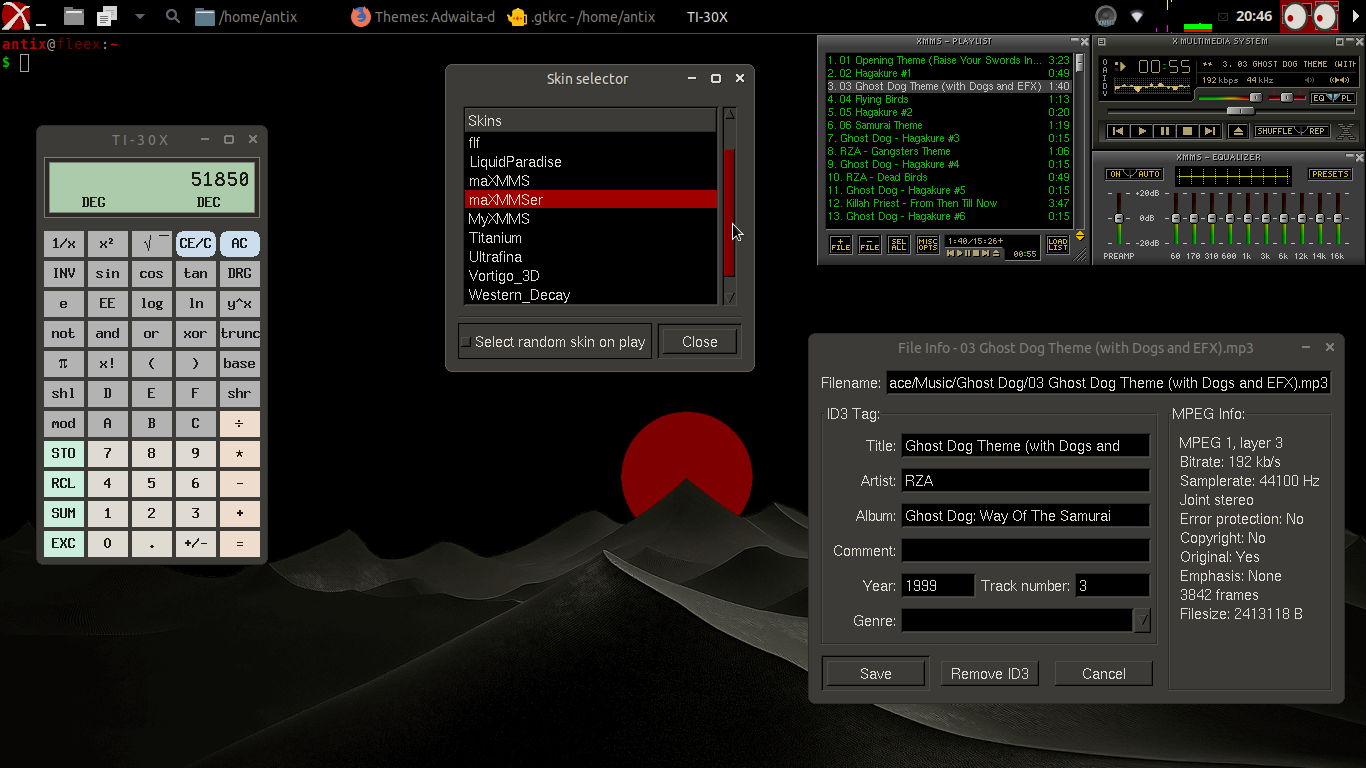
June 21, 2026 at 9:31 pm #206991MemberIn a fit of ridiculosity I’ve added a GTK1 theme to my Adwaita-darkred theme pack. Not many applications that anyone uses today are built on GTK1, but XMMS does use it for its menus and config windows, so I figured why not, eh?
As with previous releases, unpack the attached zip file into /usr/share/themes in order to install Adwaita-darkred. Then you can enable the included GTK1 theme by editing ~/.gtkrc (create this if it doesn’t already exist) and make sure the top line reads:
include "/usr/share/themes/Adwaita-darkred/gtk/gtkrc"Instructions for enabling the other included themes (GTK2, GTK3, GTK4, libadwaita/GNOME, Xtoolkit/Xaw, and IceWM) have not changed, so you can refer to my previous post here.
Other than GTK1 support, the Xtoolkit/Xaw theme has also been cleaned up a little to correct some small issues. Beyond that, there have not been any other changes.
Since this is pretty much a whole release just for theming a few parts XMMS, I’ll also include a skin for the main XMMS window, too. It’s only a small modification to the maXMMS skin that’s the default on antix, but it matches the Adwaita-darkred colors better. Copy or symlink the /usr/share/themes/Adwaita-darkred/maXMMSer folder into /usr/share/xmms/skins/ in order to use it.
I lso noticed that the links I gave above to deb installers for qt6gtk2 and qt5gtk2 are broken now, so I included those debs in the archive, too.
I reckon that with the inclusion of GTK1 now, Adwaita-darkred must be the most extensive GTK theme in the world. Because…who else would bother with GTK1?
"--"
June 22, 2026 at 7:55 am #207009 Brian MasinickModerator
@anti-apxos Thank you for the many fine themes that you’ve shared in this topic.
--
Brian Masinick
Alternate "Search B":
This search page -
AuthorPosts

- You must be logged in to reply to this topic.